
Xx530v XPON loop issue
Dear Team,
I am writing to bring two potential software-related issues to your attention that I believe warrant investigation and resolution.
1. **MAC Cloning and PPPoE Download Speed Limitation:** When utilizing MAC cloning for a PPPoE connection, I observed a consistent download speed limitation of 50 Mbps. This issue was resolved after my Internet Service Provider (ISP) released the MAC binding.
2. **Persistent EPON Registration Loop:** The router intermittently enters an EPON registration loop. This occurs daily, even after a scheduled nightly reboot. To resolve this, I must power down the device for two minutes, disconnect the optical cable, and then reconnect it once the router has fully initialized. I am uncertain if this behavior is linked to serial number spoofing and would appreciate any insights or assistance from the community or support team.
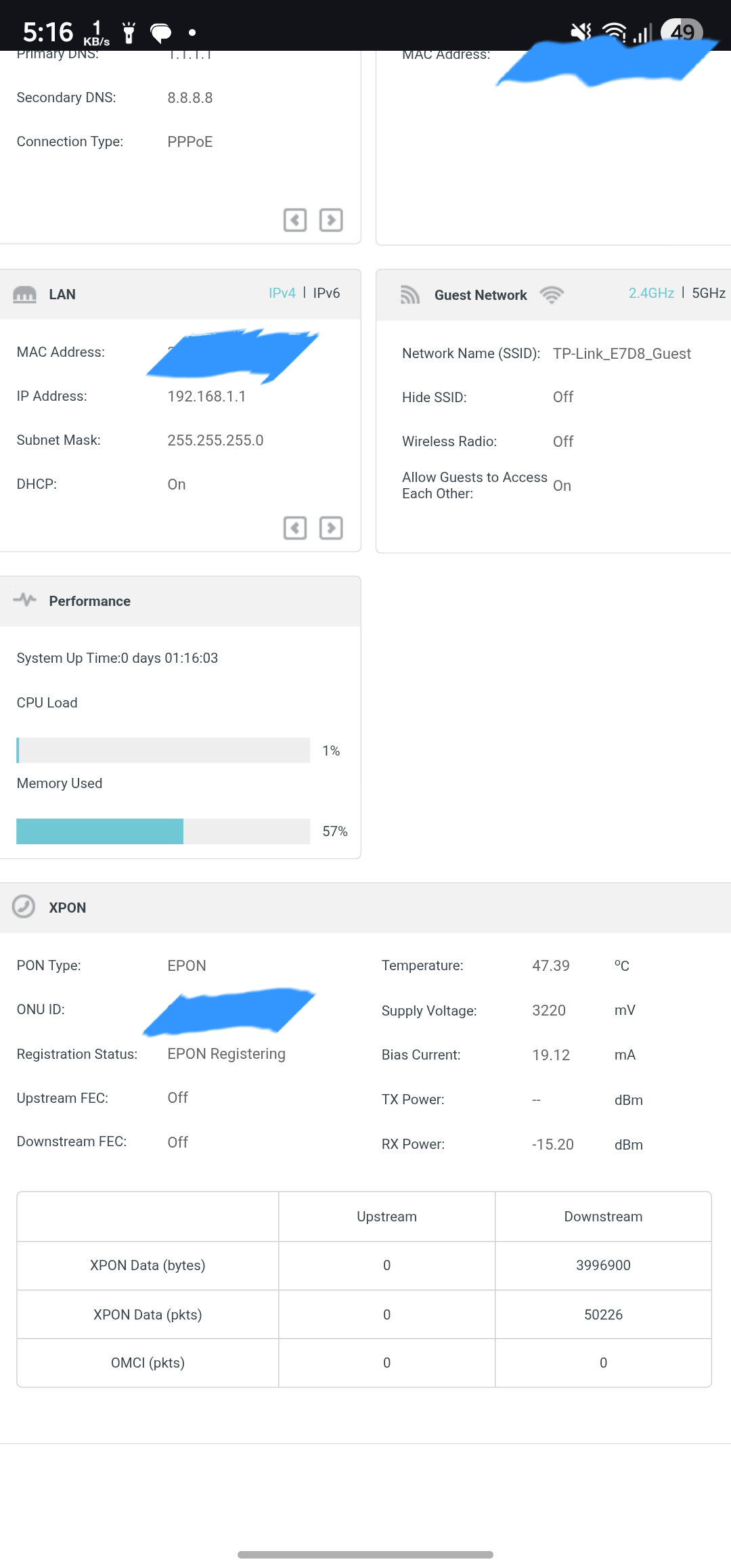
Furthermore, I would like to suggest the implementation of a dashboard feature that provides detailed data consumption statistics per device. Integrating this with cloud synchronization would be highly beneficial, ensuring data persistence even after system reboots.
Thank you for your time and consideration.
Sincerely,
Indrajit
- Copy Link
- Subscribe
- Bookmark
- Report Inappropriate Content
@IfranAli @Kevin_Z @IndrajitIG Yep router again stuck to EPON Registering loop with this 0.9.0 firmware also, installed today morning 10 AM & Just now after 5.50 PM power cycle in my area router went again to offline in tplink aginet app and all my cctv cameras are offline.
** Now this Router will be offline due to EPON Registering loop, it wont get EPON Registration successful without manual OFF & ON or need next power cycle. yes like @IfranAli stated I think EPON is still bugged and requires detailed testing by Engineers and need another beta firmware.
** 0.9.0_3.0.0_UP_BOOT_agc3000(251126 and 0.7.0_3.0.0_UP_BOOT_agc3000(250606) has same EPON Registering Loop bug firmware as previous 0.7.0 firmware.
- Copy Link
- Report Inappropriate Content


Thank you very much for your kind update here.
Please work with our engineering team and I believe they will provide a solution once the root cause is identified.
- Copy Link
- Report Inappropriate Content
IfranAli wrote
@Kevin_Z Ah okay, so they are using the beta firmware/released brazilian firmware? I thought they got a customized version of the said firmware.
I think EPON is still bugged and requires detailed testing by Engineers and release another beta firmware for client testing.
@IfranAli No worries. The engineers will try their best to figure it out.
- Copy Link
- Report Inappropriate Content

Hi @IndrajitIG @Kevin_Z & @Ram_Eswar
I've been facing this same issue. i.e. after the router is rebooted by the Reboot Schedule, the GPON light is flashing constantly. Upon checking the manual, it means the router is trying to register with the ISP. So started googling and found this current thread and another one here for this same issue.
The original/default FW version comes with this XX530v (v1.8) XPON router 0.6.0 3.0.0 v6096.0 Build 250422 Rel.46744n doesn't have this issue.
Only started after updating to the FW version 0.7.0 3.0.0 v6096.0 Build 250606 Rel.25672n from the official page here.
Tried to downgrade to the older/original/stock FW version 0.6.0 3.0.0 v6096.0 Build 250422 Rel.46744n, but got this
"Error code: 4503
The uploaded file was not accepted."
After reading all the replies from here in this thread (and also from the other thread here),
updated to the current pre-release FW version v0.9.0 3.0.0 v6096.0 Build 251126 Rel.13993n shared here by @Kevin_Z.
Unfortunately, as already reported by the other users in earlier posts, this pre-release FW version also didn't resolve the issue.
To clarify further
I only need to reboot the router via the web console/router gateway (192.168.1.1) to solve this issue. It doesn't require manually turning it off and then on (reboot) via its physical button. and it was the same for both FW versions: 0.7.0, 3.0.0 v6096.0 Build 250606 Rel.25672n & v0.9.0, 3.0.0 v6096.0 Build 251126 Rel.13993n.
This means (please pass this observation to the dev team so that they can develop the new FW version accordingly):
The hardware is fine. A manual web UI reboot works perfectly. The bug is strictly in the automated Reboot Schedule script failing to cleanly unregister the WAN/PON link before killing the system process. The scheduler-triggered reboot flow is the faulty part. More specifically, the bug is likely in one of these layers:
-the auto-reboot scheduler service,
-the shutdown/startup sequence it calls,
-or the XPON/PON reinitialization timing after that scheduled reboot.
I'm using this router for my ISP Indinet (Siti) broadband, where the fibre is directly connected to the PON port (no ONU in between) of this router, not using MAC cloning features. Connection (IP) Type: Static IP. So here I'm reporting this same and requesting you @Kevin_Z to add my email id to the list along with other (earlier) users here so that I can receive the emails from the dev team as well and can test and report about new FW versions.
- Copy Link
- Report Inappropriate Content
- Copy Link
- Report Inappropriate Content
SM-03 wrote
Hi @IndrajitIG @Kevin_Z @IndrajitIG & @Ram_Eswar
I've been facing this same issue. i.e. after the router is rebooted by the Reboot Schedule, the GPON light is flashing constantly. Upon checking the manual, it means the router is trying to register with the ISP. So started googling and found this current thread and another one here for this same issue.
The original/default FW version comes with this XX530v (v1.8) XPON router 0.6.0 3.0.0 v6096.0 Build 250422 Rel.46744n doesn't have this issue.
Only started after updating to the FW version 0.7.0 3.0.0 v6096.0 Build 250606 Rel.25672n from the official page here.
Tried to downgrade to the older/original/stock FW version 0.6.0 3.0.0 v6096.0 Build 250422 Rel.46744n, but got this
"Error code: 4503
The uploaded file was not accepted."
After reading all the replies from here in this thread (and also from the other thread here),
updated to the current pre-release FW version v0.9.0 3.0.0 v6096.0 Build 251126 Rel.13993n shared here by @Kevin_Z.
Unfortunately, as already reported by the other users in earlier posts, this pre-release FW version also didn't resolve the issue.
To clarify further
I only need to reboot the router via the web console/router gateway (192.168.1.1) to solve this issue. It doesn't require manually turning it off and then on (reboot) via its physical button. and it was the same for both FW versions: 0.7.0, 3.0.0 v6096.0 Build 250606 Rel.25672n & v0.9.0, 3.0.0 v6096.0 Build 251126 Rel.13993n.
This means (please pass this observation to the dev team so that they can develop the new FW version accordingly):The hardware is fine. A manual web UI reboot works perfectly. The bug is strictly in the automated Reboot Schedule script failing to cleanly unregister the WAN/PON link before killing the system process. The scheduler-triggered reboot flow is the faulty part. More specifically, the bug is likely in one of these layers:
-the auto-reboot scheduler service,
-the shutdown/startup sequence it calls,
-or the XPON/PON reinitialization timing after that scheduled reboot.
I'm using this router for my ISP Indinet (Siti) broadband, where the fibre is directly connected to the PON port (no ONU in between) of this router, not using MAC cloning features. Connection (IP) Type: Static IP. So here I'm reporting this same and requesting you @Kevin_Z to add my email id to the list along with other (earlier) users here so that I can receive the emails from the dev team as well and can test and report about new FW versions.
Thank you very much for the detailed description.
I will escalate your case to our support engineers for further follow-up.
A quick update to @Ram_Eswar, the R&D engineers are analyzing the logs and files you've provided via email. Our support engineer will get back to you as soon as they have some findings.
- Copy Link
- Report Inappropriate Content
@Kevin_Z Hi Kevin, the R&D engineers just now contacted me and they inform me that they are unable to recreate this error with their OLT, so they requested me for another router access session to run all diagnose tools again.Thanks.
@SM-03 Hi, You mentioned that XX530v (v1.8) XPON router 0.6.0 3.0.0 v6096.0 Build 250422 Rel.46744n doesn't have this issue. No it to have same issue but it is less
frequent as my router worked without registering loop issue exactly for 8 Days with above firmware, but after that next day(9th) during one random power cycle it to faced same EPON Registering loop error it automatically recovered after 8 hours during next power cycle schedule.
** But both 0.7.0 3.0.0 v6096.0 Build 250606 Rel.25672n & 0.9.0 3.0.0 v6096.0 Build 251126 Rel.13993n has very frequent EPON Registering loop error
** Tried to downgrade to the older/original/stock FW version 0.6.0 3.0.0 v6096.0 Build 250422 Rel.46744n, but got this "Error code: 4503.
Router wont allow you to downgrade from higher version FW to lower version FW, from FW 0.9 you can downgrade to 0.7 but you can't downgrade to 0.6
- Copy Link
- Report Inappropriate Content
Hi @Ram_Eswar,
"**what is your PON mode is it GPON or EPON? "
-PON Mode: EPON || Vendor ID: TPLG
"You mentioned that XX530v (v1.8) XPON router 0.6.0 3.0.0 v6096.0 Build 250422 Rel.46744n doesn't have this issue. No it to have same issue but it is less
frequent as my router worked without registering loop issue exactly for 8 Days with above firmware, but after that next day(9th) during one random power cycle it to faced same EPON Registering loop error it automatically recovered after 8 hours during next power cycle schedule."
-Like I said earlier here, after purchase, I use this router with stock (default) FW v0.6.0 3.0.0 v6096.0 Build 250422 Rel.46744n for (almost) a month & during that time I scheduled the reboot for every morning at 7 AM, and never faced such (PON Registering) issue during that time. Started only after upgrading to the newer FW v0.7.0 3.0.0 v6096.0 Build 250606 Rel.25672n from the official page. FYI, I never did the multiple manual OFF-ON or rebooting (like you said in your earlier post) so can't really say about that.
"Router wont allow you to downgrade from higher version FW to lower version FW, from FW 0.9 you can downgrade to 0.7 but you can't downgrade to 0.6"
-As per my knowledge, many TP-Link routers support FW downgrading. Not sure whether this particular XX530v moderl doesn't support that or its aboout FW version specific. Maybe @Kevin_Z (or anyone else here) could tell me/us more about that.
-------------------------------------------------------------------------------------------------------------------
Hi @Kevin_Z,
I received the email with support ID.
I hope you passed/shared my observation to the dev team what I wrote here in my earlier (and this) post.
Looking forward to getting any response from the dev team, with a modified/newer FW version to patch this issue at the earliest.
[P:S: How do you use the quote reply here? Not seeing any option to quote in the editor while replying.]
- Copy Link
- Report Inappropriate Content
Ram_Eswar wrote
@Kevin_Z Hi Kevin, the R&D engineers just now contacted me and they inform me that they are unable to recreate this error with their OLT, so they requested me for another router access session to run all diagnose tools again.Thanks.
If this is the case, I assume this reported issue is highly tied to a specific environment or ISP network. I hope the R&D finds more clues with the remote session.
Please keep the community updated once there is any workaround or solution. Thank you very much.
- Copy Link
- Report Inappropriate Content
SM-03 wrote
"Router wont allow you to downgrade from higher version FW to lower version FW, from FW 0.9 you can downgrade to 0.7 but you can't downgrade to 0.6"
-As per my knowledge, many TP-Link routers support FW downgrading. Not sure whether this particular XX530v moderl doesn't support that or its aboout FW version specific. Maybe @Kevin_Z (or anyone else here) could tell me/us more about that.
-------------------------------------------------------------------------------------------------------------------
Not all firmware or versions allow downgrading directly to a previous version due to code restrictions. If you would like to downgrade to the previous 0.6 version directly to confirm whether this reported issue persists, please check with the engineers directly via email.
SM-03 wrote
[P:S: How do you use the quote reply here? Not seeing any option to quote in the editor while replying.]
Once click the Reply button, you will find 'Reply with quote' in the right corner of that dialog box as follows. Click it whenever you want to quote:

- Copy Link
- Report Inappropriate Content
Information
Helpful: 2
Views: 1011
Replies: 31
Voters 2

