
TP-LINK TD W9970 v2 - How to set up with mobile data?

I have purchased a used router W9970 because it has a USB port. I wanted to use it with mobile data from my phone.
According to the manual, it can only be set up via the VDSL port. But it then says you can set up a 4G dongle?
Is there anyway to do this? Using the USB port or LAN4/WAN port? Or even via wireless?
- Copy Link
- Subscribe
- Bookmark
- Report Inappropriate Content

Here are the 3G/4G settings:
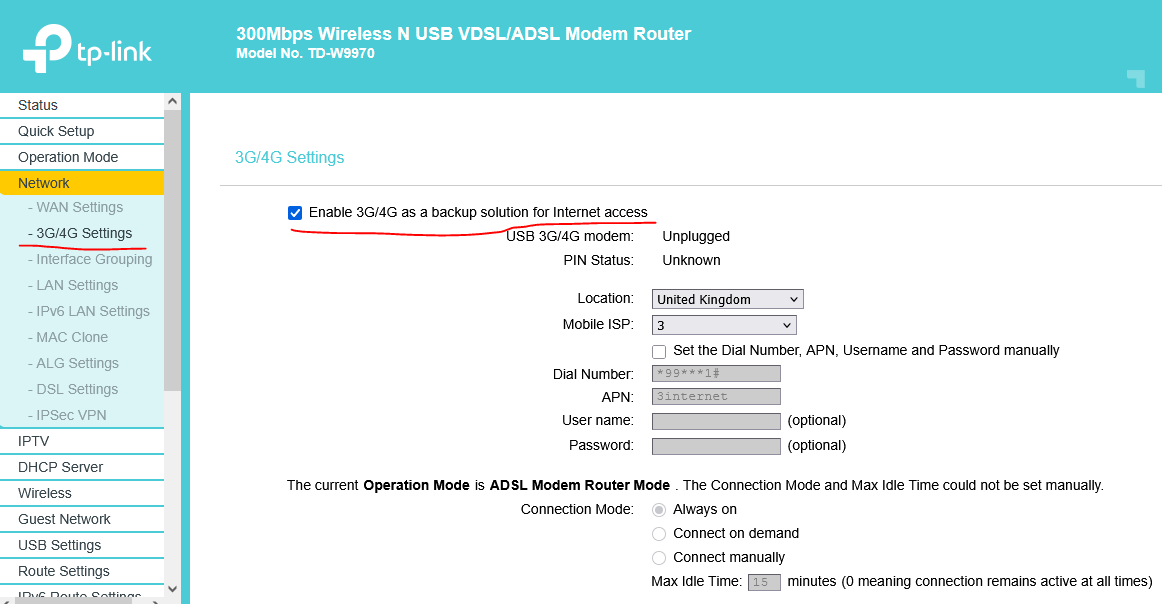
Keep in mind that in DSL modem router mode, the mobile connection is only for a back up for the main xDSL connection.
Here's the modem user guide for more details.
Here's a thread with compatible 3g/4G modems.
How to configure the DSL modem router as 3G/4G router - here.
- Copy Link
- Report Inappropriate Content
Here are the 3G/4G settings:
Keep in mind that in DSL modem router mode, the mobile connection is only for a back up for the main xDSL connection.
Here's the modem user guide for more details.
Here's a thread with compatible 3g/4G modems.
How to configure the DSL modem router as 3G/4G router - here.
- Copy Link
- Report Inappropriate Content
Thank you I would love to do this. However, you need to connect via VSDL first to access the software to make the change. Or is there a way to access 192.168.1.1 using mobile data?
- Copy Link
- Report Inappropriate Content
192.168.1.1 is the TD-W9970 LAN IP address.
Connecting a PC or a laptop to one of the TD-W9970 LAN ports, should give a 192.168.1.X IP address (by DHCP) for this computer and you should be able to access the TD-W9970 WebGUI, using a web browser. The whole process is described in the TD-W9970 user guide.
- Copy Link
- Report Inappropriate Content

TP-LINK TD W9970 v2 doesn’t natively support mobile data over USB unless it’s a compatible 4G dongle, so your best option is using a supported modem or router mode setup; similar to how users prefer stable platforms like 69live for consistent connectivity without complicated workarounds.
- Copy Link
- Report Inappropriate Content

The USB port on the TD-W9970 is typically for sharing storage or printer functions, not for tethering mobile data from a phone, and the 4G dongle support is usually limited to specific compatible USB modems rather than smartphones. So realistically, WAN via mobile hotspot or a supported LTE dongle is the practical route, similar to how Pak88 APK users prefer supported setups instead of forcing unsupported workarounds.
- Copy Link
- Report Inappropriate Content
Information
Helpful: 0
Views: 281
Replies: 5
Voters 0
No one has voted for it yet.