
Setting channel width to a max. of 40 Mhz

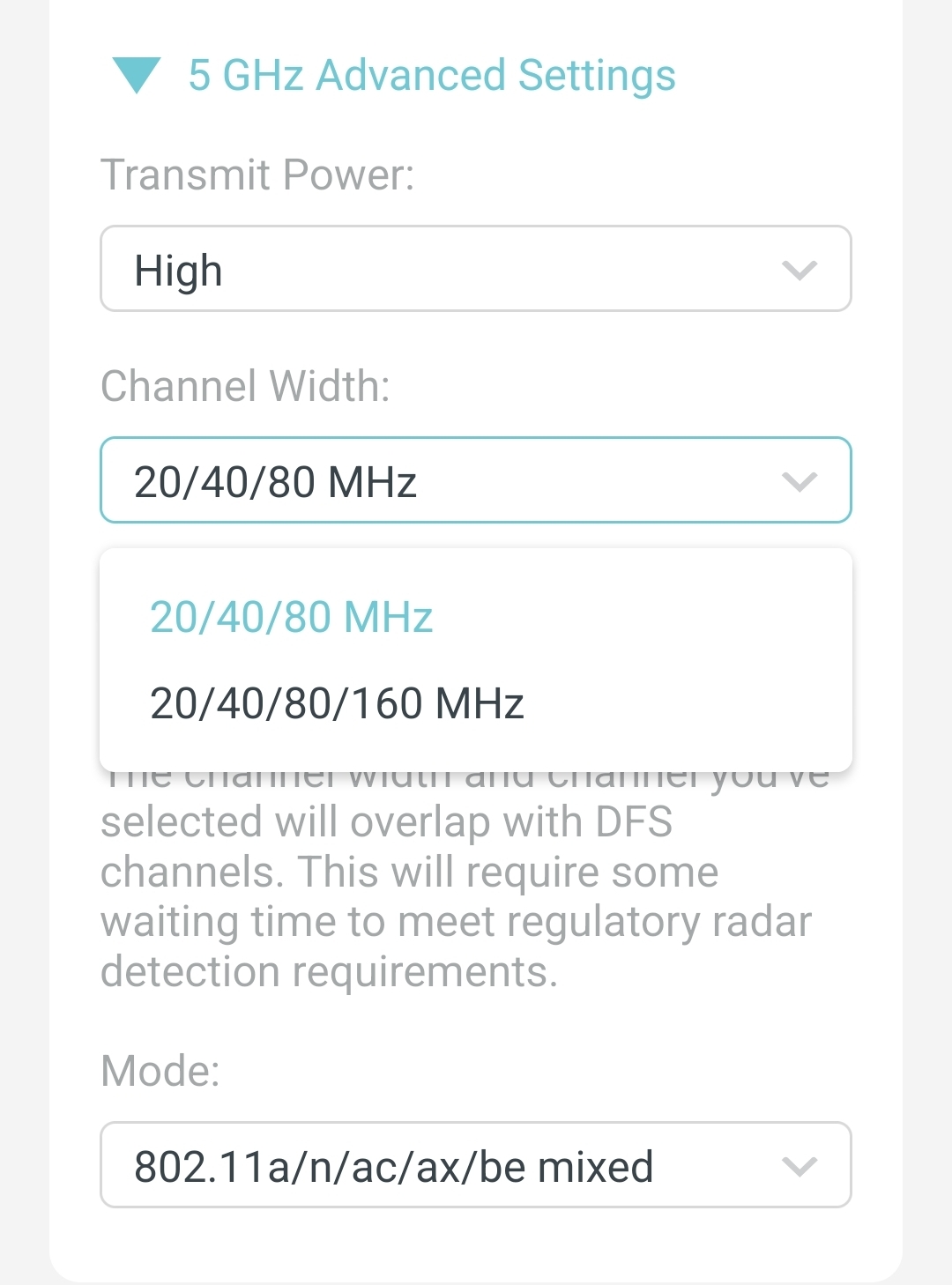
Is there a way to only set the channel width to 40 Mhz? The 5 Ghz band is unfortunately crowded already. No dice with DFS channels too as although they're vacant, I live relatively close to an airport and I've already had a few occasions of losing connectivity using those channels. This is on a BE220 (US) V1 on 1.0.4 firmware (the latest I assume?).
- Copy Link
- Subscribe
- Bookmark
- Report Inappropriate Content

Most of the routers TP-Link released in recent years don't have region-specific firmware update files anymore. The data that determines the region of a particular router is stored separately inside the router and not affected by the firmware update.
If you insist on downloading from TP-Link's US website, then you could download a firmware version 1.1.3 from this link https://www.tp-link.com/us/support/download/archer-be230/v2.60/#Firmware. On this website it is labeled as "Archer BE230(US)_V2.6_1.1.3 Build 20251120", but if you click "Download", then you will actually get a file named "be220v1-be230v2v2.2-be3600v2v2.2-be3600ProJP-be220wv1-ver1-1-3-P1[20251120-rel38341].zip", indicating that this firmware file is meant for the models BE220 V1, BE230 V2 and V2.2, BE3600 V2 and V2.2, BE3600Pro JP and BE220W V1.
- Copy Link
- Report Inappropriate Content
Hi,
TP-Link's Archer routers don't have any hidden or "secret" options. You've only got what you can see there.
Older Archer models (for example AX55 V1 and AXE75 V1) still offered the additional options "20 MHz" and "20/40 MHz" in that drop down list.
There is newer firmware available for the BE220 V1, but TP-Link's regional websites are not always up to date. However, I would be surprised if newer firmware offered the 40 MHz channel width option. I have a BE550 with the latest firmware and it also doesn't have it.
- Copy Link
- Report Inappropriate Content
Aw, that's unfortunate and moreso that it's no better with the higher-end models. It's twice with no dice now but I'm still curious about newer firmware. I can find newer firmware for other regions and revisions but I can't find anything later than 1.0.4 for the model I have (V1 US). Do you have a link to it? Thank you for helping out!
- Copy Link
- Report Inappropriate Content
Most of the routers TP-Link released in recent years don't have region-specific firmware update files anymore. The data that determines the region of a particular router is stored separately inside the router and not affected by the firmware update.
If you insist on downloading from TP-Link's US website, then you could download a firmware version 1.1.3 from this link https://www.tp-link.com/us/support/download/archer-be230/v2.60/#Firmware. On this website it is labeled as "Archer BE230(US)_V2.6_1.1.3 Build 20251120", but if you click "Download", then you will actually get a file named "be220v1-be230v2v2.2-be3600v2v2.2-be3600ProJP-be220wv1-ver1-1-3-P1[20251120-rel38341].zip", indicating that this firmware file is meant for the models BE220 V1, BE230 V2 and V2.2, BE3600 V2 and V2.2, BE3600Pro JP and BE220W V1.
- Copy Link
- Report Inappropriate Content
Thanks! I managed to update the BE220 to 1.1.6 using firmware shown for the EU V1 variant. The link you sent updated fine too. Athough I wasn't strictly looking for US-based firmware, I just took that comment as a hint to also look for newer firmware elsewhere haha. Channel width is still stuck to 80Mhz max (as expected) but I'm happier now that my BE220 is relatively more up to date.
Thank you again!
- Copy Link
- Report Inappropriate Content
Information
Helpful: 0
Views: 461
Replies: 4
Voters 0
No one has voted for it yet.