
Deco x50 - 5G (Band Problem)

Hello guys,
I'm facing an issue with my device's band. Despite having 5G SA enabled on my telco, the Deco x50-5G is consistently connected to band "B28", which is a 4G connection.
The device itself refuses to connect to band "N78", which is the 5G SA band.
I've attempted several troubleshooting steps, including resetting the device, upgrading to the latest deco firmware version (1.3.1), and using "cell lock" feature. However, none of these solutions have resolved the issue.
Could you please provide any suggestions or solutions to fix this problem?
Thanks in advance.
-Vic-
- Copy Link
- Subscribe
- Bookmark
- Report Inappropriate Content

- Copy Link
- Report Inappropriate Content


Hi,
Please refer to the following instructions to manually select the 5G band and see if that helps.
How to manually select 4G/5G Bands for 4G/5G Deco products
If the same phenomenon persists, please confirm the following information.
1. Who is your SIM card provider?
2. When you insert the SIM card into your phone, does the 5G data work? If so, which band is using?
Best Regards
- Copy Link
- Report Inappropriate Content
Thanks for your help.
I've tried cell lock, but it doesn't seem to be working. It's able to detect and select but can't lock.
1) I'm using the "U-Mobile" telco sim provider in Malaysia.
2) When I insert the sim card into my iPhone, it works and able to detects "B28 & N78" bands.
For more information, I have another Deco x50-5G device in a different location that works fine for both bands (B28 & N78) using same telco. I also can confirm that my area has coverage for both bands.The device's hardware version is "2.0" and it's running firmware "1.1.0 Build 20250719 Rel. 59911".
- Copy Link
- Report Inappropriate Content
Hi,
In your situation, please provide the following information to confirm the phone works on the 5G N78 band.
1. iPhone: Enter *3001#12345#* in the dial pad to enter FTM (Field Test Mode). This interface will display the PCI and ARFCN of the cell your phone is currently connected to.
2. Android: Download Cellular Pro from the Google Play Store. Then, find the PCI and ARFCN parameters on the LTE and NR5G pages of Cellular Pro (you need to grant Cellular Pro all required permissions).
Sometimes your phone will show that it is connected to 5G, but the above interface will only display 4G-related parameters, not 5G-related information. This is because the client may only maintain the 4G cell connection in low-data scenarios to ensure lower power consumption. In this case, to obtain 5G band-related parameters, you need to run a download task in the background before accessing the above interface to obtain the information. Note that the download task cannot be stopped before obtaining the information, so we recommend downloading games or other large applications.
Best regards.
- Copy Link
- Report Inappropriate Content
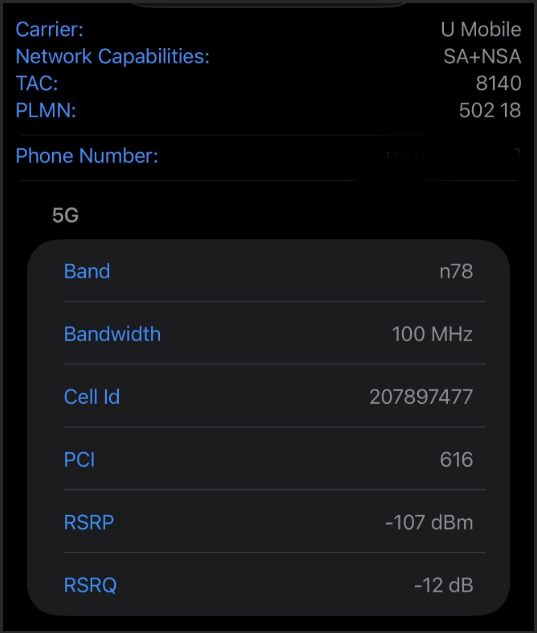
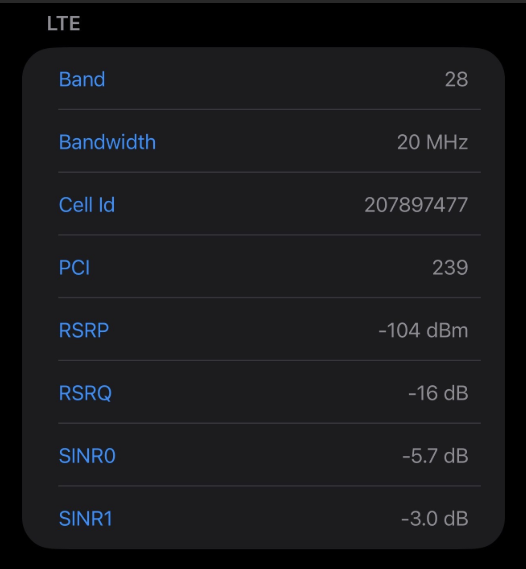
- Copy Link
- Report Inappropriate Content
Hi,
Based on the picture you provided, the iPhone's connection to the N78 5G band is not very strong, and the NRARFCN parameter is not shown.
Please try to obtain the Cell ID, PCI, and NRARFCN parameters on an Android phone by following the steps in this post, then refer to the following instructions to configure the Cell Lock function on the Deco X50-5G to see if the Deco can connect to the N78 5G band.
How to configure Cell Lock on TP-Link Deco X50-5G
Best Regards
- Copy Link
- Report Inappropriate Content
Information
Helpful: 0
Views: 385
Replies: 6
Voters 0
No one has voted for it yet.