
Preferred connection - why not permanent?

Hi
I am the user of Deco network, I have a question - does anyonw know why "preferred connection" which I can set to each individual device cannot survive network reset? Why cannot it be permanent?
Best Regards
Piotr Wojtowicz
- Copy Link
- Subscribe
- Bookmark
- Report Inappropriate Content


Hi, welcome to the community.
Regarding the "network reset", do you mean factory resetting the Deco nodes and reconfiguring them, or rebooting the Deco nodes?
1) If you reset the Deco and reconfigure it, all the previous configurations on it will be removed.
2) Rebooting the Deco node won't remove the connection preference settings. If this happens on your Deco nodes, please send us screenshots of your connection preference settings before and after the Deco reboot.
Then, please follow the instructions below to send us the Deco app log. After that, attach your reference number (such as email TKIDXXX) to the thread or reply to us if you have sent the app log.
How to collect the system log of the Deco app
Best regards.
- Copy Link
- Report Inappropriate Content
Hi, welcome to the community.
Regarding the "network reset", do you mean factory resetting the Deco nodes and reconfiguring them, or rebooting the Deco nodes?
1) If you reset the Deco and reconfigure it, all the previous configurations on it will be removed.
2) Rebooting the Deco node won't remove the connection preference settings. If this happens on your Deco nodes, please send us screenshots of your connection preference settings before and after the Deco reboot.
Then, please follow the instructions below to send us the Deco app log. After that, attach your reference number (such as email TKIDXXX) to the thread or reply to us if you have sent the app log.
How to collect the system log of the Deco app
Best regards.
- Copy Link
- Report Inappropriate Content
Hi
Thank you for your response.
It happens after network manual restart, scheduled daily restart, one of routers restart or also when the main router comes back from backup connection (4G) to WAN.
My network is composed of Deco X50-5G as the main router + 6 satellites (2 Deco S7 + 4 Deco X50-outdoor). Can it be the problem is caused by mixed routers generations (S7 + X50)?
This is example of preffered connection I have to set every time after it is vanished:
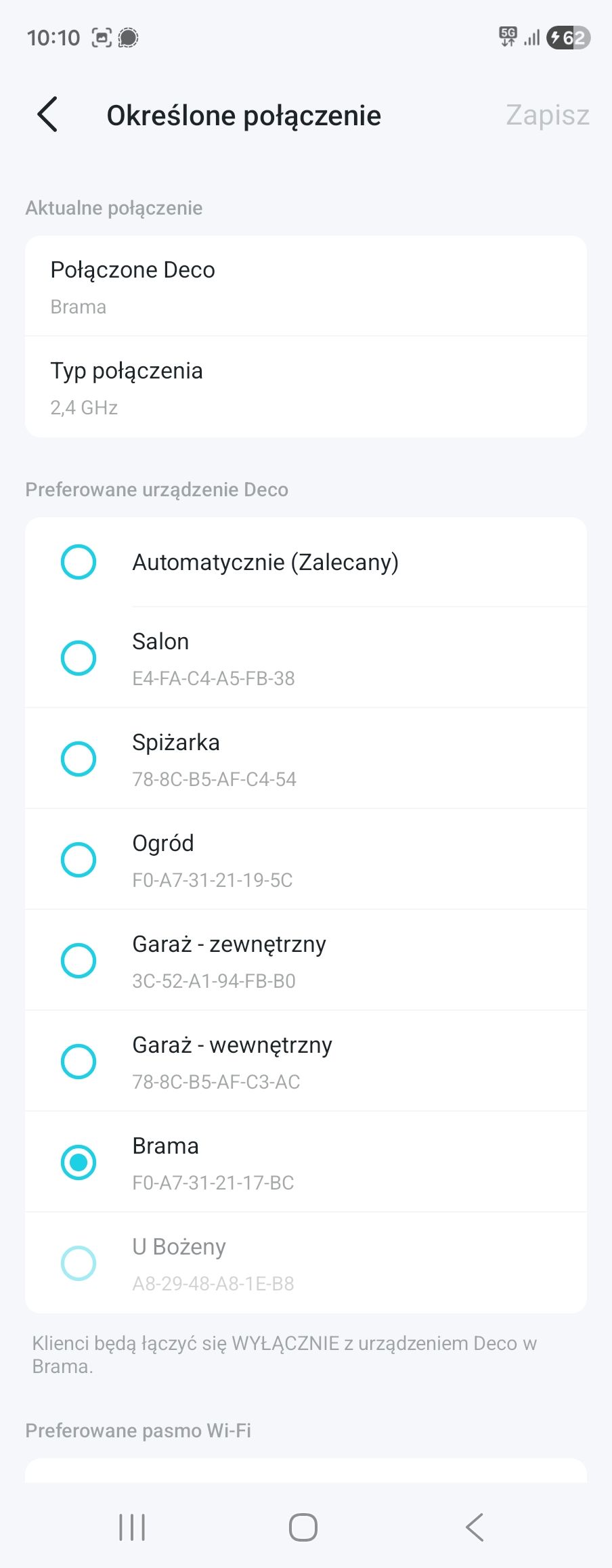
After events mentioned above, it comes back to first position (automatic).
I am not able to collect logs as I am not at home right now, I can collect it in few days if you need it.
Best Regards
Piotr Wojtowicz
- Copy Link
- Report Inappropriate Content
Hi,
Thank you for the updated information. In your situation, please send us the Deco app log after the reported phenomenon occurs. After that, please attach the reference number (e.g., TKIDXXXX) to this thread, or reply to us after you send the log.
How to Get and Send Deco System Logs to TP-Link Support
Best Regards
- Copy Link
- Report Inappropriate Content
Hi Solla-topee
Sorry for late answer, it took more time before I got back to my home. I have sent logs through tp-link deco app as described in your manual. I have added my email address (piotreklc60@gmail.com) there and link to this forum thread in the description. Please let me know if you have received these logs. If not, I will try to do it again.
Best Regards
Piotr Wojtowicz
- Copy Link
- Report Inappropriate Content
Hi,
Thank you for the update.
I have escalated your case to our tech team, and they will contact you via email to assist you further. Please wait patiently.
Best Regards
- Copy Link
- Report Inappropriate Content

@piotreklc60
Hi Piotr, This is a known limitation, preferred connection settings are stored in temporary memory, not permanent config, so a network reset wipes them. TP-Link hasn't built this as a persistent setting yet, unfortunately. Slightly off topic, but speaking of things that should be "permanent" but often need re-setup, and kind of like managing client accounts at a https://www.socially.ae/, where settings, ad permissions, and integrations often need re-confirming after platform updates. Same frustration, different system. Hopefully TP-Link adds persistent memory for this in a future firmware update.
- Copy Link
- Report Inappropriate Content
This is quite curious actually. My Sister has also Deco network but composed of 2 devices: X50-5G as the main router + one X50 as a satelite. She also has set preferred connection for one device but in her network it is not getting wiped after reset or other events. She also has scheduled daily restart but preferred connection set more than half year ago still persists. I guess it might have something to do with different generation of routers in my network (X50 + S7) but it is only my guess. Lets TP-Link engineers to find out.
- Copy Link
- Report Inappropriate Content
Information
Helpful: 1
Views: 426
Replies: 7
Voters 1
