ER7212PC v2 backup wan offline

ER7212PC v2 backup wan offline

ER7212PC v2 backup wan offline
2 weeks ago - last edited 2 weeks ago
Model: ER7212PC  
Hardware Version: V2
Firmware Version: 2.4.2 Build 20260411 Rel.22014

Hello,


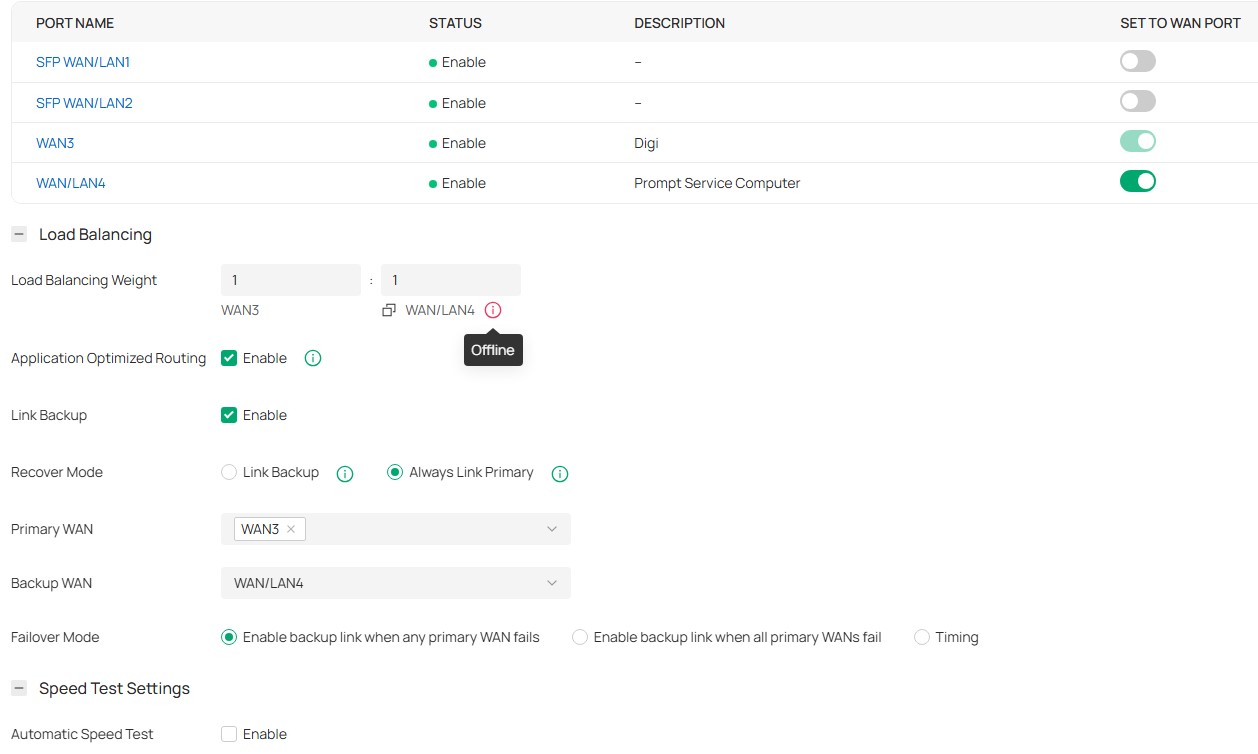
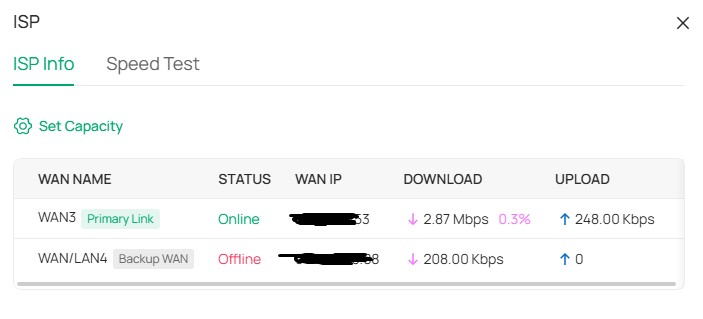
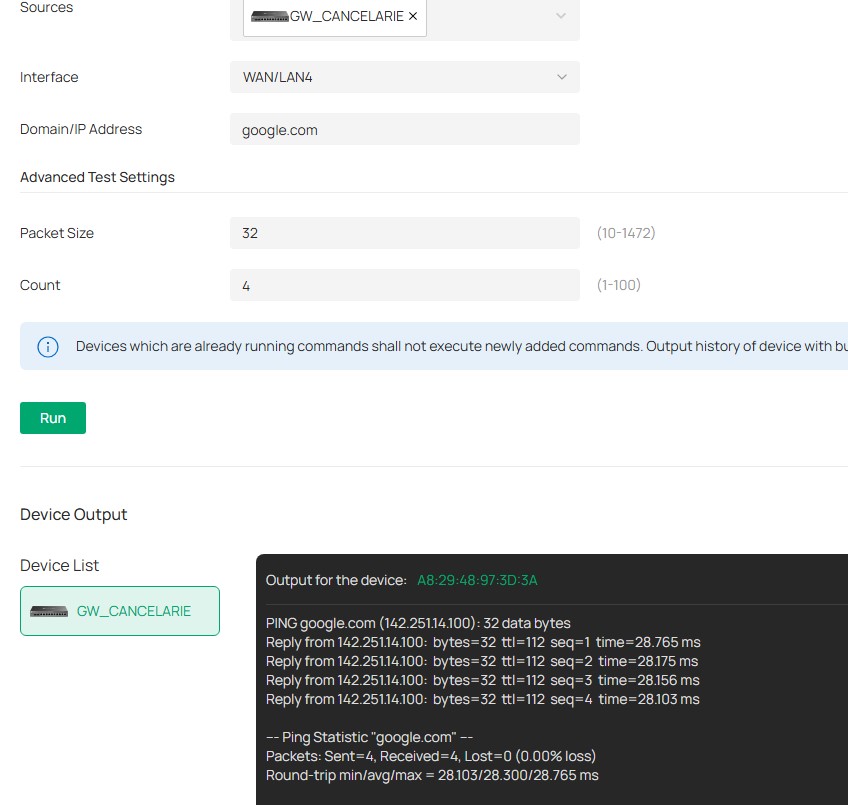
Since the new fw upgrade was released the backup wan is reported as offline, i can`t run speed test on wan 4 but ping from wan4 its ok. At this moment i don`t know if load balancing and failover features are working corectly. Load balancing is set to 1:1 but most traffic is on wan 3 ~47GB upload and 639GBdownload vs ~143MB upload and 41GB download on wan4.

There is any way to solve this problem or i need to wait for the next fw update?


  0      
0
#1
Options
1 Accepted Solution
Re:ER7212PC v2 backup wan offline -Solution
2 weeks ago - last edited 2 weeks ago

Hi @DonLeonhard 

Thanks for reaching out to TP-Link Business Forums.


Based on your configuration, it appears that Link Backup (failover mode) is currently enabled. In this mode, the behavior you will be expected is that the primary WAN handles all traffic under normal conditions while the backup WAN remains offline and does not participate in load balancing unless the primary WAN is offine.

Though the backup WAN shows as Offline, it does not really mean it disconnects from the network. The system itself would still use multiple built-in public domain names to detect whether it is online. Alternatively, you can set the Echo Server to Custom and input 8.8.8.8 or another preferred IP or hostname to check if it remains active.

If you  would like to use both WANs simultaneously, you may need to disable Link Backup and switch to Load Balancing mode only instead.

Here are some articles for your reference:

How to Configure Link Backup on Omada Gateway via Omada Controller | Omada Network Support

The differences and similarities between Load Balancing and Link Backup | Omada Network Support

 

Recommended Solution
  0  
0
#2
Options
1 Reply
Re:ER7212PC v2 backup wan offline -Solution
2 weeks ago - last edited 2 weeks ago

Hi @DonLeonhard 

Thanks for reaching out to TP-Link Business Forums.


Based on your configuration, it appears that Link Backup (failover mode) is currently enabled. In this mode, the behavior you will be expected is that the primary WAN handles all traffic under normal conditions while the backup WAN remains offline and does not participate in load balancing unless the primary WAN is offine.

Though the backup WAN shows as Offline, it does not really mean it disconnects from the network. The system itself would still use multiple built-in public domain names to detect whether it is online. Alternatively, you can set the Echo Server to Custom and input 8.8.8.8 or another preferred IP or hostname to check if it remains active.

If you  would like to use both WANs simultaneously, you may need to disable Link Backup and switch to Load Balancing mode only instead.

Here are some articles for your reference:

How to Configure Link Backup on Omada Gateway via Omada Controller | Omada Network Support

The differences and similarities between Load Balancing and Link Backup | Omada Network Support

 

Recommended Solution
  0  
0
#2
Options