
AX58 easymesh ethernet problem

Hi, i have problems with ethernet easymesh.
My network is:
NX500 Outdoor
| (Cat5 cable)
AX55 Pro
| (Cat5 cable)
TL-SG1016D switch
| (Cat5 cable)
LS105G switch
| (Cat5 cable)
AX58
The problem is that after a while, the AX58 switches from EasyMesh Ethernet to EasyMesh Wi-Fi with the AX55 Pro (the signal is very weak, but it can connect).
If I reboot the AX58, it goes back to EasyMesh Ethernet mode, but as mentioned, after a while it switches back to EasyMesh Wi-Fi.
This is very annoying. The CAT5 cables are fine, and I even replaced the switches (they're new).
I updated everything to the latest firmware version, which I found here in the forum on other topics.
If I don't find a solution, I'll return the products to Amazon.
Thanks
- Copy Link
- Subscribe
- Bookmark
- Report Inappropriate Content


Hello @Fra82 ,
Welcome to our community.
Here are some suggestions that may help you:
- Please temporarily remove one switch and test the connection directly.
- Check if the switch port status lights are stable.
- Try changing the ports between switches.
- Replace the Cat5e/Cat6 cables.
In particular:
- The cables connecting the switches
- The cables connecting the AX58 to the switches
- It is recommended to replace all of them with Cat5e or Cat6 to ensure quality.
- Copy Link
- Report Inappropriate Content
1) I cannot remove switches because are in different house floor. Switches are new and i have same problems with old switches.
2) Port status lights are stable, no packet loss or ethernet stuck
3) I could try but i think is useless
4) Cable is working (how else would it work after every reboot?)
I think problem is in your firmware......
- Copy Link
- Report Inappropriate Content
Hello @Fra82 ,
Thanks for getting back to us.
In that case, it appears your NX500-Outdoor is acting as the main router within the EasyMesh network—is that correct?
If it's convenient for you, could you swap the positions of the AX55 Pro and the AX58 to compare the results?
To help you efficiently, I've forwarded your case to the TP-Link support engineers, who will reach out to you using your registered email address later. Please keep an eye on your email inbox for follow-up.
- Copy Link
- Report Inappropriate Content
Joseph-TP wrote
Hello @Fra82 ,
Thanks for getting back to us.
In that case, it appears your NX500-Outdoor is acting as the main router within the EasyMesh network—is that correct?
If it's convenient for you, could you swap the positions of the AX55 Pro and the AX58 to compare the results?
To help you efficiently, I've forwarded your case to the TP-Link support engineers, who will reach out to you using your registered email address later. Please keep an eye on your email inbox for follow-up.
Hi Joseph, yes i can swap position.
I'll try now and i will update you.
Thanks
- Copy Link
- Report Inappropriate Content
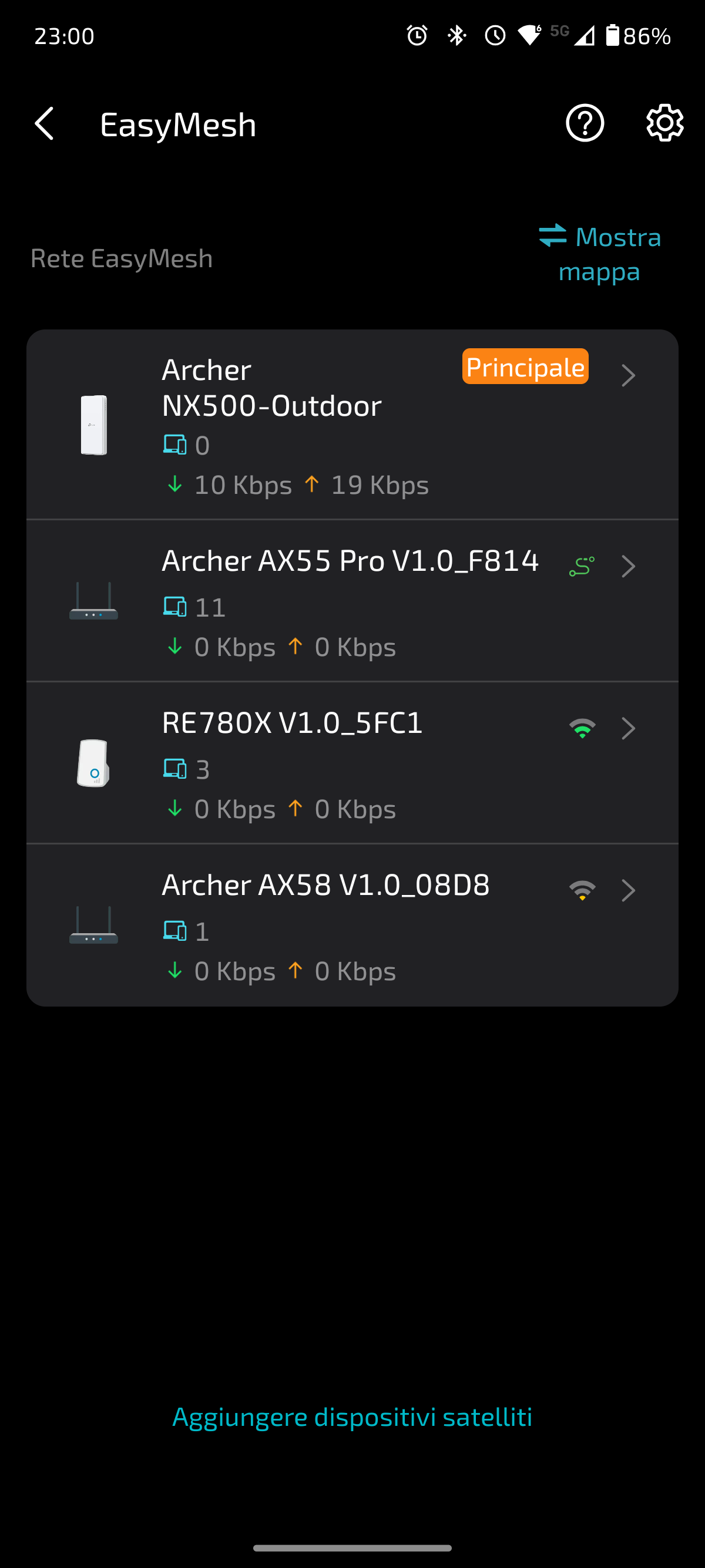
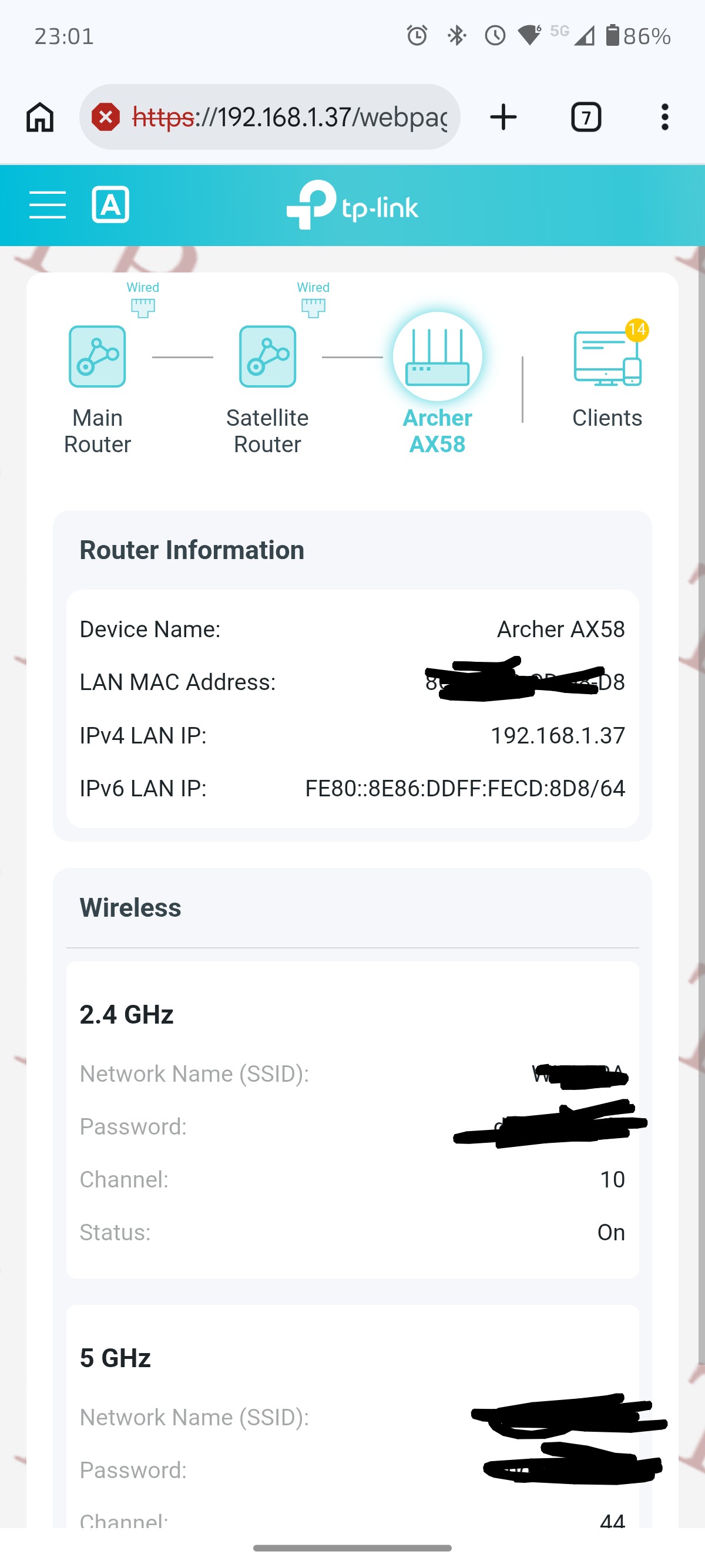
Hi Joseph, now i also noticed this difference between what's shown in the app Theter and the AX58 web interface.
In the app, it says it's connected via Wi-Fi, while in the web interface, it appears to be connected to Ethernet.
Why this difference?
Thanks
- Copy Link
- Report Inappropriate Content
Firmware Version
1.5.2 Build 20250922 rel.22602(4555)
Hardware Version
Archer AX58 v1.0
- Copy Link
- Report Inappropriate Content
Hello @Fra82 ,
Based on this, it appears that the Archer AX58 is incorrectly displayed in the App as using a Wireless Backhaul, when it is actually using an Ethernet Backhaul—is that correct? Have you updated the App to the latest version?
Additionally, we recommend that you maintain contact with the engineers; this will assist them in their subsequent analysis and help move your case forward.
- Copy Link
- Report Inappropriate Content
Information
Helpful: 0
Views: 185
Replies: 7
Voters 0
No one has voted for it yet.