TP-Link Archer TBE400E – Wi-Fi Option Missing / Driver Installation Error

Hello TP-Link Support Team,
I recently purchased the TP-Link Archer TBE400E Wi-Fi 7 PCIe adapter and physically installed it into my PC. The hardware installation is correct, and the device is firmly seated in the PCIe slot.
However, I am facing a major software issue on Windows 11:
-
Wi-Fi is not showing up: There is no Wi-Fi option or icon in Windows anywhere.
-
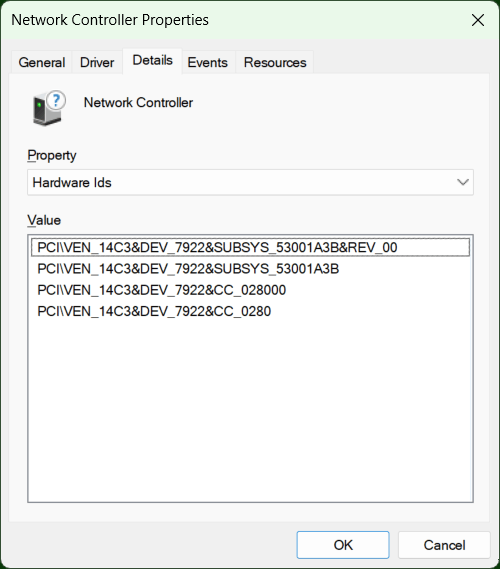
Device Manager Status: In Device Manager, the card shows up under "Other Devices" as "Network Controller" with a yellow exclamation mark. Windows cannot automatically find a driver for it.
-
Driver Installation Failure: I downloaded the official Archer TBE400E driver from your website, but when I try to run the installer, it gives me the following error: "No compatible hardware was detected." Therefore, the official setup wizard completely blocks the installation.
-
Manual Installation Failure: I also tried extracting the
.exefile to manually force-install via the.inffile, but Windows refuses to accept it due to a hardware ID mismatch.
It seems like Windows or the official installer is not recognizing the underlying Intel BE200 chipset of the card properly.
Could you please provide me with the correct, official, or a specific beta driver package (ideally with raw .inf files) that will force Windows 11 to recognize this card?
Thank you in advance for your assistance.
Best regards,