
DDNS (duck) using "Controller Connection IP" instead of WAN IP ?

Hello my friends!
I finally got a ER703WP v1 for one of my remote-sites and an "unlimited" 4G/5G activated SIM card. Basically it seems to be a omada issue/question, as it seems independent from the specific router model.
The plan is to have the ER703WP and two cameras on a remote site (VLAN/Subnet 35 with IPSEC VPN connection to two other sites (Management Site VLAN/Subnet 11 and Surveillance VLAN/Subnet 45). Powered by a 60W PoE Injector. We currently have 7 sites working fine with wired WAN, This will be #8 and the first based on mobile network.
My "Install and Backup" SIM ("home use", limitied to 20GB/month) uses the same random public IP everywhere. Everything works fine, but 20G is this sites daily throughput, not monthly.
My new "business use" SIM with unlimited data "masks" the connection. The one it uses to connect to the controller (and all other communication) is different from the one routed on the WAN Interface...
E.g. currently: for the routing tables and the ddns parameter [IP] it uses a sometimes private IP "10.68.186.226" (random each connection, not always private), for controller connection it uses "213.225.37.37" (random each time as well, but only from 5 different subnets so far, and of course public).

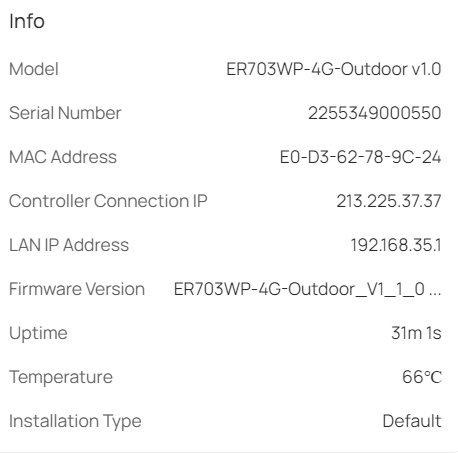
Now my question regarding this is:
can the "connection IP" Parameter be used for the DDNS "Update-URL"
currently:
"...&token=[PASSWORD]&ip=[IP]" (update-URL is sensitive language and against the community rules)
something like
"...token=[PASSWORD]&ip=[Controller-Update-IP]" ?
That would be sufficient to get everything (the VPN Connections) up and running
Or do you see any other way besides paying 5,50 EUR on top each month for a static IP?
Kind regards from Vienna


