
KS220M dying out of nowhere

I have the exact same issue as described in this previous post:
https://community.tp-link.com/en/smart-home/forum/topic/641150
I'm disappointed to see that there was no answer resolving the issue from 2 years ago.
I currently have several KS220M installed in three bathrooms in my house. Everything works for a while, but then they just stops working (never all at the same time. When this happens, it's like the affected dimmer's hardware has crashed. Even the physical buttons do nothing, Nothing works. ie. If I attempt to trigger it using the motion sensor, the physical button, or the app and the light doesn't change states (sometimes it is stuck off, other times it is stuck on). It continues to look online in the app.
When I press the restart button on the right, bellow the main switch, the switch reboots and works again for a while.
This is happening often enough that I may have to remove them. 🙁
Has anyone else had this same issue and found a fix?
- Copy Link
- Subscribe
- Bookmark
- Report Inappropriate Content


Ensure that the KS220M with the beta firmware installed has been disconnected from all unauthorized third-party (open-source) platforms. If the problem occurs, please send me the time of the recurrence or when you first notice it, and your time zone.
- Copy Link
- Report Inappropriate Content

I have the exact same issue with my two KS220M. I have 0 issue with all my other Kasa products.
Hardware version: 1.0
Firmware version: 1.1.6
- Copy Link
- Report Inappropriate Content
@thininvestigato Are you also using any third party integrations like Home Assistant?
Wayne-TP has suggested:
Ensure that the KS220M with the beta firmware installed has been disconnected from all unauthorized third-party (open-source) platforms. If the problem occurs, please send me the time of the recurrence or when you first notice it, and your time zone.
I don't want to do that, so was hoping that you are not already using some third party things like HA.
- Copy Link
- Report Inappropriate Content
Yes, I am using HA and that was the reason why I got Kasa devices in the first place. I don't have access to the beta firmware though.
Now, an interesting datapoint is that I have a KS200M (same switch without dimmer) in the same 2-gang as one of my KS220M's. It never died while being exposed to the same conditions (WiFi signal, temperature, etc). This really makes me think there is something specific about the KS220M that's making it overheat/overload.
- Copy Link
- Report Inappropriate Content

I am also having issues with every one of my KS220Ms I have over 70 other Kasa devices and only have the problem with the KS220M, they randomly freeze and behave the same as others have described here.
- Copy Link
- Report Inappropriate Content

I've been running the beta firmware for about a month. Still need to reset the reset switches every couple days or so.
I'm also running Home Assistant, and same as others, have other Kasa switches and light bulbs that work without issue.
I'm considering moving these switches to a location where I don't need them connected to Home Assistant since I can't rely on them currently.
- Copy Link
- Report Inappropriate Content

I am having similar problem
Ive experienced it ever sinced i moved from kasa to tapo app
Mind you have i have 2 KS220m, they both have the same problem, tho i lose control of them at different times.
i have multiple kasa plugs who never had any issues.
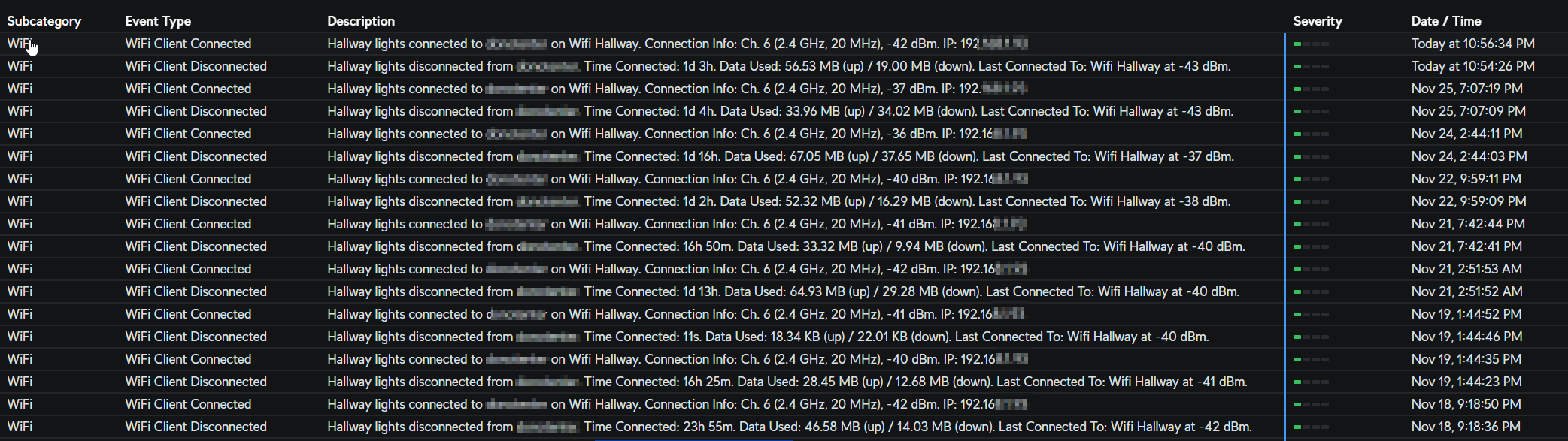
When i do lose control of them, i cant use the switch at all (including in the app and physically pressing the switch)
I have to do a reset every time in order for them to work again. Then it does fail every 1 or 2 days later
Heres a quick rundown on my unifi router for one of the ks220m switch
- Copy Link
- Report Inappropriate Content

I've done some further testing. Not connected to Homebridge it does not crash, I've had it running for months now with zero issues. As soon as I connect it to homebridge, crashes within a day.
Very unfortunate. This model of switch is the ONLY one that has this issue. I have the other kasa motion switch (without dimmer) and that one has ZERO issues. So specificaly it is the KS220M which has dimmer and motion where it has the crashing problem.
Super frustrated with tp-link's lack of interest in resolving this and only blaming it on 3rd party connections. It makes me want to rip out every kasa switch and switch to another brand entirely.
- Copy Link
- Report Inappropriate Content
bb147 wrote
I've done some further testing. Not connected to Homebridge it does not crash, I've had it running for months now with zero issues. As soon as I connect it to homebridge, crashes within a day.
Very unfortunate. This model of switch is the ONLY one that has this issue. I have the other kasa motion switch (without dimmer) and that one has ZERO issues. So specificaly it is the KS220M which has dimmer and motion where it has the crashing problem.
Super frustrated with tp-link's lack of interest in resolving this and only blaming it on 3rd party connections. It makes me want to rip out every kasa switch and switch to another brand entirely.
That's an interesting data point! That would mean the issue is not HomeAssistant itself but probably frequent polling instead. Have you tried to lower the polling frequency?
I can confirm the dimmerless one does not crash.
- Copy Link
- Report Inappropriate Content

The beta firmware that @Wayne-TP is able to make available to specific devices does improve the situation, but does not resolve it.
I have two KS220M switches. As for everyone else, all other Kasa devices are not affected.
One KS220M is connected to Home Assistant (HA). It crashes on average every two weeks, which is much better than the poublic firmware.
The other one also has the beta firmware, but it is not connected to HA. It has not crashed since I installed the beta firmware.
-What was your experience wiht the beta firmware? Did it improve things for you? If it did, I think it is worth letting Tp-Link know,
I do not know what was done in the beta firmware to improve stability, it does help, but there are still some issues it does not fix.
In the future, when Matter becomes standard (on new devices), 3rd party integration will be a given.
I think TP-Link knows that allowing 3rd party integration with their devices is important for their clients. "Third-Party Compatibility" toggle in the Kasa app did not appear in there by accident.
I do not know why they are dropping the ball with this issue.
My next step is to try to integrate KS220M into HA through the supported Kasa integrations, like SmartThings.
- Copy Link
- Report Inappropriate Content
Information
Helpful: 0
Views: 4663
Replies: 46
Voters 0
No one has voted for it yet.