
KS220M dying out of nowhere

I have the exact same issue as described in this previous post:
https://community.tp-link.com/en/smart-home/forum/topic/641150
I'm disappointed to see that there was no answer resolving the issue from 2 years ago.
I currently have several KS220M installed in three bathrooms in my house. Everything works for a while, but then they just stops working (never all at the same time. When this happens, it's like the affected dimmer's hardware has crashed. Even the physical buttons do nothing, Nothing works. ie. If I attempt to trigger it using the motion sensor, the physical button, or the app and the light doesn't change states (sometimes it is stuck off, other times it is stuck on). It continues to look online in the app.
When I press the restart button on the right, bellow the main switch, the switch reboots and works again for a while.
This is happening often enough that I may have to remove them. 🙁
Has anyone else had this same issue and found a fix?
- Copy Link
- Subscribe
- Bookmark
- Report Inappropriate Content

For those who still want to use the KS220M with Home Assistant, I have a partial workaround to avoid the crashing.
I say partial because it requires an internet connection, so the integration is no longer local.
I have added a Kasa integration into SmartThings, and then added SmartThings to Home Assistant.
Over the past month, I had 0 problems with this solution and KS220M dimmers.
As an added benefit, the constant network traffic to the Kasa device also stopped as there is no more polling.
I have not migrated the other Kasa devices to the SmartThings route (due to lack of time), but I do not expect any trouble from them.
- Copy Link
- Report Inappropriate Content

Hi chiming in here as well.
I confirm that this has been working for me for the past 3 weeks.
Just make sure you "disable" the switches in home assistant under the tplink integration.
- Copy Link
- Report Inappropriate Content

- Copy Link
- Report Inappropriate Content
- Copy Link
- Report Inappropriate Content
Is there a way to automatically restart the device? If yes, I would like to try restarting it every night as a workaround.
- Copy Link
- Report Inappropriate Content
You can automatically restart them using HA, but in my case, it did not help. I even had a 12h restart schedule and scheduled the polling to 10 seconds, and they would still freeze.
So far, the only solution is to disable the device in HA and use the integration from Smart Things.
For the beta firmware, you need to send @Wayne-TP a private message with the mac addresses of your dimmers.
- Copy Link
- Report Inappropriate Content

I disabled polling and the issue stopped. Unfortunately, otherwise it continues to be a problem. I have not had any issues since disabling polling. But there are obvious downsides to disabling polling.
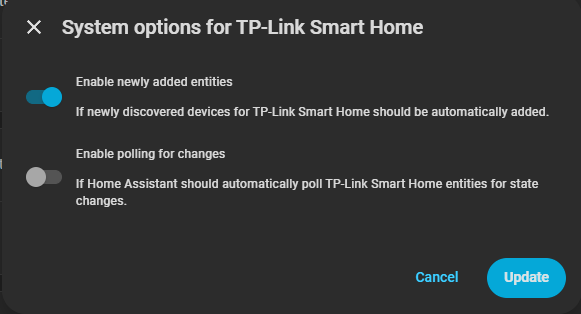
- Copy Link
- Report Inappropriate Content
Yeah just disable them in the tp link integration. And only using then via smarthings integration instead
- Copy Link
- Report Inappropriate Content
- Copy Link
- Report Inappropriate Content
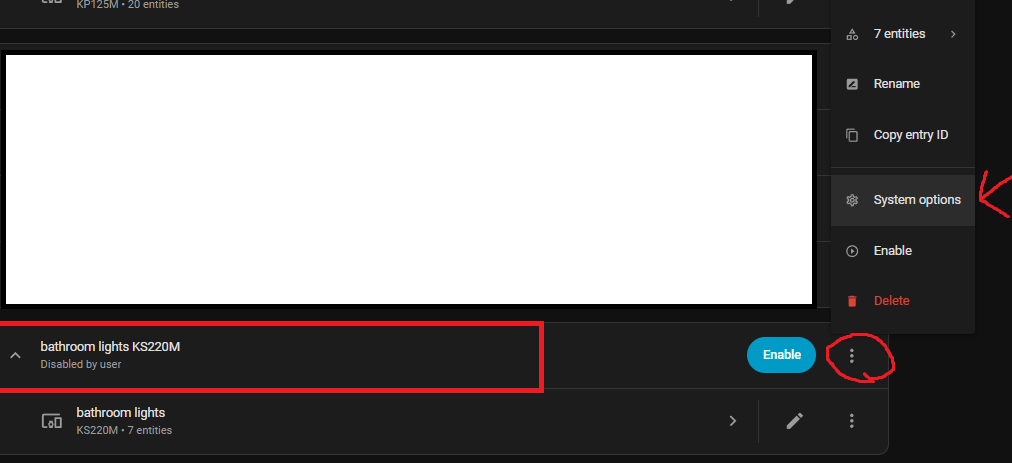
- Copy Link
- Report Inappropriate Content
Information
Helpful: 0
Views: 5163
Replies: 46
Voters 0
No one has voted for it yet.