
KE110 and connected TRV not following schedule, not following open window detection rules

I switched my complete heating system from Netatmo to TP-Link Kasa products this season and so far I'm very satisfied.
I also got two KE110 for the two biggest rooms, one bound to one TRV and one to three.
I'm experiencing the phenomenon where the two rooms with the KE110 don't follow the smart schedule. The app correctly shows the next time-slot but when the time comes, the temperature doesn't change. It happens not always but at least once a day so far.
Disabling and enabling the smart control usually helps. And sometimes it displays "Hold Temperature" except I didn't do any manual changes.
I also connected one Tapo T110 Window Sensor and bound it to the KE110. The Sensor works and detects the opening, but the KE110 doesn't always follow the set rules either.
All of these problems only happen with the KE110. The single TRVs work flawlessly, also with T110 sensors. Anyone else having these issues?
- Copy Link
- Subscribe
- Bookmark
- Report Inappropriate Content

hi! I have the same problem with my ke110! The Smart control lose the settings during the day. I have 6 different TRV and this never happened during this 2 years. Only now with the ke110
- Copy Link
- Report Inappropriate Content

@GEORGzer At first, it was recommended to me by the support in my region. Since then, I have left it, because it is much better for testing errors. At the same time, it is more economical because it happened that instead of that, it was still heating even at night.
- Copy Link
- Report Inappropriate Content

Please force close and re-open the app, check if you can still see the same thing on the overview page. Try to test it on another phone.
What's the version of your Kasa app? Please ensure it is updated.
- Copy Link
- Report Inappropriate Content

I am having this problem with all three of the ke110's I own. It is very frustrating. I have checked all the settings as per previous post.
- Copy Link
- Report Inappropriate Content
@Snurse A beta firmware is available for addressing this issue. If you would like to try it, DM me the Mac address of your KE110 and the KH100 hub.
- Copy Link
- Report Inappropriate Content
Hi, I tried it on both iOS and Android and it behaves exactly the same when this error occurs. My main setup is via Android where I have version 3.4.402 build 1337. And on my wife's phone where iOS is version 3.4.401 build 1744.
- Copy Link
- Report Inappropriate Content

Hello everyone, regarding the issue discussed in this thread, our R&D team has provided a beta firmware as a temporary solution. The official release is on the way, i'll keep you posted if there is any progress. If you would like to try the beta, keep watching!
Phenomenon Description
When linking one or multiple KE100 units with a KE110 controller, you may observe that connected KE100 devices do not adjust temperatures according to the Smart Control rules configured on the KE110.
Workaround
Beta firmware to address this issue is now available to community users. To apply the beta firmware, follow the steps below.
1. Find the Mac address on your Kasa KE110 and the KH100 hub.
2. Send a message to @Wayne-TP in the following format:
[843126][KE110 Smart Control Failure] + Mac address of the KE110 and the KH100
Before the Upgrade
(1) Please be sure you have read the Beta Test Agreement before upgrading the Pre-release firmware!
(2) How to update the firmware of the Tapo devices on the Tapo App
(3) Firmware downgrade is not supported. When a new official version is released, updating it will overwrite the beta version.
- Copy Link
- Report Inappropriate Content
Kulisak wrote
After extensive testing of the firmware you uploaded to device A8-29-48-18-AC-AF, I am pleased to report that everything appears to be stable, at least regarding the temperature history logs.
However, I would like to highlight an issue that might be related to the error mentioned in my previous correspondence. Regarding my other device, A8-29-48-18-B3-9B (which is not yet running the new firmware), the attached photos show that it is exhibiting similar problems. Please note, I am aware you may already know about this behavior and may have addressed it in the updated firmware.
The device seems to get stuck in a transition state. My schedule is set to 18°C from 00:00 to 05:59, with a target of 22°C starting at 06:00. During the minute of transition, the device defaults to "Frost Protection" mode.
What is particularly interesting is the visual discrepancy:
In the Device Overview card, a rising edge is visible just before 06:00, but at 06:00 it drops suddenly to 5°C.
In contrast, when viewing the detailed Temperature History, it indicates that the current target is correctly set to 22°C.
Could you please confirm if the new firmware also resolves this specific display and functional discrepancy? Additionally, when can I—or the general user base—expect to receive this firmware update for the rest of our devices?
Regarding the inconsistency between the two charts, a specialist will assist in investigating this issue. A support ticket will be sent shortly to the email address associated with your community account. If you no longer use this email or no longer have access to it, please send me a message with your updated contact email address.
- Copy Link
- Report Inappropriate Content

@Wayne-TP DM to you.
I have the same problem.
But in addition, last week I encountered the error described here twice: https://community.tp-link.com/en/smart-home/forum/topic/850168 (screenshot of the first post). Unfortunately, I can no longer trace how this error occurred.
Is the beta version the same one that resolves both problems?
EDIT:
I just activated boost mode via KE110. Now the app is showing the error. No message appears on the TRV, and there's no motor noise.
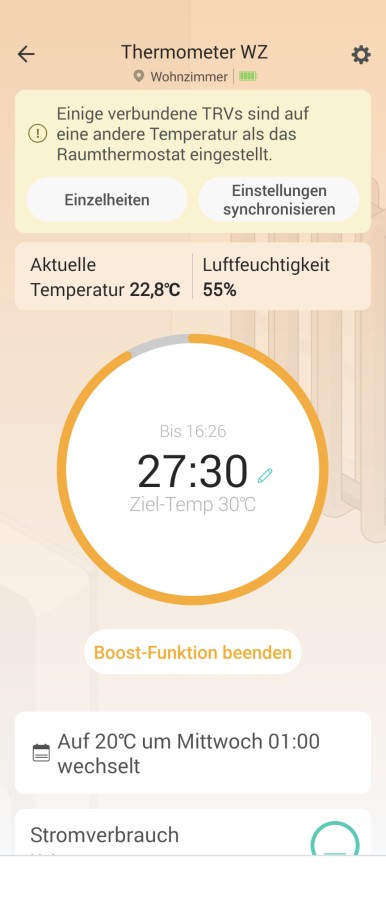
Klick on sys setting, TRV reacts and takes over the setting.
But after reaching the boost duration (30 min), the same error occurs again.
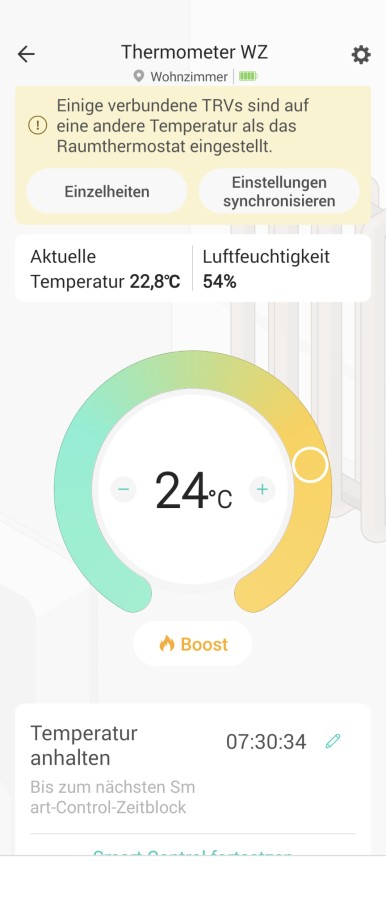
And again, the TRV only reacts after clicking on sync setting.
- Copy Link
- Report Inappropriate Content
Information
Helpful: 0
Views: 2439
Replies: 29
Voters 0
No one has voted for it yet.