
How to get rid of "Frequently Triggered" notification for motion sensors?

Hi,
does anyone know a way to get rid of the "Frequently Triggered" notification that the TAPO app seems to give you automatically for your motion sensors?
I have some T100 motion sensors in area where they frequently sense motion (as intended - that is their job after all).
However for some reason from time to time (I think once per week?) the TAPO app thinks it has to tell me that I have some sensors that trigger often and makes suggestions to lover the detection interval to consume battery. Almost like a tooltip:
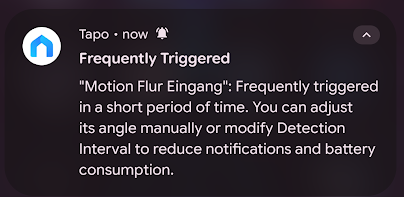
This is quite annoying, as I want those sensors to trigger and do their thing as they are supposed to.
What I don't want is a message telling me "you are triggering your sensor so often, please change the config to conserve battery". For me this means having my otherwise silent and automatic smart home des notify me for something I don't care about. This is basically just a sensor complaining that it has to do a lot of work.
I know this sounds a bit like a luxury problem, as this is only a few notifications a week - but it is still annoying. Usually when I get an alert from my TAPO app it is something major and not just unwanted spam like this.
Does anyone know a solution how to get rid of this "tooltip" notification for good without changing any detection settings?
Regards
Mick


