
How to get rid of "Frequently Triggered" notification for motion sensors?

How to get rid of "Frequently Triggered" notification for motion sensors?

How to get rid of "Frequently Triggered" notification for motion sensors?
2026-01-10 17:13:01 - last edited 2026-02-12 06:47:37
Model: Tapo T100  
Hardware Version:
Firmware Version:

Hi,


does anyone know a way to get rid of the "Frequently Triggered" notification that the TAPO app seems to give you automatically for your motion sensors?

I have some T100 motion sensors in area where they frequently sense motion (as intended - that is their job after all).


However for some reason from time to time (I think once per week?) the TAPO app thinks it has to tell me that I have some sensors that trigger often and makes suggestions to lover the detection interval to consume battery. Almost like a tooltip:
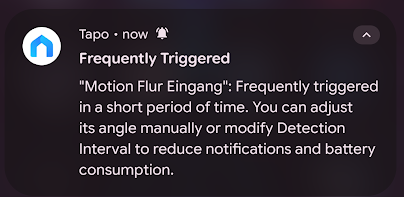


This is quite annoying, as I want those sensors to trigger and do their thing as they are supposed to.


What I don't want is a message telling me "you are triggering your sensor so often, please change the config to conserve battery". For me this means having my otherwise silent and automatic smart home des notify me for something I don't care about. This is basically just a sensor complaining that it has to do a lot of work.


I know this sounds a bit like a luxury problem, as this is only a few notifications a week - but it is still annoying. Usually when I get an alert from my TAPO app it is something major and not just unwanted spam like this.


Does anyone know a solution how to get rid of this "tooltip" notification for good without changing any detection settings?


Regards

Mick

0
0
#1
1 Accepted Solution
Re:How to get rid of "Frequently Triggered" notification for motion sensors?-Solution
2026-01-13 04:48:24 - last edited 2026-02-12 06:47:37

Hi  @MicknNJ ,


I remember getting this for all my sensors, I just increased the "Detection Interval". Not sure why any-one would need it detecting every few seconds. I just set mine to 60secs, noting that it's not polling every 60 seconds, it just doesn't retry for 60 secs. Therefore as long as it has not detected anything in the last 60 seconds, it will detect movement instantly which is fine for most uses.


Having said that it is silly that you can set it to 4 seconds and then it sends you a notification as you have mentioned. 

Recommended Solution
1
1
#2
6 Reply
Re:How to get rid of "Frequently Triggered" notification for motion sensors?-Solution
2026-01-13 04:48:24 - last edited 2026-02-12 06:47:37

Hi  @MicknNJ ,


I remember getting this for all my sensors, I just increased the "Detection Interval". Not sure why any-one would need it detecting every few seconds. I just set mine to 60secs, noting that it's not polling every 60 seconds, it just doesn't retry for 60 secs. Therefore as long as it has not detected anything in the last 60 seconds, it will detect movement instantly which is fine for most uses.


Having said that it is silly that you can set it to 4 seconds and then it sends you a notification as you have mentioned. 

Recommended Solution
1
1
#2
Re:How to get rid of "Frequently Triggered" notification for motion sensors?
2026-02-07 18:27:48
Same here and i have 60 seconds interval Any solution ?????
0
0
#3
Re:How to get rid of "Frequently Triggered" notification for motion sensors?
Friday - last edited Friday

  @MicknNJ I have the same issue as you, as I need mine to detect me when I'm in my kitchen.


It needs to detect all movement so that it can turn on the light for a set period of time.


However, if I do what the Tapo app recommends, then there are times when I'm in the kitchen and the light goes out. This can be dangerous as I may be using the stove at the time and I may burn myself because my kitchen is pretty dark when there is no light on.


Any advice, tips, or whatever will be greatly received.


I've even tried turning off the notifications but that doesn't work either. They may not be push notifications, but they are notifications none the same.


Chris (adelphiaUK)


Please excuse misspellings and anything that may not make sense or cause offence as the medication I take can have an adverse effect on my mind.

0
0
#4
Re:How to get rid of "Frequently Triggered" notification for motion sensors?
Monday

Hi  @adelphiaUK


You just have to set your light on time to a period longer than the sensor detection interval duration, i.e have your light on duration set to 3 minutes.


This is how it works:

Assume the sensor detection interval is set to 60 seconds to save battery and stop the frequent sensing message.

1. The sensor first detects movement. This should trigger your automation to turn on your light for say 3 minutes.

2. The sensor will not detect movement for the next 60 seconds. This is fine as the light stays on for 3 minutes.

3. After 60 seconds the sensor will begin to detect movement again. This will detect any movement continually. So any movement during the next 2 minutes will restart the automation, even after 1 second. The light will then stay on for another 3 minutes. Obviously if you don't move in this period then the light will go off but that would be the same if the sensor detection interval duration is set to 1 second.


I hope this helps/clarifies.

0
0
#5
Re:How to get rid of "Frequently Triggered" notification for motion sensors?
Monday

  @Rbuck I get that, but what about the initial turn on? Let's say I set it to 1 minute detection and the light on for 3 minutes? That means I will be in the kitchen for up to 1 minte before the light comes on the first time.


Im going to have a play to see what happens with some of my ideas in regards to this.


Chris


Please excuse misspellings and anything that may not make sense or cause offence as the medication I take can have an adverse effect on my mind.

0
0
#6
Re:How to get rid of "Frequently Triggered" notification for motion sensors?
Yesterday

Hi  @adelphiaUK,


That cannot occur. If you have not been in the kitchen for over 60 seconds then it will trigger instantantly, if you had been in the kitchen then the light will already be on for 3 minutes...


Trust me it works, i have all mine set to detection interval to 60 secs and my lights always turn on instantly and stay on while i'm moving around in the room.


I suggest you set it up and try it... if you have problems then i am happy to provide some guidence...

0
0
#7
