make a Dead USB Port Live Again!

make a Dead USB Port Live Again!

make a Dead USB Port Live Again!
a week ago - last edited a week ago
Model: Archer AXE75  
Hardware Version: V1
Firmware Version: 1.5.2 Build 20260113 rel.53105(4555)

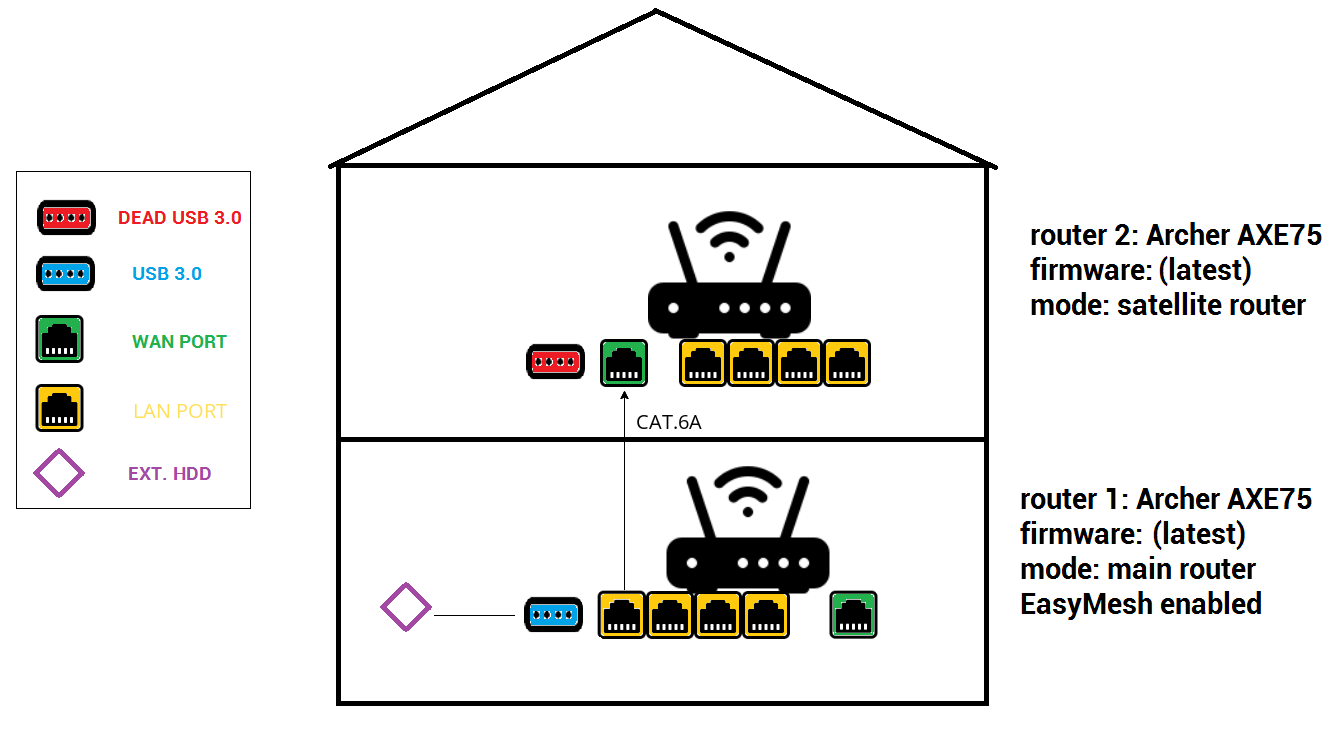
as per title, and per image bellow:


it is absolutely useless to offer USB port on the router if connecting two routers in mode MAIN_ROUTER---SATELITE_ROUTER will KILL the USB port on the satelite router!


what kind of dirty marketing lies we are fed here. If I buy 2 high-end routers with USB ports I demand that both USB ports are WORKING!


why there is no hammer packed in the box as well, so we could just smash these piece of junk routers, that you do not develop properly!


this is outrageous! 

#revive_the_Dead_USB_Port

  1      
  1      
#1
Options
3 Reply
Re:make a Dead USB Port Live Again!
a week ago

  @hWmMzIfYNRISEgn 


As per this post the USB port is working after the AXE75 is set up as a satellite router.

Is you issue that you can't access the satellite router USB media server settings or that its USB port is not working at all ?

If this was helpful click on the arrow pointing upward to make it blue. If this solves your issue, click the star to make it blue and mark the post as a "Recommended Solution".
  1  
  1  
#2
Options
Re:make a Dead USB Port Live Again!
Saturday

  @terziyski as per the post you linked me, thats exactly the issue here. from the post: "But I cannot access the device via the IP address of the connection" - this says it all.


also I strongly disagree with the accepted solution of that linked post. it is totally unacceptable to "fix the issue" by resetting the device.


yes, I can't access the satellite router USB anyhow and yes, its USB port is not working at all under satellite mode.


this is basically similar issue we had back in a day with the firmware update of the satellite router - the only way to do that, was to hard-reset the satellite router, update the firmware and re-enable satellite mode again. fortunately, this issue was patched by one of the firmware update, and now in the main router, we have a dedicated window with listed satellite router and ability to check for firmware update as well as to directly update the firmware of satellite router from within the main router.


asking for a same treatment for the USB port. clearly if one is possible, the other is also possible by design (especially when other brands like ASUS are able to)

  0  
  0  
#3
Options
Re:make a Dead USB Port Live Again!
Monday

  @hWmMzIfYNRISEgn 


I understand the issues you've described. I think at that point in time, this probably has been the only accepted solution.

That's because the FW is evolving constantly, so lets hope the features you mentioned would be implemented in some forthcoming FW release.

For example, there's a pre-release (beta) FW for BE550 v2 announced here which includes some advanced features for Easymesh setup.

But I really can't speculate on that since this is entirely up to the TP-Link development team.

If this was helpful click on the arrow pointing upward to make it blue. If this solves your issue, click the star to make it blue and mark the post as a "Recommended Solution".
  0  
  0  
#4
Options