
Battery suddenly started draining significantly

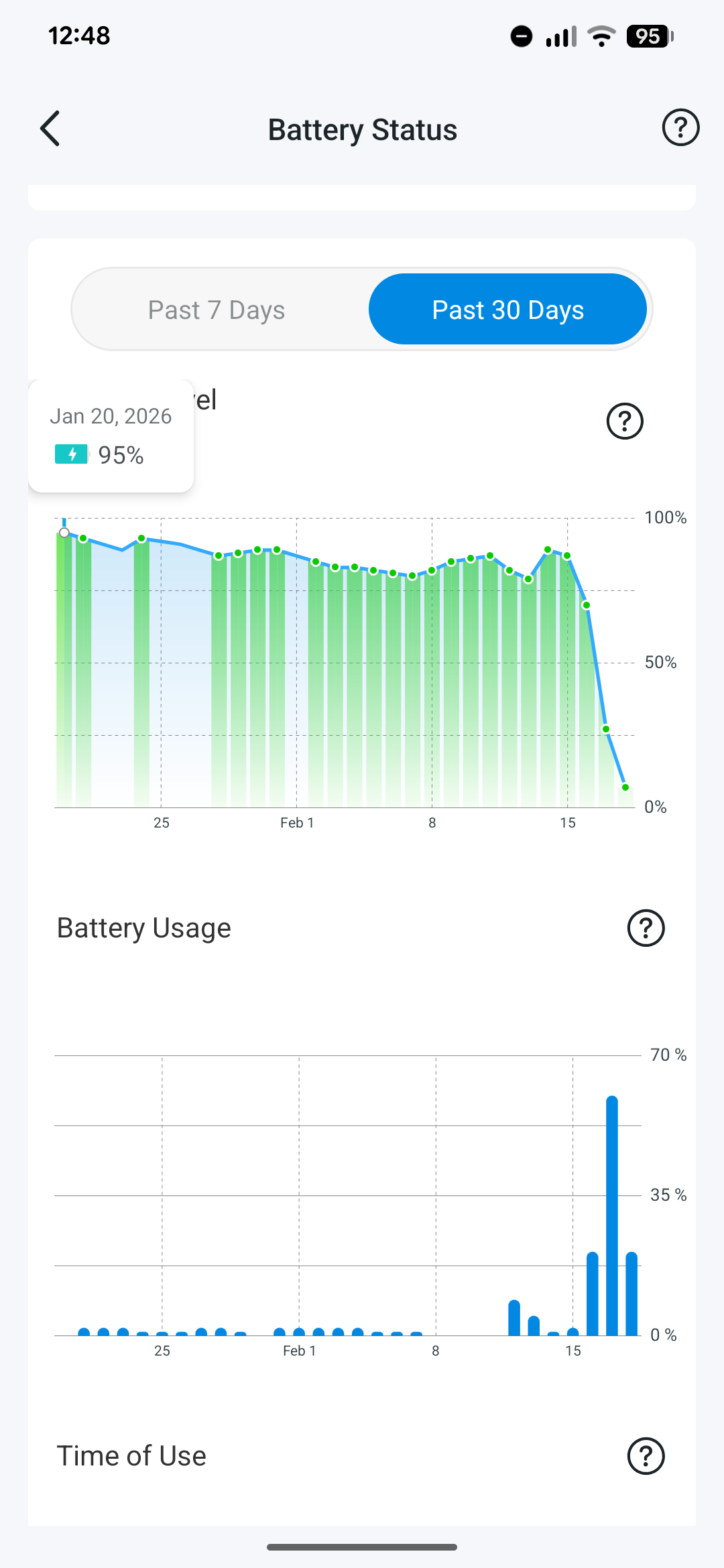
I haven't changed my settings for a few months and there hasn't been anything unusual happening outside my front door. In the span of three days the battery of my solar-powered camera dropped from 90% to 5%. I'm based in the UK's South-East so solar power was a rarity this month overall, that hasn't had any impact here. If anything, this is when the sun actually started to come out a bit.
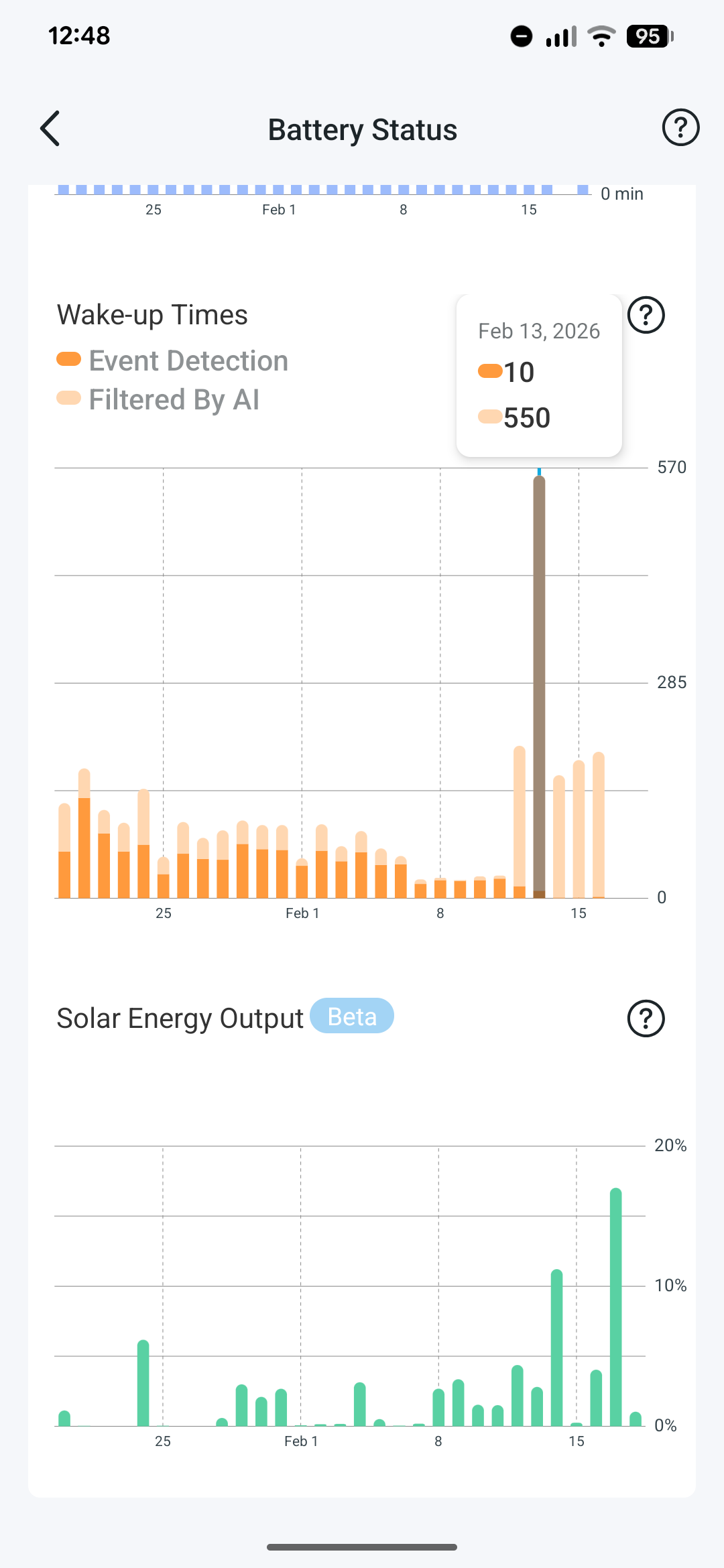
Curiously it coincides with a huge increase in wake-up times but AI has been so aggressive at removing them that on most days I'm not even receiving a single event detection.
Does anyone have any ideas what might be going on here?
- Copy Link
- Subscribe
- Bookmark
- Report Inappropriate Content


As your camera is used with a solar panel, please confirm whether proper waterproof measures were taken in place. Otherwise, it might lead to hardware problems. How to Properly Connect a Tapo Solar Panel to Compatible Tapo Cameras Using the Waterproof Gasket
More suggestions can be found here, FYI. What to do if the battery drains quickly on my Tapo battery-powered camera/doorbell?
- Copy Link
- Report Inappropriate Content
The camera’s AI mechanism helps filter out non‑essential events, such as those triggered by lighting changes or shadows, reducing the number of notifications sent to your phone. However, please note that each time the camera wakes up to analyze motion, it consumes battery power. This explains why your camera’s battery drains quickly when it wakes up as frequently as 500 times per day.
To figure out what’s waking up your camera so often, try this simple test: point the camera at a blank wall for half a day or a full day, and keep an eye on how many times it wakes up. If the number drops a lot, it means something in its usual view was setting it off, maybe a moving branch, a passing car, or shifting light. Take a look around to see what it might be. If you can’t avoid that trigger, try tilting or turning the camera so it doesn’t see the thing that keeps waking it up.
Additionally, if your camera is integrated with third‑party platforms such as Home Assistant, please disconnect it from those services. We’ve received feedback from users that Home Assistant can increase the camera’s battery drain.
- Copy Link
- Report Inappropriate Content
Thanks for the suggestions. I did indeed have Home Assistant with the Tapo Camera integration so I've removed that, but I haven't seen an improvement as a result. I've also removed the camera from my Wifi network and re-added it but again to no avail.
I do notice that the camera is consistently considered the slowest connection of all my devices according to my router's overview, despite the fact that the camera is roughly 2 meters separated from the router (both are at the front of the house).
In the past few days I've seen its battery go down tremendously again and this time the app doesn't show even a single wake up time, whether it was filtered or not. In fact, in the past few days I've only had three clips being created.
I enabled diagnostics on the camera and had a look through the file with Claude which analysed the following:
=========
Looking at your diagnostics from Feb 27, there are several clear indicators of what's draining the battery: 1. Extremely frequent wake-ups This is the biggest issue. On Feb 27 alone, the camera went through dozens of boot cycles, sometimes only minutes apart (e.g., 10:04, 10:10, 10:25, 10:30, 10:36, 10:42...). Each wake-up draws significant power — the camera has to power on WiFi, connect, initialise the video pipeline, mount the SD card, etc. 2. Frequent live view access Many of these wake-ups are triggered by someone (or the app) connecting to view the feed. The logs show repeated P2P and relay connections from your local network (192.168.0.159) and your external IP. Each time you open the live view in the Tapo app, the camera fully wakes up. On the morning of Feb 27, there were clusters of back-to-back connections — some sessions lasting only a few seconds before disconnecting and reconnecting. 3. Watchdog timer resets Several entries showmcu_rst_reason=2(WDT reset) and watchdog failure counts likewd_fail:0_4_1. These are abnormal reboots where the camera's processor wasn't responding in time, forcing a restart — wasting power on an unproductive boot cycle. 4. Battery level over the day You can see the drain directly: the battery dropped from around 18% (early morning) down to ~13% by midday, largely driven by all those wake cycles. 5. SD card corruption warnings Every single boot logs a FAT-fs warning about the volume not being properly unmounted. This suggests the camera is shutting down abruptly rather than cleanly, which could indicate the power-down sequence is being cut short.
=========
This will be a little bit distorted because this morning I was indeed actively looking at the camera while diagnosing. That said, given the filesystem warnings I did format it and I'll see what effect that has.
- Copy Link
- Report Inappropriate Content
As your camera is used with a solar panel, please confirm whether proper waterproof measures were taken in place. Otherwise, it might lead to hardware problems. How to Properly Connect a Tapo Solar Panel to Compatible Tapo Cameras Using the Waterproof Gasket
More suggestions can be found here, FYI. What to do if the battery drains quickly on my Tapo battery-powered camera/doorbell?
- Copy Link
- Report Inappropriate Content
@Wayne-TP I suspect that might be it then: I had someone install it for me but I don't see a waterproof gasket in there (or if it was, it's now gone). The functionality of the camera has further deteriorated to the point that it doesn't actually do any recordings anymore either
- Copy Link
- Report Inappropriate Content
vannevelj wrote
@Wayne-TP I suspect that might be it then: I had someone install it for me but I don't see a waterproof gasket in there (or if it was, it's now gone). The functionality of the camera has further deteriorated to the point that it doesn't actually do any recordings anymore either
If the issue is indeed caused by a hardware failure, unfortunately there are no troubleshooting steps you can take to resolve it.
I recommend contacting your local support team to inquire about potential warranty coverage. Please note, however, that damage resulting from improper installation is typically not covered under the warranty terms. Contact Technical Support
- Copy Link
- Report Inappropriate Content
Information
Helpful: 0
Views: 389
Replies: 5
Voters 0
No one has voted for it yet.