
New Feature Lock Your Smart Door Lock with Smart Actions


We're excited to announce that one of the most highly requested features for our Tapo Door Locks is being added. With the latest update, it is now possible to automatically lock your door with Smart Actions! 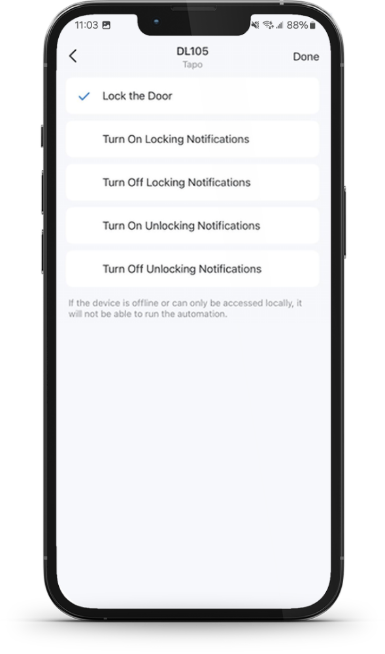
Supported Devices
-
Tapo DL100(US) V1.6, Firmware version 1.0.15 Build 251203 Rel.142427
-
Tapo DL105(US) V1.6, Firmware version 1.0.12 Build 251107 Rel.093522
-
Tapo DL110(US) V1.6, Firmware version 1.0.26 Build 251107 Rel.181526
-
Tapo DL110(CA) V1.0, Firmware version 1.0.26 Build 251107 Rel.181526
"Lock the Front Door 30 Minutes After I Arrive Home"
Perfect for ensuring peace of mind once settled in from work
"Lock the Front Door Every Night at 10 PM"
Never worry about forgetting to lock the door before bed again.
“Lock the Front Door When ‘X’ Camera Detects Unknown Faces” (Compatible Cameras + Hubs Only)
Automatically Lock Your Door When a Stranger or Non-Family Member is Detected
“Lock the Front Door When I Leave Home”
Never worry about accidentally leaving the door unlocked while on the road
NOTE: If your device is offline or can only be accessed locally (such as via the Wi-Fi scheduling feature), the lock will not be able to run the automation!
How Do You Plan on Automating Your Door Lock?
We’d love to hear your ideas – let us know in the comments below!
Related Articles
How to create Smart Action (Automation or Shortcut) on Tapo app
Geofencing: Automations with Your Location
What To Do If Tapo Smart Action (Automation/Shortcut) Doesn't Take Effect or Delay?

