
Wrong with battery-powered cameras only start mirroring when an events is detected

I only connect a singl non-battery powered camera but still show this error: battery-powered cameras only start mirroring when an events is detected. if al detection is disabled, mirroring will be deactivated.
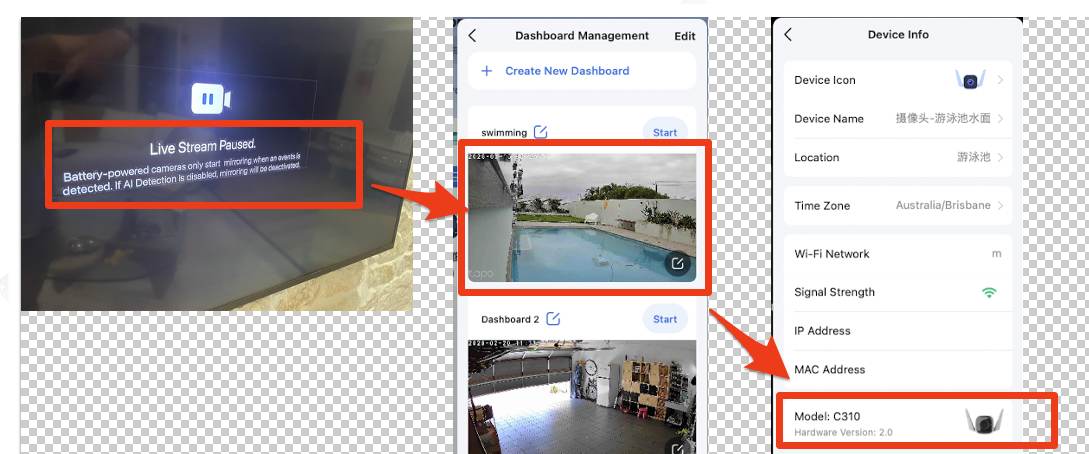
- Copy Link
- Subscribe
- Bookmark
- Report Inappropriate Content


Unplug and reconnect the HDMI cable to ensure a proper connection. Use a new cable if available. Try to re-enable screen mirroring, then re-add the camera.
If the above suggestions don't help, then further investigation is required. Click here to contact technical support.
- Copy Link
- Report Inappropriate Content
My Tapo H500 version:
- Hardware version: 1.0
- Fireware version: 1.3.12 Biuld 20260128 rel.51424
- Copy Link
- Report Inappropriate Content
Unplug and reconnect the HDMI cable to ensure a proper connection. Use a new cable if available. Try to re-enable screen mirroring, then re-add the camera.
If the above suggestions don't help, then further investigation is required. Click here to contact technical support.
- Copy Link
- Report Inappropriate Content
Information
Helpful: 0
Views: 334
Replies: 2
Voters 0
No one has voted for it yet.