
D235 keeps alerting phone that it switches from hardwired and back to battery

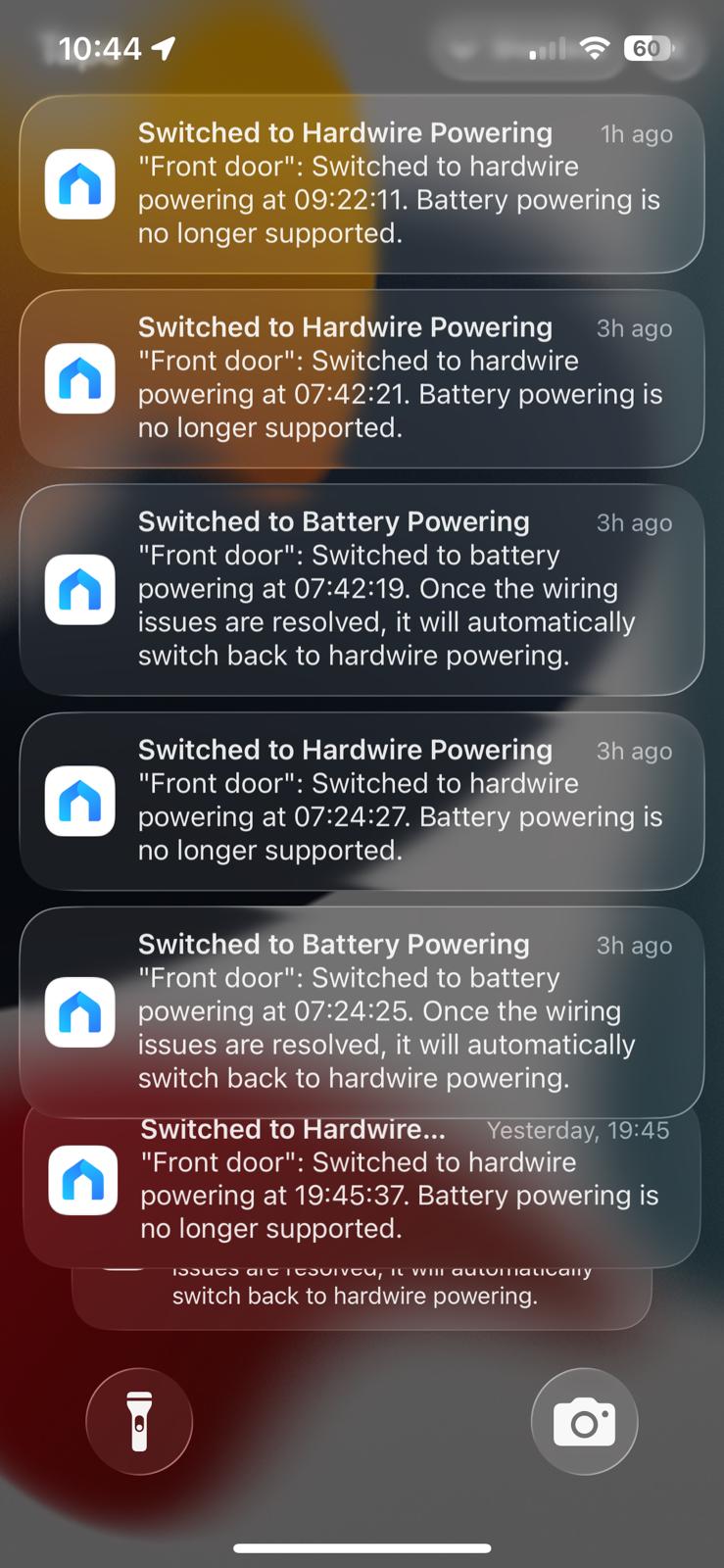
Got a hardwired D235 but for some reason it momentarily switches to battery and then back to hardwired. Each time it does this iI get 2 phone notifications and it happens day and night. No way to switch this notification off other than I guess to turn off all notifications which would defeat the point of having it.
No idea why it switches as the hardwired power supply always keeps it at 100%. If I could take the battery out I would but it's not user removable.
As you can see, it switches for seconds and then switches back. Thinking of returning it as I think it's a fault and i'm getting fed up with the phone going off at night,.
Anyone else got any ideas?
Thanks
Garry
- Copy Link
- Subscribe
- Bookmark
- Report Inappropriate Content


This article should help, take a look. Why does the Tapo Doorbell still discharge when powered through hardwiring?
Regarding the reply you received, this appears to be an automated response from our knowledge base. While this system works well for most situations, we understand that every case is unique. If the response doesn’t quite fit your situation, no problem at all, just request further assistance from a live support agent.
- Copy Link
- Report Inappropriate Content
And the reply from Tapo Technical Support.........
Hi, The Tapo D235 has two power supply options; you can use hardwired connections without batteries. Thanks for using Q&A.
If this is a technical answer from technical support, it's time to send it back for a refund.
Their own information says the battery is not user removable and it already set to hardwired.
- Copy Link
- Report Inappropriate Content
This article should help, take a look. Why does the Tapo Doorbell still discharge when powered through hardwiring?
Regarding the reply you received, this appears to be an automated response from our knowledge base. While this system works well for most situations, we understand that every case is unique. If the response doesn’t quite fit your situation, no problem at all, just request further assistance from a live support agent.
- Copy Link
- Report Inappropriate Content
@678gary Just as an update for anyone else, tech support advised that i changed the power supply which I did. The new one has a much higher VA rating.
It's still doing it although it is now once every 6-7 days. Switches over for 2 seconds and then straight back.
Still no clear answer for the reason but I am requesting a software update to ensure notifications only occur if the switchover lasts for a set period of time ( i'd say 60 seconds) or the ability to turn power notifications off altogether.
- Copy Link
- Report Inappropriate Content
678gary wrote
@678gary Just as an update for anyone else, tech support advised that i changed the power supply which I did. The new one has a much higher VA rating.
It's still doing it although it is now once every 6-7 days. Switches over for 2 seconds and then straight back.
Still no clear answer for the reason but I am requesting a software update to ensure notifications only occur if the switchover lasts for a set period of time ( i'd say 60 seconds) or the ability to turn power notifications off altogether.
You can post your suggestion as a separate thread in the Feature Requests section. That way, users who share the same idea can join the discussion and vote for your post directly.
- Copy Link
- Report Inappropriate Content
@Wayne-TP I was more hoping that this would be fixing what appears to be a design fault rather than an optional end user feature.
- Copy Link
- Report Inappropriate Content
678gary wrote
@Wayne-TP I was more hoping that this would be fixing what appears to be a design fault rather than an optional end user feature.
@678gary You only need to share your idea, it will serve as valuable background information for the product team when evaluating this suggestion. They will review the feature requests regularly, hot topics with detailed background information (e.g., use scenarios, reasons why you want or don't want a particular feature, etc) will be prioritized for evaluation. Whether it will be adopted, how it might be implemented, or when it could be released are details we cannot confirm at this time.
- Copy Link
- Report Inappropriate Content
Information
Helpful: 0
Views: 311
Replies: 6
Voters 0
No one has voted for it yet.