
The channel width in the satellite router is automatically set to 20 MHz

I have two Archer AX73 V2 routers with updated firmware (1.2.1 Build 20250717 rel.40826 on both routers); they are connected in EasyMesh Ethernet Backhaul network. There is an issue: devices connected via Wi-Fi 5 GHz to the satellite router show low internet speed. I used the WiFi Analyzer app and found that this router shows a channel width of 20 MHz. After rebooting the router, it shows 160 MHz and the speed becomes normal, but after a few hours the speed drops again and WiFi Analyzer shows 20 MHz once more. The router settings indicate 20/40/80/160 MHz and the channel selection is set to Automatic. I tried changing it to 20/40/80 MHz and channel 36, but it didn't help. Main router doesn't have this problem, it always show 160 MHz and speed is always maximum, at least I've never noticed anything different. Can you help me to fix this problem?
- Copy Link
- Subscribe
- Bookmark
- Report Inappropriate Content


Hello @Zinmoor ,
This is actually related to regulatory restrictions and spectrum allocation rules. The 160 MHz bandwidth might not be available on certain channel ranges in the 5 GHz band in some regions/countries due to regulatory restrictions.
The 5GHz band is divided into different channel groups, and not all of them support the wider 160 MHz channel width:
• Channels 36-64 (lower 5GHz band) can support 160 MHz in many regions
• Channels 149-161 (upper 5GHz band) typically don't have enough contiguous spectrum to support 160 MHz width in most regulatory domains
Additionally, the Dynamic Frequency Selection (DFS) mechanism affects which channels can be used. With DFS enabled, devices monitor frequencies for radar signals and must vacate channels if radar is detected. Different channel ranges have different DFS requirements and availability.
When you select narrower channel widths (like 20 MHz, 40 MHz, or 80 MHz), channels 149-161 become available because these narrower widths fit within the spectrum allocated to that upper band.
This is normal behavior based on your region's wireless regulations and is designed to ensure your router operates within legal frequency allocations. For more details about DFS, you can refer to: Brief introduction of DFS function
- Copy Link
- Report Inappropriate Content
Hello @Zinmoor ,
Welcome to our community.
This appears to be a wireless stability problem specific to the satellite router. Here are some troubleshooting steps thtat may help:
For the satellite router's wireless settings:
1. Replace Ethernet Cable: Verify the Ethernet cable between the main router and satellite device is functioning properly and try using a different cable if possible
2. Router placement: Make sure the satellite router is properly placed in an open area instead of inside a cabinet or shelf, as this can affect wireless performance.
3. Change Wi-Fi channel manually: In the satellite router's web interface, go to Advanced > Wireless > Wireless Settings. Instead of using Automatic channel selection, try manually selecting a specific 5GHz channel to avoid nearby interference. Test different channels (like 36, 40, 44, 48, 149, 153, 157, 161) to find the best one for your environment that maintains 160 MHz width.
4. Verify channel width settings: Keep the 5GHz channel width set to 20/40/80/160 MHz as you have it. The router should automatically select the appropriate width, but interference or regulatory restrictions in your area might be causing it to fall back to 20 MHz.
5. Check for interference: Use your WiFi Analyzer app to check if there are many neighboring networks on the same or overlapping channels. Heavy interference can force the router to reduce channel width. If you find significant interference, try channels in the higher range (149-161) or lower range (36-48) depending on which is less congested.
6. Disable certain features: Go to the web interface > Advanced > NAT Forwarding > UPNP to disable UPNP, and go to Advanced > Security to disable SIP ALG. These features may affect Wi-Fi performance.
7. Check Parental Controls: Open the Tether app, go to Parental Control, and ensure no parental control profile is configured for the affected devices.
8. Update client device drivers: Make sure the network adapter drivers, system, or firmware on your client devices (e.g., PC, phone, or smart devices) are up to date.
Best Regards.
- Copy Link
- Report Inappropriate Content
@Joseph-TP ,
Thank you for your help, but another question has come up regarding the channel settings: in my router settings for channel width 20/40/80/160 MHz, only channels 36–64 are available to select; channels 149–161 are not in the list; they appear in other channel width settings
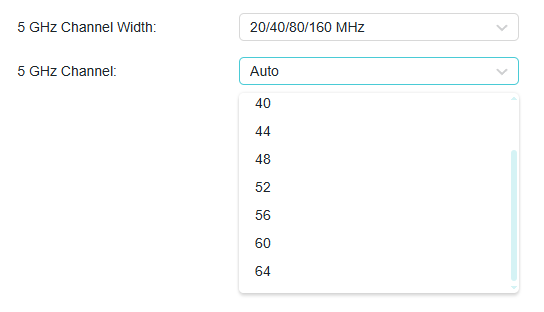
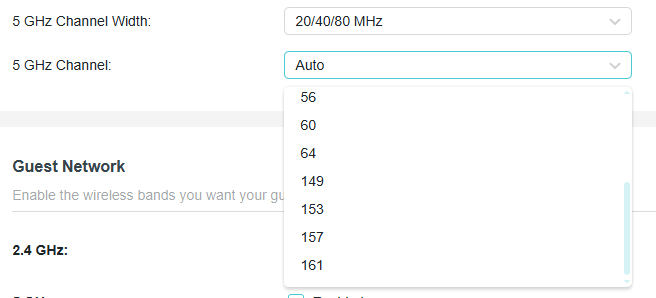
- Copy Link
- Report Inappropriate Content
Hello @Zinmoor ,
This is actually related to regulatory restrictions and spectrum allocation rules. The 160 MHz bandwidth might not be available on certain channel ranges in the 5 GHz band in some regions/countries due to regulatory restrictions.
The 5GHz band is divided into different channel groups, and not all of them support the wider 160 MHz channel width:
• Channels 36-64 (lower 5GHz band) can support 160 MHz in many regions
• Channels 149-161 (upper 5GHz band) typically don't have enough contiguous spectrum to support 160 MHz width in most regulatory domains
Additionally, the Dynamic Frequency Selection (DFS) mechanism affects which channels can be used. With DFS enabled, devices monitor frequencies for radar signals and must vacate channels if radar is detected. Different channel ranges have different DFS requirements and availability.
When you select narrower channel widths (like 20 MHz, 40 MHz, or 80 MHz), channels 149-161 become available because these narrower widths fit within the spectrum allocated to that upper band.
This is normal behavior based on your region's wireless regulations and is designed to ensure your router operates within legal frequency allocations. For more details about DFS, you can refer to: Brief introduction of DFS function
- Copy Link
- Report Inappropriate Content
Information
Helpful: 0
Views: 749
Replies: 3
Voters 0
No one has voted for it yet.