
C560WS, poor tracking

I have bought 2 C560WS to replace C530WS.
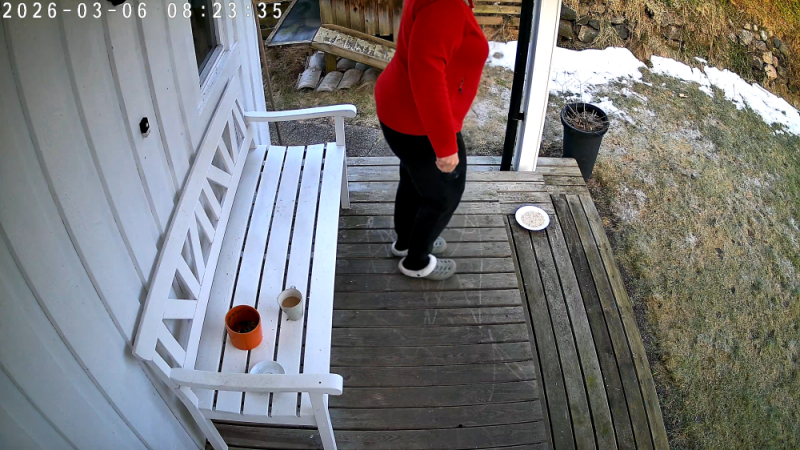
But the auto-tracking on the new cameras cuts the head of people standing in front of my door...
Attached an example.
- Copy Link
- Subscribe
- Bookmark
- Report Inappropriate Content


ONVIF wrote
Thanks.
The camera is over my entrance door.
If a person stands right in front of the door it tilts down, but when the person moves away from the door it doesnt track properly.
As you can see there is plenty of space around the feets, but the head, which of course is the most important, is not shown.
The camera should have tiltet upwards as the person moves away.
It was working much better with the old C530WS.
I have rebooted the camera several times and the problem is the same. It always return to the default posistion after a while.
Hi,
Thank you for your reply!
Please refer to the troubleshooting steps mentioned in my previous post: What to do if the Tapo Pan/Tilt camera can't return to its original position properly after tracking
If the issue persists, please contact support for further assistance and follow‑up.
Best Regards.
- Copy Link
- Report Inappropriate Content
Hello,
Welcome to the Tapo community, and thank you for sharing your experience with the C560WS.
To make sure we fully understand the situation, could you please help us confirm one point:
after motion tracking is triggered, does the camera tilt downward, and as a result, when you view the live stream afterward, the person’s head is partially or completely out of the frame?
If the Camera shifts from the default position (e.g., tilts downwards), please try the following steps:
In Tapo App > Camera's Device Settings > Reboot Camera page, enable Auto Reboot feature and check if this improves the situation.
For more details, visit: What to do if the Tapo Pan/Tilt camera can't return to its original position properly after tracking
Best Regards.
- Copy Link
- Report Inappropriate Content
Thanks.
The camera is over my entrance door.
If a person stands right in front of the door it tilts down, but when the person moves away from the door it doesnt track properly.
As you can see there is plenty of space around the feets, but the head, which of course is the most important, is not shown.
The camera should have tiltet upwards as the person moves away.
It was working much better with the old C530WS.
I have rebooted the camera several times and the problem is the same. It always return to the default posistion after a while.
- Copy Link
- Report Inappropriate Content
ONVIF wrote
Thanks.
The camera is over my entrance door.
If a person stands right in front of the door it tilts down, but when the person moves away from the door it doesnt track properly.
As you can see there is plenty of space around the feets, but the head, which of course is the most important, is not shown.
The camera should have tiltet upwards as the person moves away.
It was working much better with the old C530WS.
I have rebooted the camera several times and the problem is the same. It always return to the default posistion after a while.
Hi,
Thank you for your reply!
Please refer to the troubleshooting steps mentioned in my previous post: What to do if the Tapo Pan/Tilt camera can't return to its original position properly after tracking
If the issue persists, please contact support for further assistance and follow‑up.
Best Regards.
- Copy Link
- Report Inappropriate Content

Hi, i have a very similar problem. The camera does not return to its original viewpoint after detection. You will spend time with TP answering lots of questions and going around in circles via support email with no solution. I'm returning mine to the retailer for a refund.
- Copy Link
- Report Inappropriate Content
Information
Helpful: 0
Views: 269
Replies: 4
Voters 0
No one has voted for it yet.