
C645d minutes of not recording in 24/7 recording

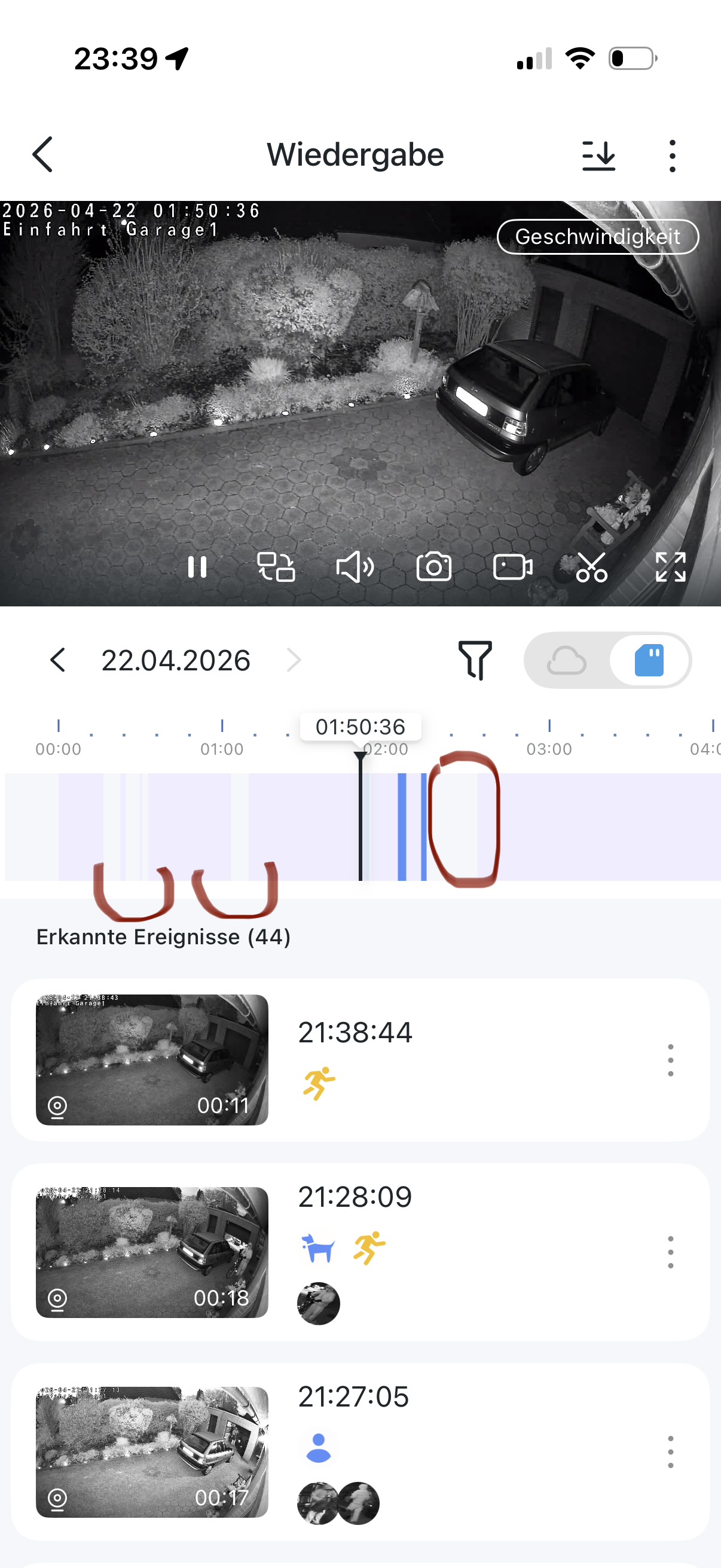 Hello together,
I have installed the C645d camera as replacement for C460. The camera before have no problems with 24/7 recording. I install this with the H500 Hub, like the camera before. From all other cameras the 24/7 recording are saved full to the hub. The wlan what the camera uses is also from TP Link Omada. Im this situation with this new camera I have the problem that I have minutes of not recording. You see this in the picture. I reset the camera, restarted the hub. In Omada Controller the camera is full online the whole time. There are no WLAN Problems. The H500 is connected over network cable. I don't know what I must do, or is this a problem in this firmware?
The same C460 at the same place worked without issues.
Thanks for regards
Maximilian
- Copy Link
- Subscribe
- Bookmark
- Report Inappropriate Content

Please check the signal strength of this camera. What's its RSSI rate? How to check and improve the network connection stability of Tapo&Kasa smart devices
Just in case, you may want to review the recording schedule of your camera. Were there any gaps in the timeline? How can I enable the 24/7 Capture on Battery Camera?
- Copy Link
- Report Inappropriate Content
Hello,
I check this before. RSSI rate is -71. Also I lay yesterday this camera 20cm next an Access Point. The error exists then also. The plan says to record all time.
- Copy Link
- Report Inappropriate Content
Maximilian500 wrote
Hello,
I check this before. RSSI rate is -71. Also I lay yesterday this camera 20cm next an Access Point. The error exists then also. The plan says to record all time.
A signal strength of -71 dBm is very weak and may cause various connectivity issues for the camera, let alone reliably transferring and storing video to the hub.
After moving the camera, did you restart it to ensure it connects to a closer access point? Has the RSSI value changed at all?
- Copy Link
- Report Inappropriate Content
Hello,
I test this also with a C460 and directly with C645d 20cm near an access point. Only the C645d makes this problems. The RSSI is then a little better. Restarted the cam also. Same error, as before.
Thanks regards
- Copy Link
- Report Inappropriate Content

Maximilian500 wrote
Hello,
I test this also with a C460 and directly with C645d 20cm near an access point. Only the C645d makes this problems. The RSSI is then a little better. Restarted the cam also. Same error, as before.
Thanks regards
Sometimes physically moving a device doesn’t guarantee better signal strength — if the original connection remains stable, it may not automatically switch to a closer access point.
Can you check which AP the Tapo C645D is currently connected to? After moving the camera, is it actually linked to the nearest AP? Another option is to temporarily turn off the AP the camera is connected to. Once the connection drops, the camera should automatically reconnect to the same network using the strongest available signal from another AP.
For your case, i would recommend reaching out to our support team for further investigation. Contact Technical Support
- Copy Link
- Report Inappropriate Content
I tested this also with restart, the camera is connected to the nearest AP. I think it lays really on the camera. But now I give this away. For me this makes no sense, maybe the unit is defective. Thanks for answers!
- Copy Link
- Report Inappropriate Content
Maximilian500 wrote
I tested this also with restart, the camera is connected to the nearest AP. I think it lays really on the camera. But now I give this away. For me this makes no sense, maybe the unit is defective. Thanks for answers!
That said, I still recommend contacting our support team, there’s a good chance they can help resolve the issue. Even if it ends up being a problem specific to that individual device, you’ll at least have a clear answer. Then you can go ahead and request a replacement, without worrying that the next one will have the same problem.
- Copy Link
- Report Inappropriate Content
Information
Helpful: 0
Views: 173
Replies: 7
Voters 0
No one has voted for it yet.