OC300 failes to massivly upgrade devices Firmware

OC300 failes to massivly upgrade devices Firmware

OC300 failes to massivly upgrade devices Firmware
Friday - last edited 13 hours ago
Model: OC300  
Hardware Version: V1
Firmware Version: 1.34.18 Build 20260506 Rel.79284

I've been writing this post while figuring this out, so please bear with me.


This past year has been a headache to upgrade devices firmware.

Every time I log in there are a large amount of devices with outdated Firmware.
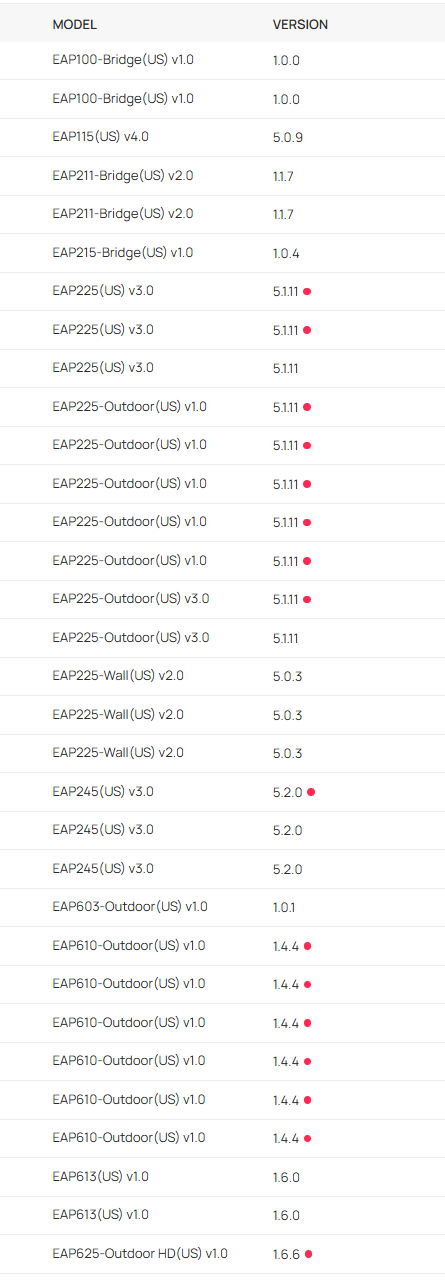
 

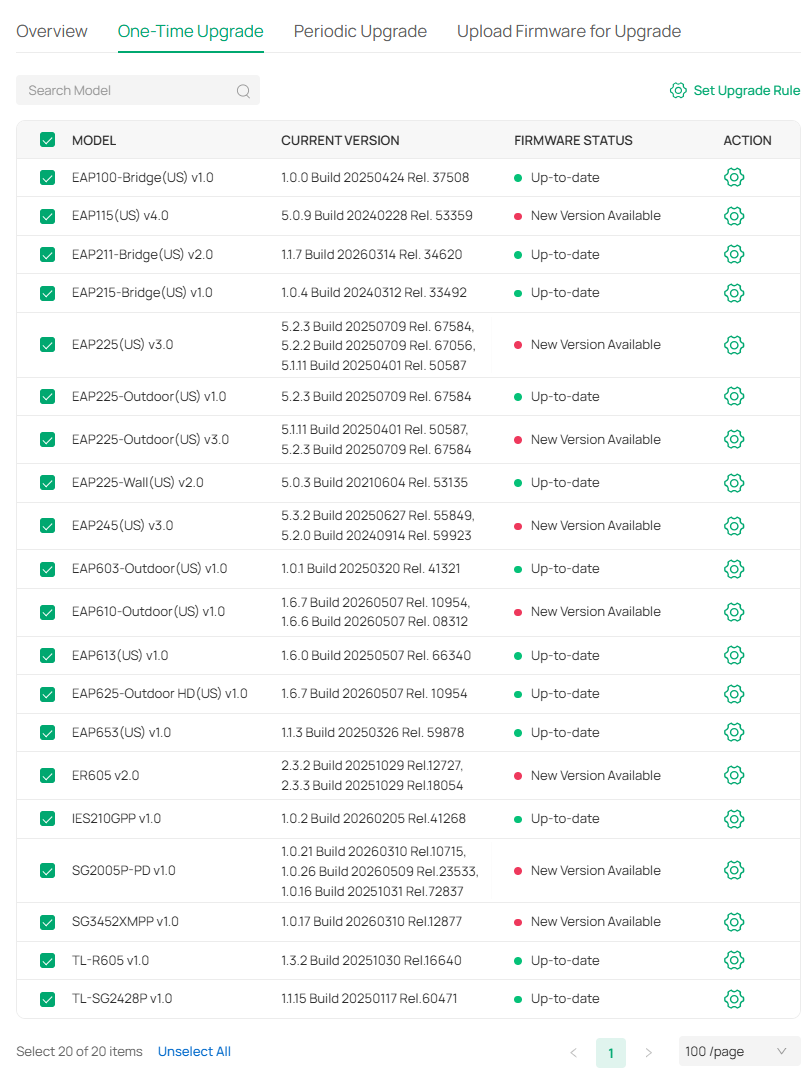
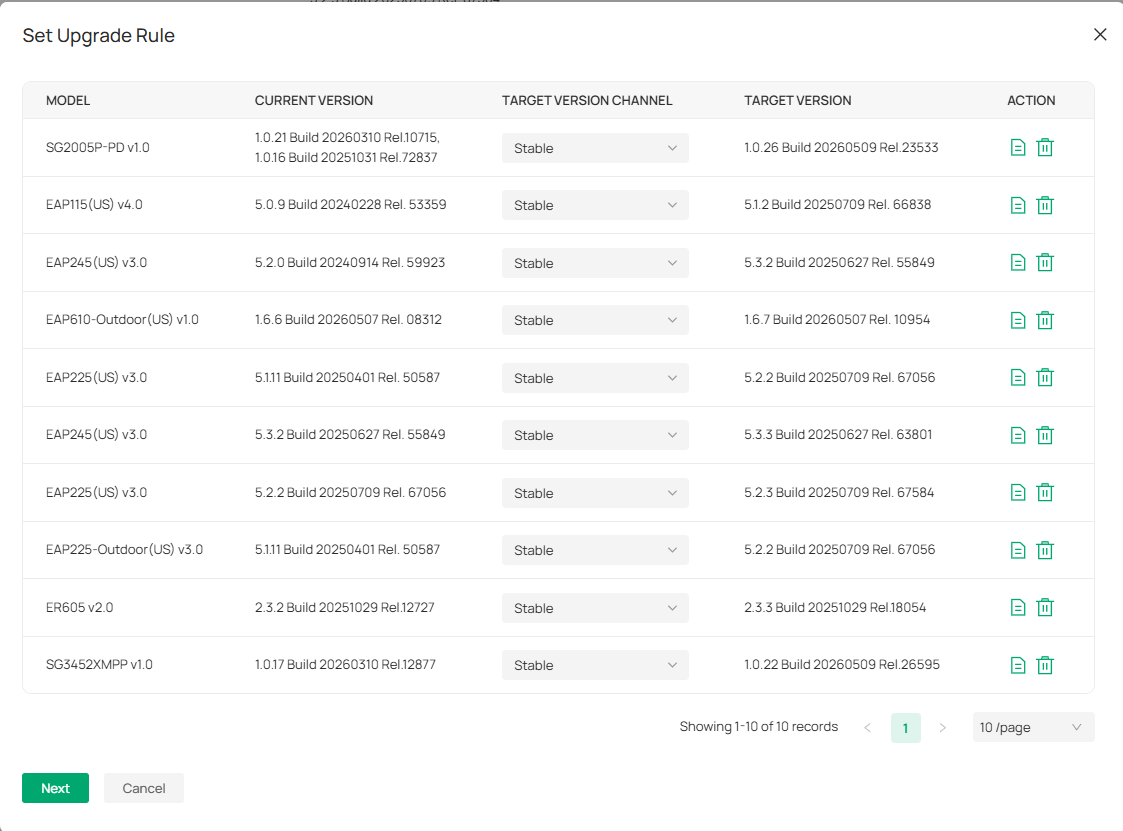
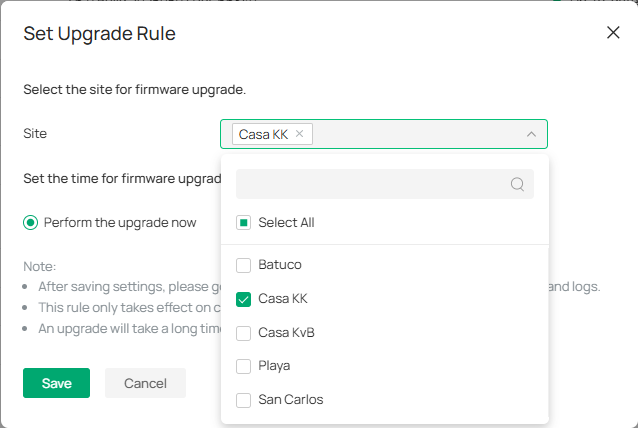
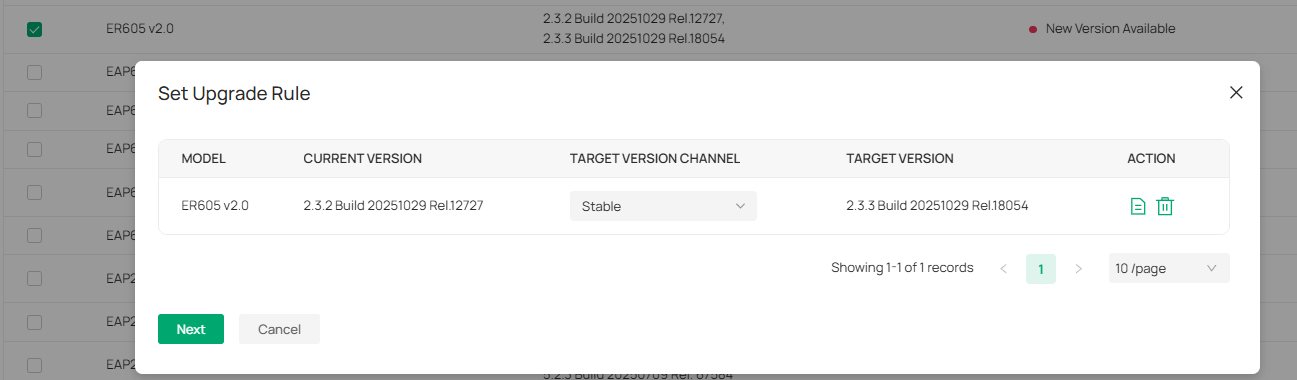
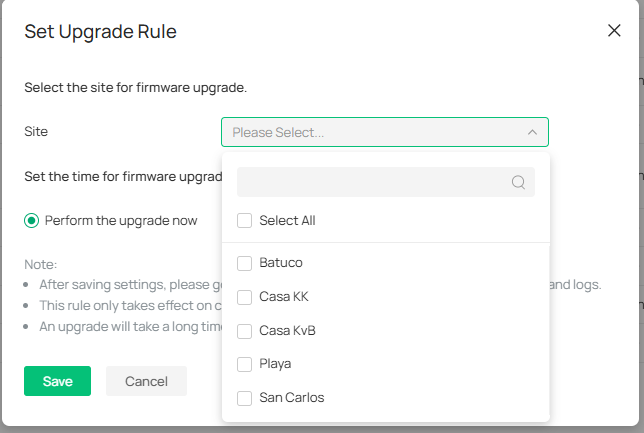
I've tried several ways to update the devices, which used to be easy untill they moved it to the global view with a complicated select model/ select version/ select site scheme. They had eliminated every way to simply select a device and upgrade its firmware.


More and more devices are lagging as FW versions are piling up.


This scheduling of a one-time upgrade has been horrible. I thought it never worked as I'm not getting any feedback of the upgrading process beyond the "Failed device list" in the action column.
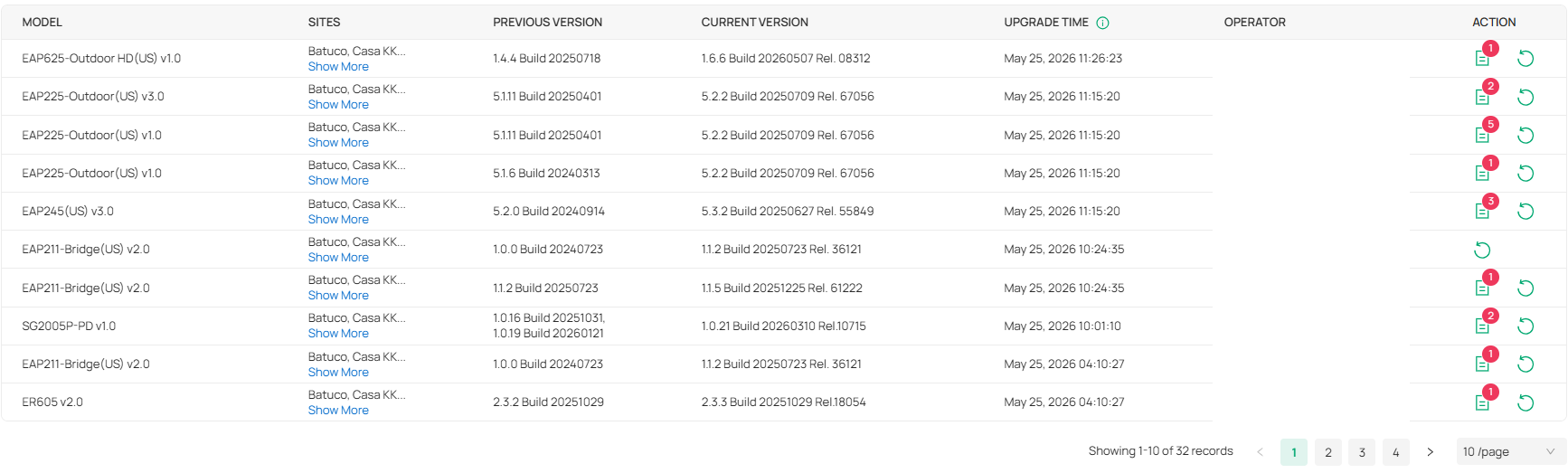
 

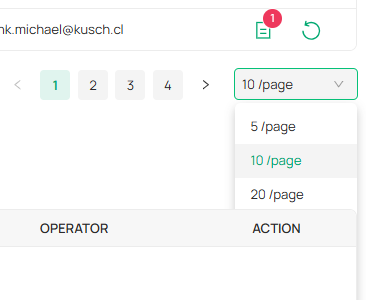
Note: I can't capture the whole liste because due to a bug in many views the next section covers the xx/page button, even preventing to select the last visible option. In this case I can only select 5/ and 10/. 20/ is unselectable.
 

Now I'm noticing there seems to be one, and only one, device that upgrades every time I try upgrading. No matter if I only try it with one site, one device model, or whatever low number of devices combination I try. I only figured this out because there is only one device with a recent UPTIME after I try the upgrading process.


So now that the single device upgrade is back, (don't know since which omada version) I've started to upgrade device by device trying to make manually sure I'm not upgrading a device that is behind another upgrading device, which is very time consuming and difficult, given I'm on a farm with multi hop wired, bridged and mesh devices, not counting I'm managing several sites with the same OC300.
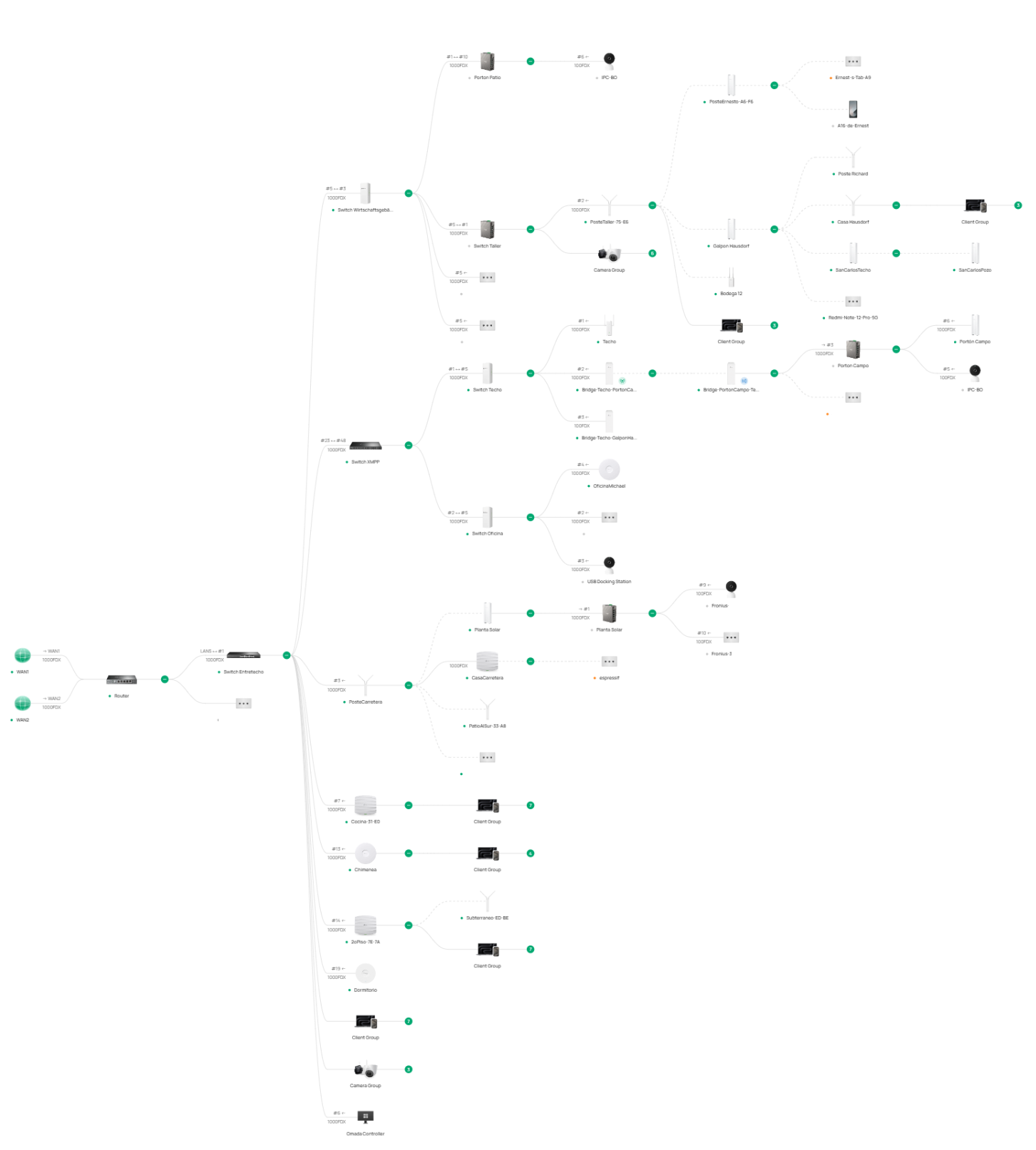


What used to be the "batch upgrade" option that inteligently started with the righ-most topoloy devices untill reaching the router seems to be missing and broken ever since omada v6.

The new (back again) single device upgrade option is hindered by the fact that the FW upgrade queue is very limited to only 4 devices at a time.
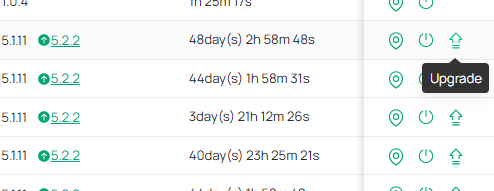
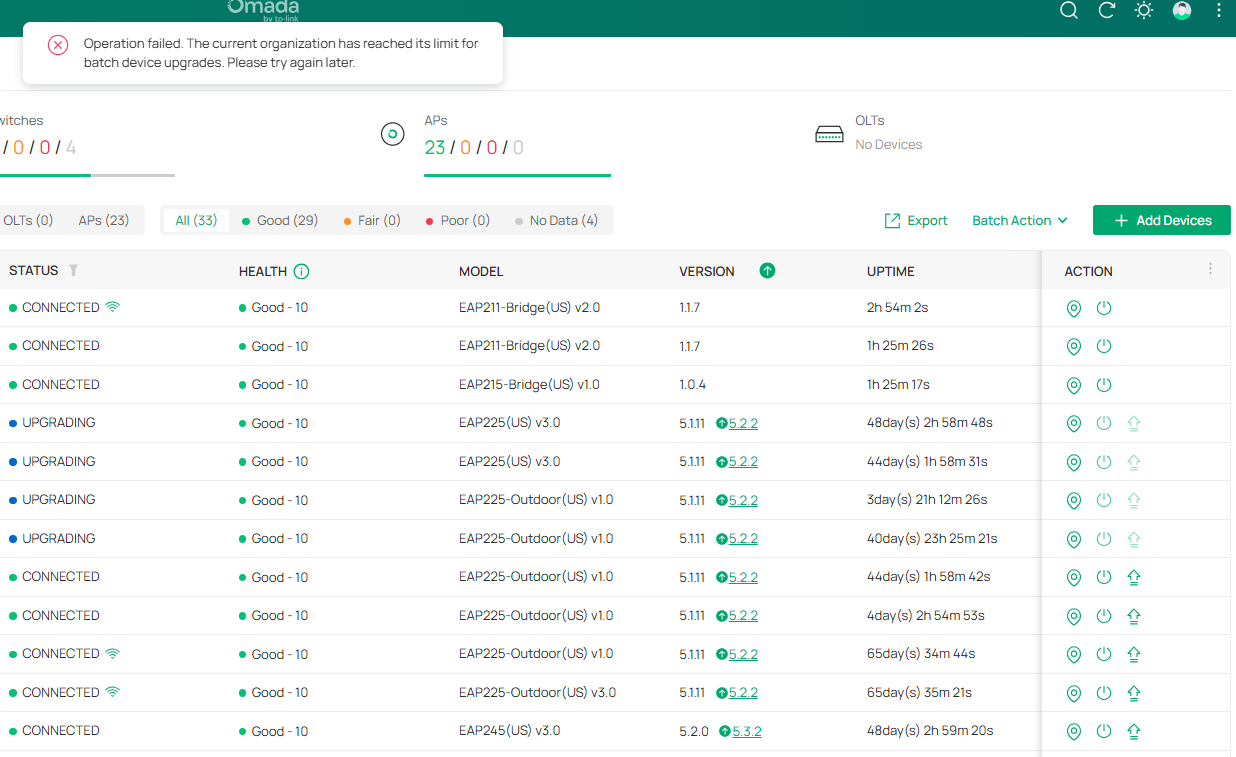


The more devices on a controller, the worse the FW upgrade gets. I have two OC300, one OC200 and one ER7212PC. I had no trouble with OC200 and ER7212PC as they have only a handfull of devices, but both OC300 have been a nightmare to keep up to date. In fact untill today where I notices one of the maybe 30+ upgrade pending devices had a hours instead of days UPTIME, I hadn't been able to keep these 2 OC300 devices upgraded.


This is worsened by the fact that it seems many devices are not straightly upgraded to the latest firmware, but to the next one if there have been more than one since its current version, which on the devices page still shows up as upgrade pending.


I've had lots of trouble with FW update on remote site before which turned out to be ISP blocking new ports, but now I can't upgrade the devices on the local site to keep up with the constant stream of new FWs. And the fact that there is no actual feedback whatsoever on the FW update process that doesn't requiere staring at the screen and manually taking notes, makes the whole thing so much worse and frustrating.


Now that I managed to upgrade just 4 devices, I can manually upgrade another 4. Ridiculous. This is after the previous 7 attempts using the Global -> Firmware -> One-Time Upgrade massively failed.
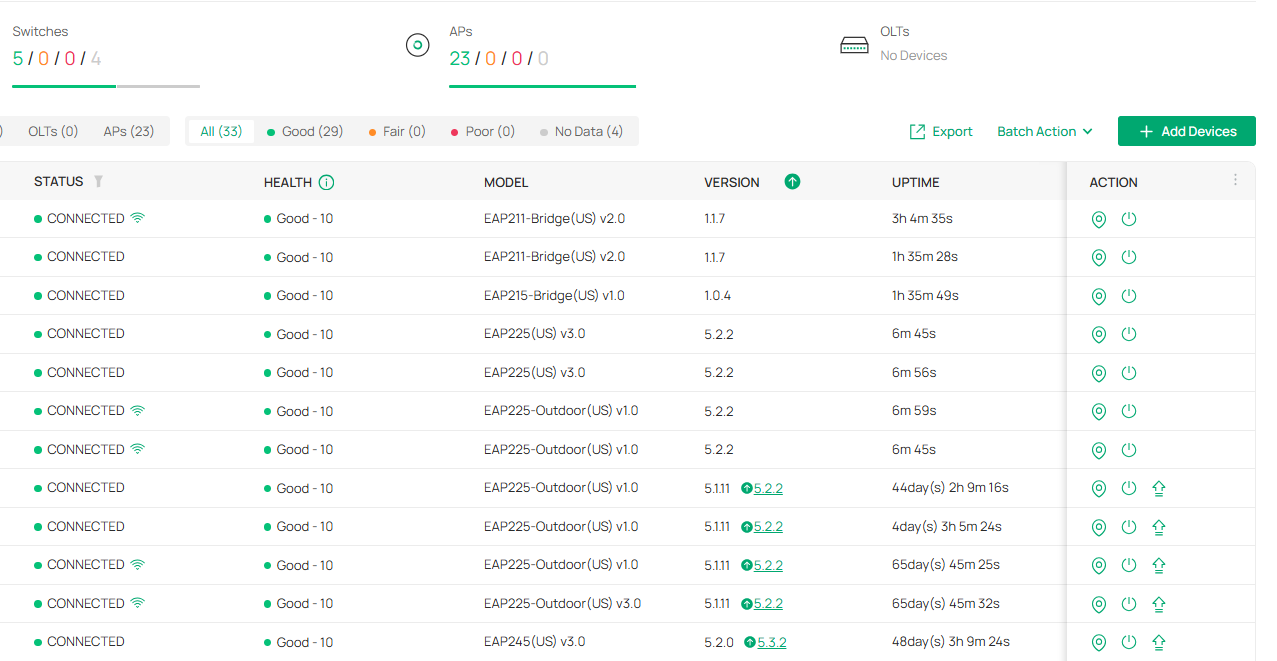
 

Seems like Golbal-> Firmware is still in beta despite no longer showing the beta logo/comment.



  0      
0
#1
Options
1 Accepted Solution
Re:OC300 failes to massivly upgrade devices Firmware-Solution
13 hours ago - last edited 13 hours ago

Hi  @Tintronic 


Thanks for posting here. Sorry to hear about the unsatisfactory upgrade experience. Below are some explanations and suggestions regarding the issue you mentioned.

  1. “Global” centralized upgrades are meant for multi-site control and risk reduction
    In multi-site, multi-model environments, a purely “click a device to upgrade” workflow can easily lead to selecting the wrong site/model, pushing an incompatible build, or saturating a site’s limited bandwidth—causing widespread outages.
    Centralizing the entry point in Global and requiring model/version/ selections is intended to reduce errors and enforce consistent rollout policies.

  2. Upgrade concurrency (queue) limits are there to prevent self-inflicted outages
    Firmware upgrades usually reboot devices and can interrupt links. If too many switches/APs are upgraded at once, the controller may lose network connectivity mid-upgrade, resulting in a worst-case “half-upgraded, site offline, hard to recover” scenario.
    A low concurrency limit (e.g., the “4 devices” you observe) is commonly used to:

  • reduce controller CPU/IO/storage load (package hashing, distribution, polling)
  • prevent simultaneous reboots on the same topology path from breaking the management plane
  • Avoid consuming WAN uplink bandwidth when many sites share one controller
  1. The old “topology-aware batch upgrade” is harder to guarantee in complex topologies
    In environments with multi-hop wired links, bridging, mesh, and multiple sites under one controller, topology discovery can be incomplete or change dynamically (especially with mesh/bridged links).
    If the controller cannot reliably confirm dependencies, an “auto topology batch upgrade” is more likely to reboot an upstream device first, interrupting downstream upgrades—which shows up as “batch upgrade failed.”

  2. “Not upgrading straight to the latest, only to the next version,” is often due to upgrade-path requirements
    Some devices/firmware trains require step upgrades due to bootloader changes, configuration database migrations, or security module updates. Skipping required intermediate versions can risk bricking or losing configuration.
    So the system may intentionally choose the “next recommended hop,” which keeps the device appearing “upgrade pending” afterward.

Recommendations

1) Split upgrades into “site windows + groups + low concurrency.”

  • Use a maintenance window per site (off-peak). Avoid pushing all sites globally in one run.
  • Within each site, upgrade in layers:
    1. edge devices / APs / downstream access switches
    2. distribution/aggregation switches
    3. gateway / upstream core last
      This manually recreates a safer order even if the “topology-smart batch upgrade” behavior isn’t available.

2) Plan for staged upgrades: align to an intermediate recommended version first

  • If a model is several versions behind, first bring it to a recommended/stable intermediate release, then move to the latest.
  • Practically: pick the Recommended/Stable build for that model (if shown), not necessarily the newest one, as the first step.

3) Improve the success rate by removing controller-to-device blockers

Even on local sites, many “mass failures” come down to these:

  • consistent routing/ACL/firewall rules between controller and device management subnets (especially across VLANs/subnets)
  • DNS and time sync health (can affect downloads, validation, logs)
  • controller storage space and overall health (firmware cache/log/database growth can slow task scheduling)
  • for mesh/bridged devices: upgrade only when links are stable/good quality, and prioritize nodes closer to the wired backbone

4) Use a “small validation → rolling rollout” rhythm

  • Upgrade 1–2 devices per model first to confirm:
    • they come back online/adopted properly
    • VLAN/SSID/ACL behavior is unchanged
  • Then expand to rolling groups at the allowed concurrency (e.g., 4 at a time). It’s tedious, but it’s also the safest approach from a risk-control standpoint.


Recommended Solution
  0  
0
#2
Options
1 Reply
Re:OC300 failes to massivly upgrade devices Firmware-Solution
13 hours ago - last edited 13 hours ago

Hi  @Tintronic 


Thanks for posting here. Sorry to hear about the unsatisfactory upgrade experience. Below are some explanations and suggestions regarding the issue you mentioned.

  1. “Global” centralized upgrades are meant for multi-site control and risk reduction
    In multi-site, multi-model environments, a purely “click a device to upgrade” workflow can easily lead to selecting the wrong site/model, pushing an incompatible build, or saturating a site’s limited bandwidth—causing widespread outages.
    Centralizing the entry point in Global and requiring model/version/ selections is intended to reduce errors and enforce consistent rollout policies.

  2. Upgrade concurrency (queue) limits are there to prevent self-inflicted outages
    Firmware upgrades usually reboot devices and can interrupt links. If too many switches/APs are upgraded at once, the controller may lose network connectivity mid-upgrade, resulting in a worst-case “half-upgraded, site offline, hard to recover” scenario.
    A low concurrency limit (e.g., the “4 devices” you observe) is commonly used to:

  • reduce controller CPU/IO/storage load (package hashing, distribution, polling)
  • prevent simultaneous reboots on the same topology path from breaking the management plane
  • Avoid consuming WAN uplink bandwidth when many sites share one controller
  1. The old “topology-aware batch upgrade” is harder to guarantee in complex topologies
    In environments with multi-hop wired links, bridging, mesh, and multiple sites under one controller, topology discovery can be incomplete or change dynamically (especially with mesh/bridged links).
    If the controller cannot reliably confirm dependencies, an “auto topology batch upgrade” is more likely to reboot an upstream device first, interrupting downstream upgrades—which shows up as “batch upgrade failed.”

  2. “Not upgrading straight to the latest, only to the next version,” is often due to upgrade-path requirements
    Some devices/firmware trains require step upgrades due to bootloader changes, configuration database migrations, or security module updates. Skipping required intermediate versions can risk bricking or losing configuration.
    So the system may intentionally choose the “next recommended hop,” which keeps the device appearing “upgrade pending” afterward.

Recommendations

1) Split upgrades into “site windows + groups + low concurrency.”

  • Use a maintenance window per site (off-peak). Avoid pushing all sites globally in one run.
  • Within each site, upgrade in layers:
    1. edge devices / APs / downstream access switches
    2. distribution/aggregation switches
    3. gateway / upstream core last
      This manually recreates a safer order even if the “topology-smart batch upgrade” behavior isn’t available.

2) Plan for staged upgrades: align to an intermediate recommended version first

  • If a model is several versions behind, first bring it to a recommended/stable intermediate release, then move to the latest.
  • Practically: pick the Recommended/Stable build for that model (if shown), not necessarily the newest one, as the first step.

3) Improve the success rate by removing controller-to-device blockers

Even on local sites, many “mass failures” come down to these:

  • consistent routing/ACL/firewall rules between controller and device management subnets (especially across VLANs/subnets)
  • DNS and time sync health (can affect downloads, validation, logs)
  • controller storage space and overall health (firmware cache/log/database growth can slow task scheduling)
  • for mesh/bridged devices: upgrade only when links are stable/good quality, and prioritize nodes closer to the wired backbone

4) Use a “small validation → rolling rollout” rhythm

  • Upgrade 1–2 devices per model first to confirm:
    • they come back online/adopted properly
    • VLAN/SSID/ACL behavior is unchanged
  • Then expand to rolling groups at the allowed concurrency (e.g., 4 at a time). It’s tedious, but it’s also the safest approach from a risk-control standpoint.


Recommended Solution
  0  
0
#2
Options