Tapo App for P110M Smart Plug - Allow Zero Power Prices

Tapo App for P110M Smart Plug - Allow Zero Power Prices

Tapo App for P110M Smart Plug - Allow Zero Power Prices
3 weeks ago - last edited 2 weeks ago
Model: Tapo P110M  
Hardware Version: V1
Firmware Version: 1.4.1 Build 251020 Rel. 183216

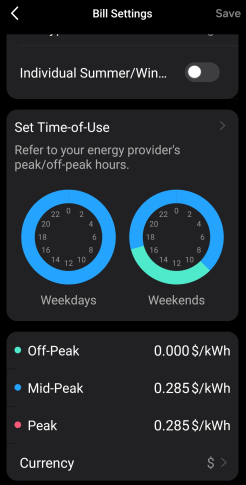
We get free power from 9-5pm on weekends which the Tapo app nearly supports if I understand correctly. For some reason, under periodic billing, it forces a minimum electricity price to be entered for the peak/off-peak settings. I'd like to add a zero price for off-peak and use that for the free periods, with the regular price for peak. Not sure why there needs to be a minimum price, but the save button won't activate below about $0.02/kWh

  0      
0
#1
Options
3 Reply
Re:Tapo App for P110M Smart Plug - Allow Zero Power Prices
3 weeks ago - last edited 2 weeks ago

  @CamTheLegend 


Is your Tapo app updated? Zero is supported on my device.

CES 2026 Meet TP-Link AI Assistant and More New Products!
  0  
0
#2
Options
Re:Tapo App for P110M Smart Plug - Allow Zero Power Prices
3 weeks ago - last edited 2 weeks ago

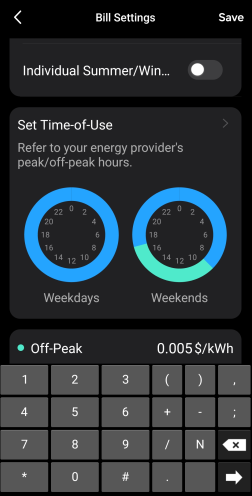
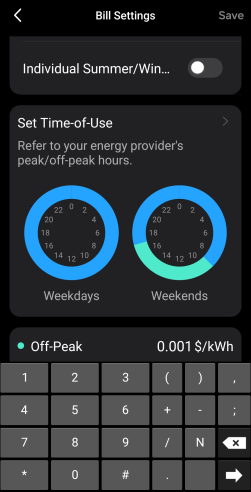
  @CamTheLegend Hi Wayne, I should have mentioned I'm using the Android app if that's not obvious from the version numbers. Are you on the same versions or running some beta versions? These are the latest available to me. It's quite inconsistent and I'm able to get it down to $0.005/kWh not, but as shown below the save button is going dull and not being available in the screens < $0.005/kWh.


Cam

  0  
0
#3
Options
Re:Tapo App for P110M Smart Plug - Allow Zero Power Prices
2 weeks ago

  @CamTheLegend 


This doesn't seem like the expected behavior. To assist with this case, a specialist will help to follow it up through email. Please check your inbox later to confirm.


If the email you used to register for the TP-Link community is not your contact email or you cannot access it, please send me your contact email through private message.
 

CES 2026 Meet TP-Link AI Assistant and More New Products!
  0  
0
#4
Options