
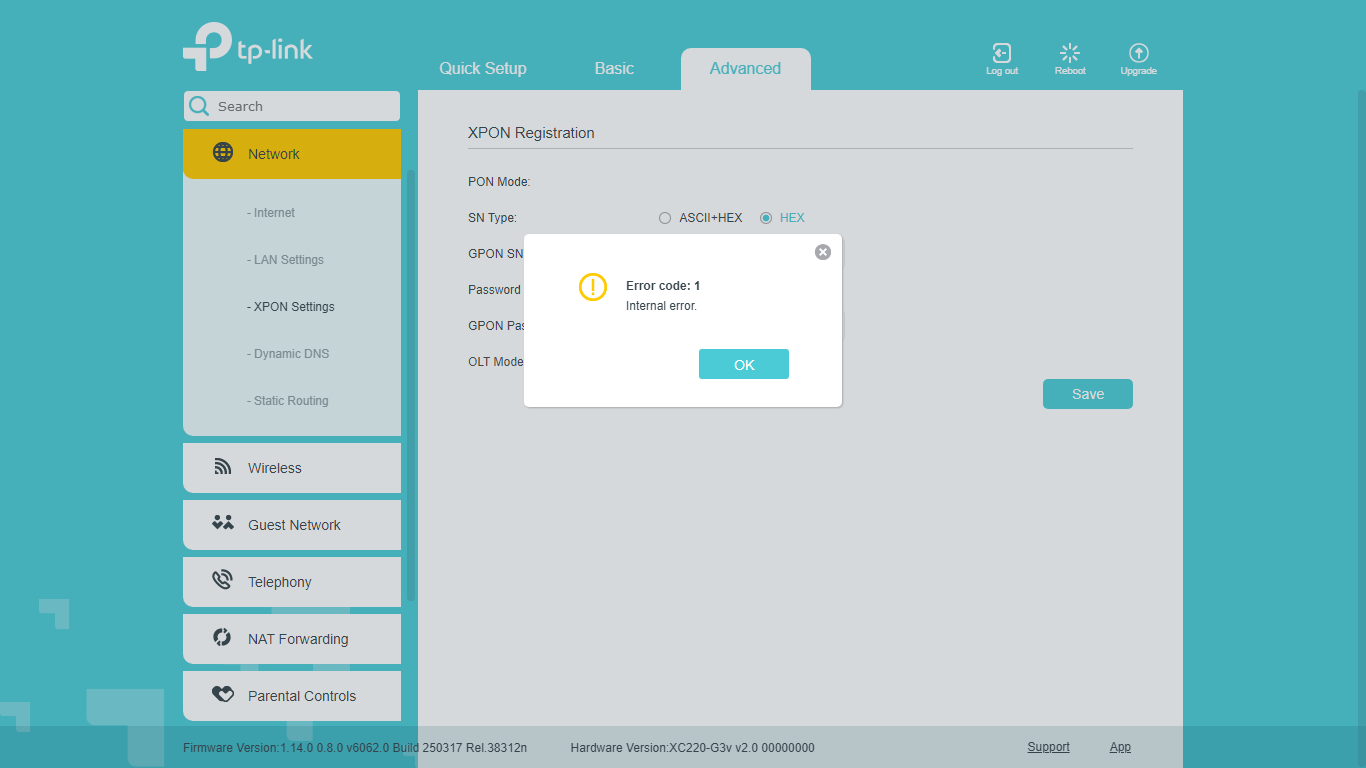
Olt Ont Error code: 1 Internal error. ONT : XC220-G3v ONT XX230v

Olt Ont Error code: 1 Internal error. ONT : XC220-G3v ONT XX230v

Olt Ont Error code: 1 Internal error. ONT : XC220-G3v ONT XX230v
2 weeks ago

Error code: 1 Internal error. ONT : XC220-G3v   ONT XX230v


Model: XC220-G3v  

Hardware Version: V2

Firmware Version:

Error code: 1 Internal error.


Model: XC220-G3v  

Hardware Version: V2

Firmware Version: 1.14.0_

1.14.0    esta dando  esse erro e nao funciona corretamente na olt Error code: 1 Internal error. a onu aparece e fica apagada 

A versao anterior tambem 1.13 a anterior a essas nao dava, mais nao esta possibilidadndo downgrade como faço o dowgrade em versoes quenao permite? ou concerta isso tp-link


A ONT XX230v

TAMBEM ultima versao 1.0_0.16.0 3.0.0  so normalizou apos dowgrade para a 0.12.0 3.0.0 v6066.0 Build 240319 Rel.37770


OBSERVAÇAO: O ERRO SO ACONTECE APOS COLOCA O CONECTOR DA FIBRA NA ONT, E DEPOIS QUE VC TIRA O CONECTOR DA FIBRA A LUZ DA FIBRA NA ONT NAO APAGA ELA FICA FIXA SO SE DESLIGAR A ONT DA ENERGIA E RELIGAR QUE APARESSE O LOSS E SE LIGAR A ONT COM A FIBRA COLCOADA JA DA O ERRO


ARRUMA ISSO AI TP-LINK BAITA DE UM STREEES ESSA SITUAÇAO    e por favor ja detalhei tudo ai vc ficam me perguntando depois tudo denovo
 

  0      
0
#1
Options
2 Reply
Re:Olt Ont Error code: 1 Internal error. ONT : XC220-G3v ONT XX230v
2 weeks ago

  @vanderstone   me deixa voltar na x220 versao XC220-G3v_(BR)_V2_1.10.0_0.8.0 Build 240511 esse tava normal eagora fico sofrendo com esses bugs que vcs me arruma sorte que so foi algumas que atualzei senao era varios clientes fora

  0  
0
#2
Options
Re:Olt Ont Error code: 1 Internal error. ONT : XC220-G3v ONT XX230v
an hour ago

Hello @vanderstone 


Thank you for posting on the TP-Link Community.


Does this mean you cannot configure the XC220-G3v to connect to the internet via PON connection anymore after upgrading its firmware from XC220-G3v_(BR)_V2_1.10.0_0.8.0 Build 240511 to 1.14.0_0.8.0 Build 250317?


Have you tried resetting it to factory defaults and reconfiguring it from scratch?


BTW, are you a supplier or the provider?


For any urgent requests, it's recommended to contact our Live Chat or Hotline support directly:

https://www.tp-link.com/br/support/contact-technical-support/#Hotline-Support

Nice to Meet You in Our TP-Link Community. Check Out the Latest Posts: Introducing AI QoS: Elevate Your Gaming Experience on the Archer GE800 Gaming Router! Connect TP-Link Archer BE550 to Germany's DS-Lite (Dual Stack Lite) Internet via WAN Archer GE550 - BE9300 Tri-Band Wi-Fi 7 Gaming Router Archer AX90 New Firmware Added Support for EasyMesh and Ethernet Backhaul If you found a post or response helpful, please click Helpful (arrow pointing upward icon). If you are the author of a topic, remember to mark a helpful reply as the "Recommended Solution" (star icon) so that others can benefit from it.
  0  
0
#3
Options