
X60 Specified Connection

Hello TP-Link Support,
I recently added a Deco X60 as the main unit in my Deco network. My current setup is:
-
Deco X60 (Main)
-
3 × Deco M4R (Satellite, Ethernet Backhaul)
-
1 × Deco M5 (Satellite, Ethernet Backhaul)
The network is working properly; however, I noticed that the "Specified Connection Settings" are reset whenever the X60 reboots. I have a scheduled reboot configured once a week, and after each reboot, these settings are lost and need to be configured again.
Could you please confirm if this is a known issue with the Deco X60 firmware and whether there is a fix or workaround available?
Thank you for your assistance.
- Copy Link
- Subscribe
- Bookmark
- Report Inappropriate Content


Hi,
The reported phenomenon is not a known issue with the Deco X60. Please provide the following information for further analysis.
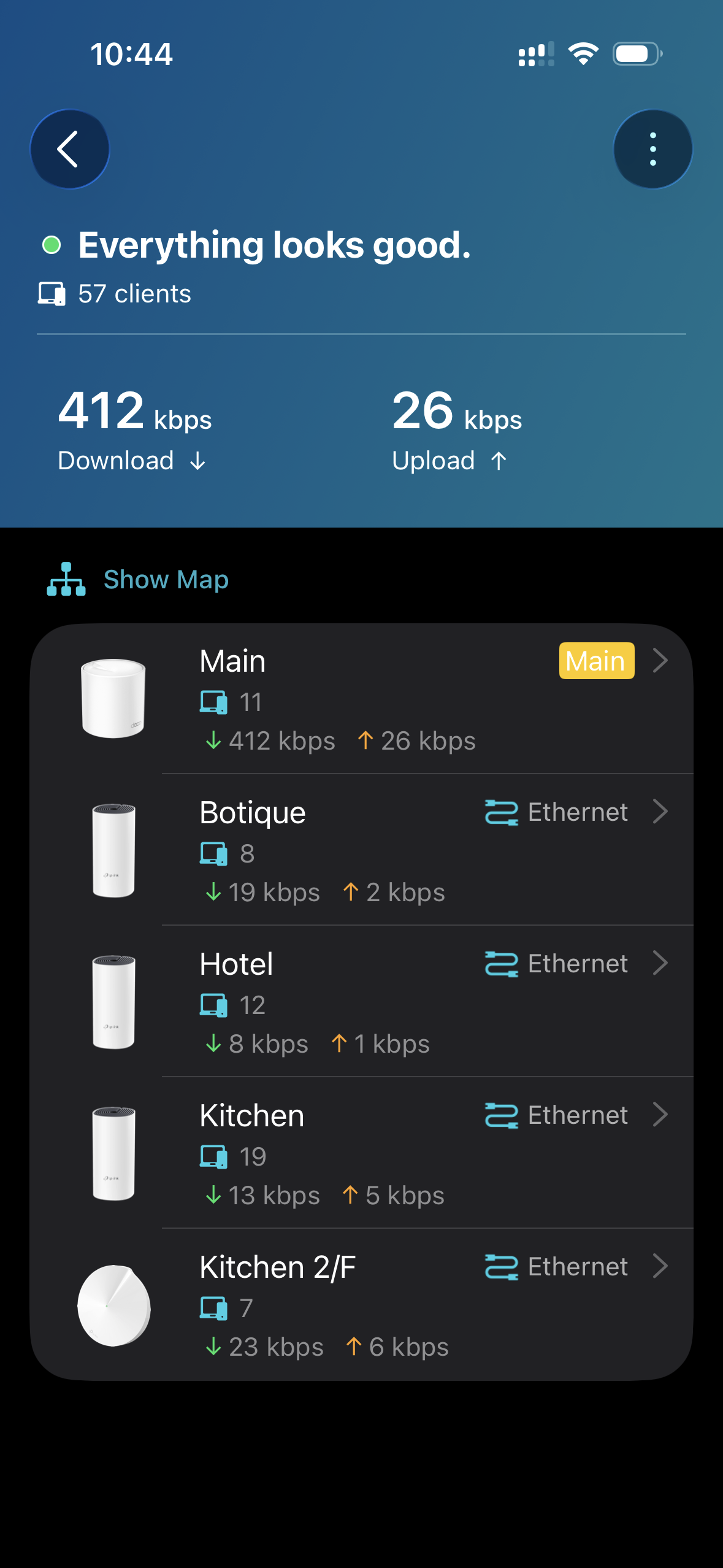
1. Please go to the Deco app > Network tab > tap a Deco, and send us the screenshots of the Show Map and Show List pages.
If you have a switch between the Deco nodes, please send us its model number and describe how you connect it to the Deco nodes.
2. Please provide the firmware and hardware versions of your Deco M4R and Deco M5. Then go to the Deco app > App Settings > About page to check the Deco app version.
3. Whether all client devices' Specified Connection Settings reset after the main Deco X60 reboots? Would you please find a client device and send us the screenshot of the Specified Connection Settings page before and after the X60 reboots? Please also confirm which Deco and Wi-Fi band the device connects to.
Best Regards
- Copy Link
- Report Inappropriate Content
1.

1.
Switch is a tplink 8-port TL-SG1008D. it is connected to the main node (x60).
the satellites (m4r's & m5), is connected to the switch via lan cables.
2.
3x deco m4r's
us ver 2.0
fw 1.8.2 20251027 rel.36869
1x deco m5
us ver 3.0
fw 1.9.4 20260312 rel.17129
app version 3.10.417
3.
Yes, all client devices' Specified Connection Settings reset after the main Deco X60 reboots.
this one is connected to kitchen (m4r) @ 2.4ghz
before reboot:
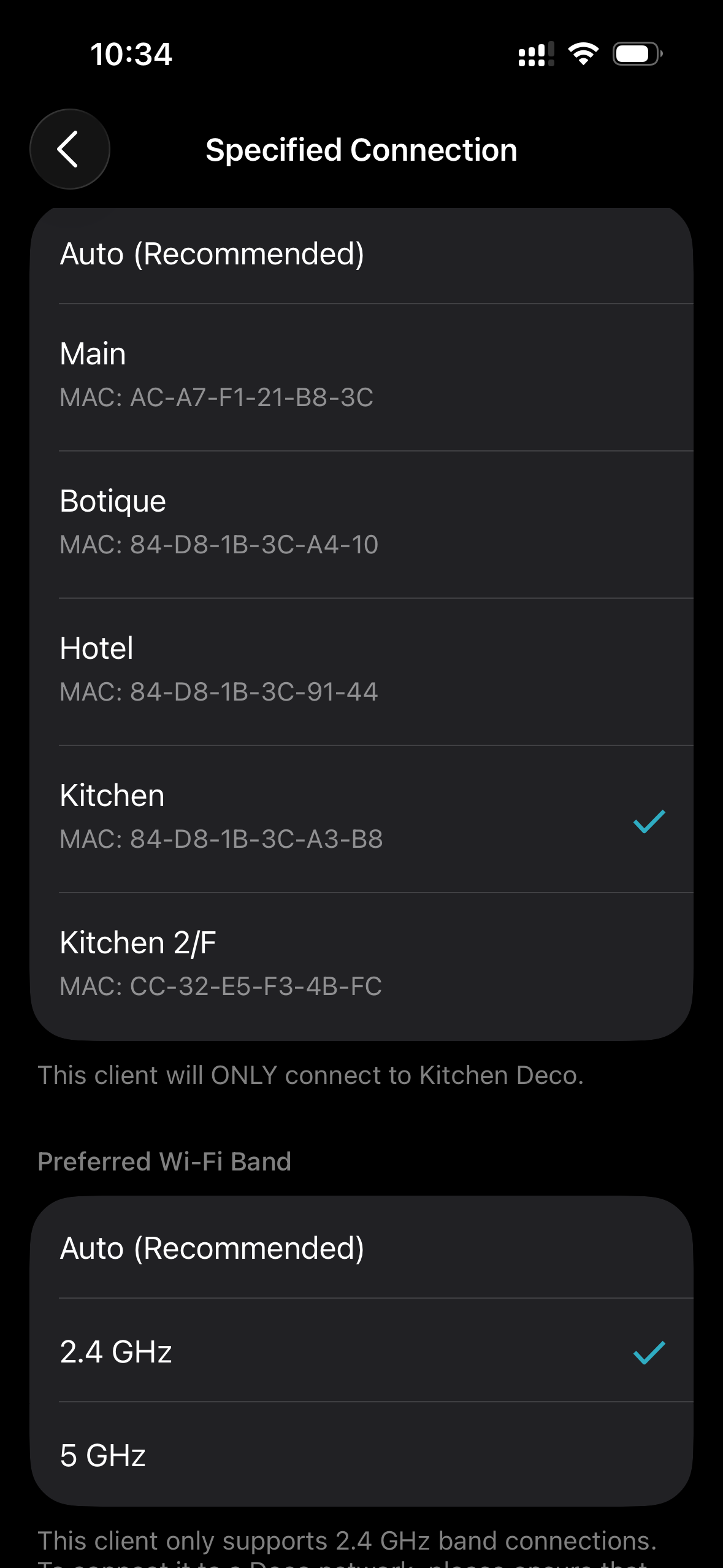
after reboot:

- Copy Link
- Report Inappropriate Content
Hi,
Please click here to download the new firmware for the Deco X60 V4, update it via the Deco's web UI, and then check if it resolves the reported phenomenon.
How to Update TP-Link Deco Firmware
If not, please refer to the instructions below to send us the Deco app log for further analysis, and let us know if you have sent the log file.
How to Get and Send Deco App Log to TP-Link Support
Best Regards
- Copy Link
- Report Inappropriate Content
I have updated my Deco X60 V4.20 to the firmware version you provided. Unfortunately, the issue still persists. The "Specified Connection Settings" are still reset after the Deco reboots.
As requested, I have already sent the Deco app log files for further analysis.
- Copy Link
- Report Inappropriate Content
Hi,
I have escalated your case to our tech team, and they will contact you via email to assist you further. Please wait patiently.
Best Regards
- Copy Link
- Report Inappropriate Content
Information
Helpful: 1
Views: 211
Replies: 5
Voters 1
