
WiFi Calling Summary always empty

I have an EAP773 and an EAP725-Wall all running production release firmware.
I went through my DNS log and used all the the name to add the WiFi Calling Profile.
I have tested that WiFi Calling works, by turning on Airplane mode and then enable WiFi. Making calls works.
But the summary is always empty. Not sure if it's the controller's issue or EAP issue. Aso tested SIP ALG on or off with the combination of IPSec ALG on and off. Nothing seems to matter.
- Copy Link
- Subscribe
- Bookmark
- Report Inappropriate Content

@mbze430 Follow this guide WiFi Calling Setup first and make sure that you can see „{Your Carrier} Wi-Fi” status on your mobile phone, otherwise your calls go through regular network. Then, to capture calls history, you need to create WiFi Calling Profile in which you provide your carrier(s) ePDG URLs that can be found at your country regulator authority website or some 3rd party websites like MCC-MNC Database. Be also aware that call statistics are not real-time and short calls (let's say under 1 minute) may not be captured in the history at all.
- Copy Link
- Report Inappropriate Content
@KrispPL Yes already done all that. If you read through my post I already said I went through all my DNS log to pull all the MNC URL. it's been like 7 days and no logs.
- Copy Link
- Report Inappropriate Content


Hi @mbze430
Thanks for reaching out to TP-Link Business Forums.
May I know what's the hardware and firmware version of your EAP773 & EAP725-Wall?
Are they now fully adapted to V6.2 controller?
If you reboot your mobile phone, EAPs and the OC, does it make any difference?
- Copy Link
- Report Inappropriate Content
The eap725-wall is on 1.3.3 last reboot was one day ago
The eap773 is on 1.1.5 last reboot was one day ago
I am using sdn Linux controller 6.2 which I just installed about 6 days ago. Been hesitant but did it anyway. Since you guys never been great with the software side
- Copy Link
- Report Inappropriate Content

I did some testing, it could also be the phone provider that doesn't support it, I have two subscriptions from two different ones with dual sim, one worked with wifi calling but the other didn't.
so check with your phone provider if they support ePDG
- Copy Link
- Report Inappropriate Content
I am in the US. Literally their "how to" faq gives ATT and Tmobile samples of the edpg hostname. Which are the two carriers we tested on. Again, searching the DNS log the phones do a name resolution to the exact edpg name lookup their 'how to' guide as well. We know wifi calling works because in our test we turn off cellular via airplane mode and only enable wifi I am not sure how many time I need to repeat myself to make a point
- Copy Link
- Report Inappropriate Content
- Copy Link
- Report Inappropriate Content
@mbze430 So, maybe you could check out your Linux logs agains Monogo DB issues or firewall.
- Copy Link
- Report Inappropriate Content
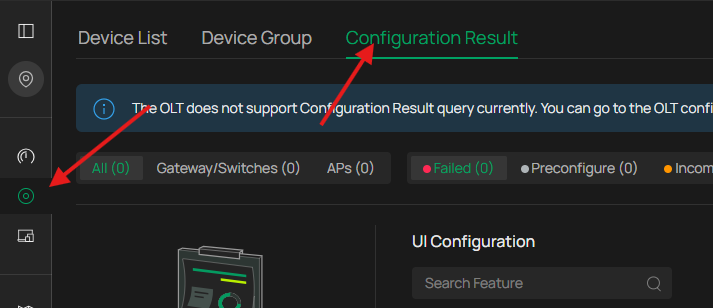
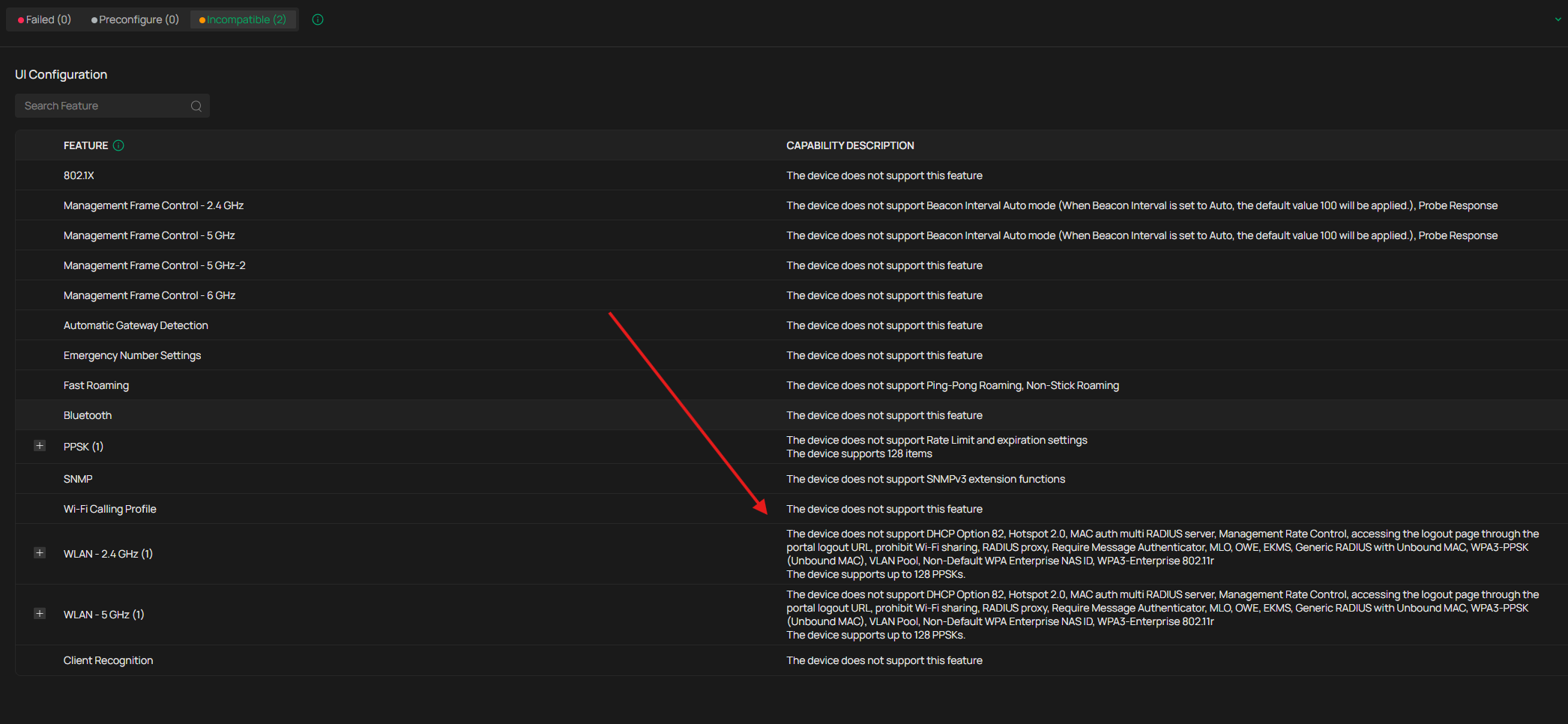
Turns out the EAP773 =
| Wi-Fi Calling Profile |
The device does not support this feature |
However, the EAP725-Wall DOES support WiFi Calling.
Not sure why TPLink products are so fragmented. *smh* 
I will create a new SSID to test on the EAP725-Wall.
My REAL concern is making sure the wifi calling packets are tagged EF (DSCP 46) (or whatever TPlink decide to tag them).
@Gabriel-TP
Is the EAP773 going to support Wifi calling profiles or "the hardware doesn't support it"?
Can you tell us exactly what it is doing? It looks like it's marking EF when set to Voice egress out of the AP. However, inbound UDP/4500 are all marked 0, will it track return packet? Does it do a rewrite the packets with EF?
- Copy Link
- Report Inappropriate Content
Information
Helpful: 0
Views: 253
Replies: 9
Voters 0
No one has voted for it yet.