Minecraft Java Port forwarding help
 This thread has been locked for further replies. You can start a new thread to share your ideas or ask questions.
Description of Problem:
Hello, I've been trying to port forward for my Minecraft server. I followed the Open Ports for Minecraft Server on Routers guide and got to the very end. I'm a bit confused by "Note: Be sure the WAN IP on the router is a public one, otherwise, you will need to open the corresponding port on the modem in front of the TP-Link router."
Going into my settings, I see the WAN IP is a private one. What do I need to do to "open the corresponding port on the modem in front of the TP-Link router?"
Extra Information:
The server works on "localhost" when I try to connect on the device it's being hosted from
The server works on other devices connected locally to the same network
The router has been power cycled
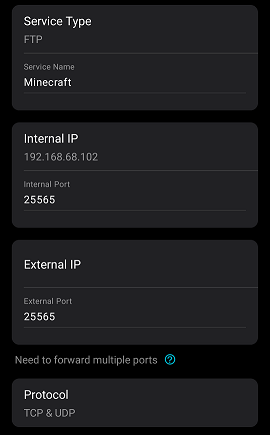
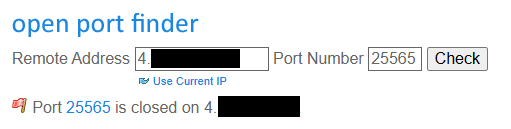
I have verified that the port is closed through a port checker and my friend attempting to connect to the server