
Archer BE550 Pro - Random Reboots / Instability Due to MLO
Archer BE550 Pro - Random Reboots / Instability Due to MLO

I wanted to make this post here to help anyone else out with the BE550 Pro router. YMMV, of course, but this worked for me.
TLDR; If experiencing random reboots/instability with this router, disable MLO. It's been completely stable for me ever since.
I was frustrated with this router frequently dropping internet, causing all my SSIDs to drop for several minutes at a time. I had to either wait for it to recover on its own, or forcibly reboot the router to get it to recover.
This was completely unacceptable, especially while working from home. After many hours of troubleshooting, I discovered that MLO was the culprit of the problem.
My current theory is that the MLO software on this router is still buggy, as this variant of router hasn’t received a firmware update since December 2024.
PS. Not to mention, MLO is essentially without any real benefits right now for everyday client devices.
- Copy Link
- Subscribe
- Bookmark
- Report Inappropriate Content

@linkuser8282 LInksys is pushing this MLO feature with its new 7G routers just as if it's not a failure.
- Copy Link
- Report Inappropriate Content

For logging, suggest you copy the link of this forum topics, and request TPLink to give u a firmware with USB Logging feature. So they can investigate. I did agree that when we using MLO, it should be 3 band work together.
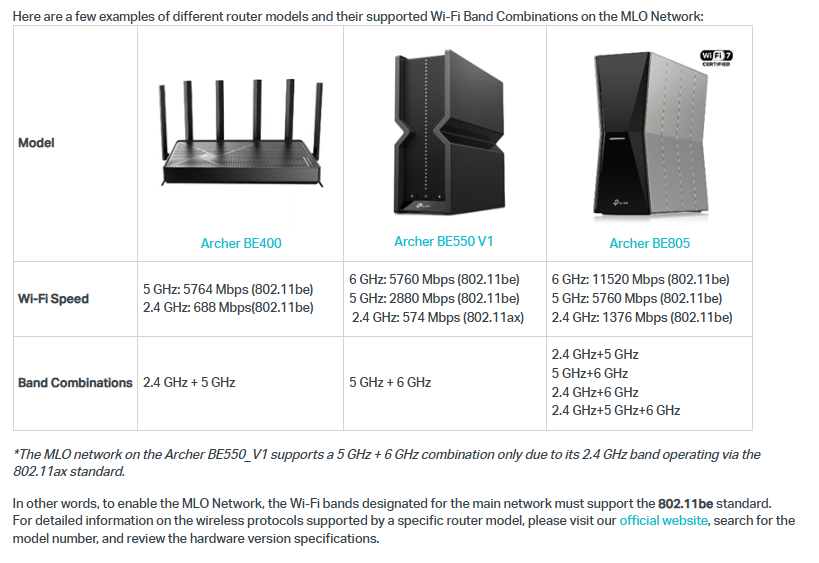
Kindly refer to Making the Most of the MLO Network Feature on a Wi-Fi 7 Router - Home Network Community
Thats the reason I thinks to opt out from tplink product. It like a backstab to their first batch customer who purchase BE550 V1 and the 2.4GHz is only support until WiFi 6

but BE550 V2 2.4GHz is support until WiFi7.

- Copy Link
- Report Inappropriate Content
Information
Helpful: 3
Views: 3423
Replies: 12
Voters 1