
Initial setup

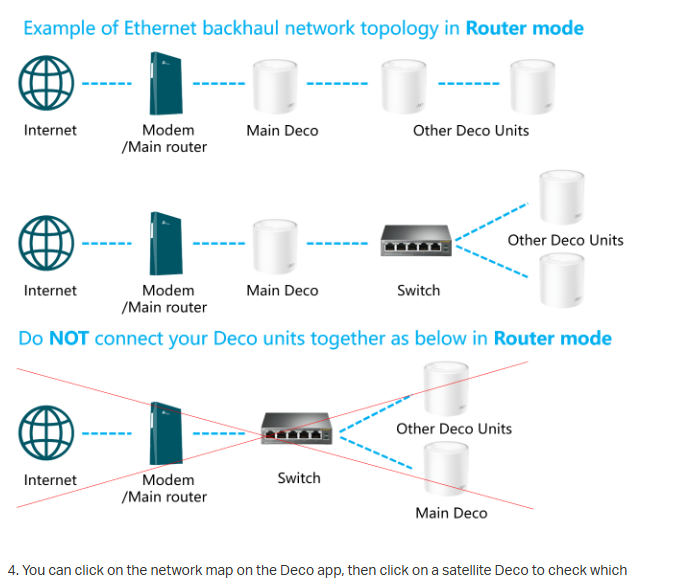
Three questions. Does Is each ethernet cable have to be plugged into a source or just the one that you connect to a modem. Can you connect the ethernet cable to the router instead of the modem. Can one of the mesh system canister ethernet cables be connected to the ethernet port in the television.
- Copy Link
- Subscribe
- Bookmark
- Report Inappropriate Content


jcagame2026 wrote
Three questions. Does Is each ethernet cable have to be plugged into a source or just the one that you connect to a modem. Can you connect the ethernet cable to the router instead of the modem. Can one of the mesh system canister ethernet cables be connected to the ethernet port in the television.
Not much to go on here as you've not specified what Deco you have?
I will assume you are confused by the numbers of Ethernet ports on a Deco?
One, usually on the bottom is the 'WAN' port. That receives the Ethernet cable from the Modem, which has the ISP's Internet output connected to it. This may NOT be true for all Deco's though? I have 2 here, and the back ports are different in count, and even the labeling.
You'd be best off reading the documentation for your Deco, or going to the Support page, https://www.tp-link.com/us/support/download/ and enter model number and then read the documentation there if you do not have it?
I assume that 'canister' means Deco in your post, so then yes, any device that has Ethernet connectivity can be connected to one of the 4 output ports but NOT the port for the cable from the modem.
- Copy Link
- Report Inappropriate Content

- Copy Link
- Report Inappropriate Content
Information
Helpful: 0
Views: 223
Replies: 2
Voters 0
No one has voted for it yet.