
Mesh Product recommendation for specific scenario
Mesh Product recommendation for specific scenario

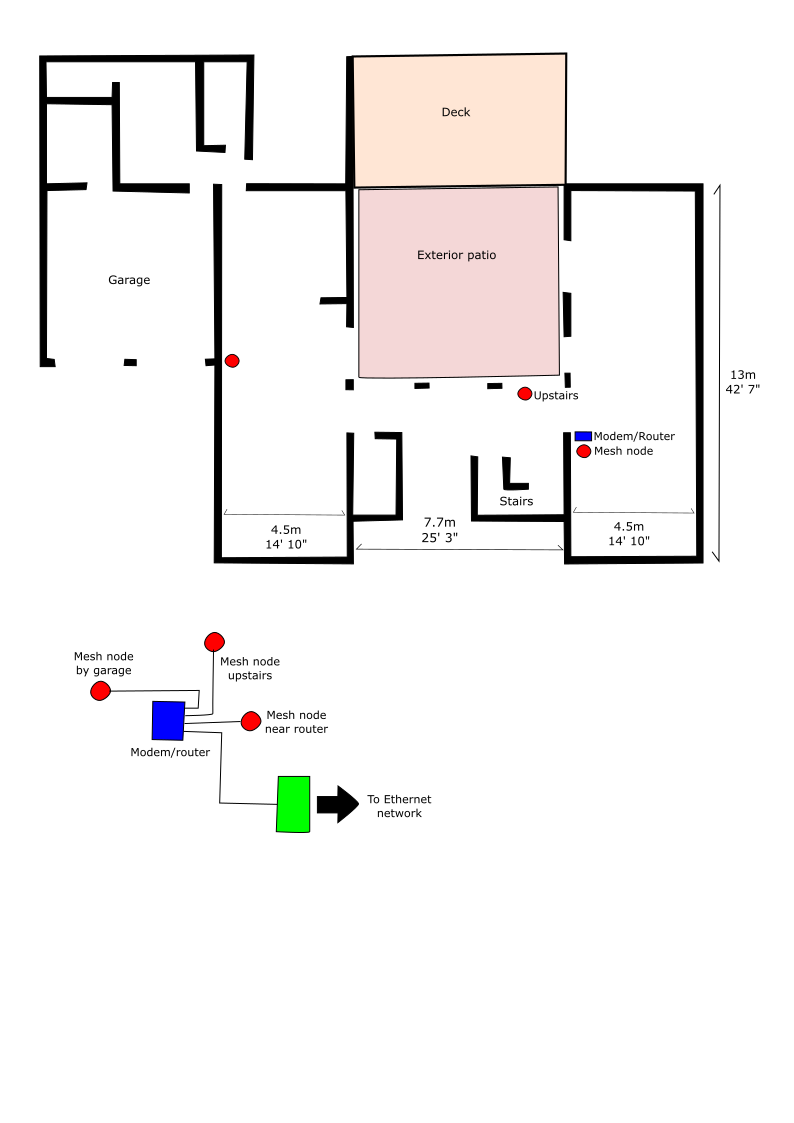
Hello, I am currently looking for a Wifi 6 mesh system and have identified various TP-Link products. I would like some orientation as to which one best could fit my needs. I have included a rough sketch of the construction.
The only note of this construction is that the walls are made of brick and supported by concrete columns and beams with rebar.
The overall area to be covered is 4,100 square feet
I am looking for a Wifi 6 solution, maybe 6E if not cost prohibited
I will be using Cat 6 cable
Is the layout illustrated in the image adequate? I am open to better options.
Will the one mesh node upstairs be enough to cover this area?
Do the nodes need to be connected directly to the router? I ask this because if none of the mesh nodes need to be connected directly, then I have some flexibility to the mesh node placement. For example, I can move the mesh node near the router to the opposite wall.
Is the Ethernet backhaul, as shown in the image, correct?
Which TP-Link product is recommended for this scenario?
I appreciate any feedback/orientation. Thanks!
- Copy Link
- Subscribe
- Bookmark
- Report Inappropriate Content

Remember you can keep the router IF you have it in bridge mode and the WiFi is turned off.
As for the IoT network it's turned off by default. You can use the IoT network on your deco no matter what mode you have it set to. Once you turn on the IoT network your are creating a new SSID for your smart home devices.
So what you can do is call your ISP - Have them set the modem/router you have to bridge mode making sure WiFi is also off. Set up your decos as routers. Create the first network with a different SSID and password than what you use now. At this point none of your devices will connect because you made a new SSID and Password
Now enable the IoT network - Now when you make this network use the same SSID and Password you used to use one all your devices - Now everything with connect to the IoT network
You don't have to use the IoT network but it's nice if you have lots of smart home devices
- Copy Link
- Report Inappropriate Content
Do you have a set price limit if so can we have it? It will help us design a system for you :)
- Copy Link
- Report Inappropriate Content
@HelpFixDecoApp Thanks. I am hoping to keep it under $300 USD.
- Copy Link
- Report Inappropriate Content
Ok thank you for that. I have three models picked out for you but please keep this in mind. No matter which one you go with one of the mesh units MUST be connected to the Modem via an Ethernet cable. The other two mesh nodes will connect to the 1st one via WiFi
Also it looks like your modem is also a router. So you will want to call your ISP and have them place the router in bridge mode and to diable the built in WiFi of the modem in case placing it in bridge mode doesn't shut off the WiFi broadcast. If you don't you will have to run the deco mesh in AP mode which removes a lot of the options
You can view the three options via the link below they are in order from left to right and all three are WiFi 7 :)
https://www.tp-link.com/us/compare/?typeId=5757&productIds=73573%2C89000%2C91685
The BE63 is a little over your budget of $300 coming in at $360 on amazon but hardware wise and speed it's the best of the three with a range of up to 7600 sq ft
The BE25 is under your budget of $300 coming in at $219.98 on amazon it's not as strong as the BE63 and has a range of up to 6600 sq ft
The BE23 is under your budget of $300 coming in at $179.99 on amazon it's not as strong as the BE63 or BE25 and has a range of up to 6500 sq ft
If you have any other questions please let us know :)
- Copy Link
- Report Inappropriate Content
@HelpFixDecoApp Thanks! I really appreciate these ideas. Given the area that I need to cover, the BE23 looks like it wil do, nicely. I am still thinking - maybe the BE25 is better to have to compensate the brick walls and rebar.
I really don't need Wifi 7, but nice to have in case someday I acquire a device that can take advantage of this technology.
My ISP provides one in all device: modem, router and Wifi; however, my idea is to piece them out so that I have a modem, router and wifi in separate devices, but this will most likely come at a future time. If I do have these three separate devices, how would the connection go? I was visualizing ISO to modem, modem to router and finally router to TP Link DEco device. Is this feasible?
I can try connecting the mesh nodes wirelessly; however, if I can get more speed using an Ethernet back haul, I would like to do this. Again, would this be feasible?
Again, thanks for your help.
- Copy Link
- Report Inappropriate Content
If you want to use the modem and router you have with your deco mesh network you will need to run the decos in AP mode just keep in mind a lot of the built in options of your deco mesh will not work in AP mode.
To see the options you will lose out on running in AP mode see this link. This link goes over how to set up your decos in AP mode if you choose that route.
Your best bet is to stop using the router your using and use the deco's as your router. You can still keep the router and not use your deco in AP mode as long as you shut off WiFi mode on the router and set it to bridge mode. Usually most WiFi broadcast will be disabled once you set the router to bridge mode but not all of them shut off WiFi in this mode some routers have a separate WiFi option to disable.
As for Ethernet backhaul yes you can set them up as long as you have Ethernet in the other two rooms. As for connecting all three you will want to use either option one or option two in the image below.
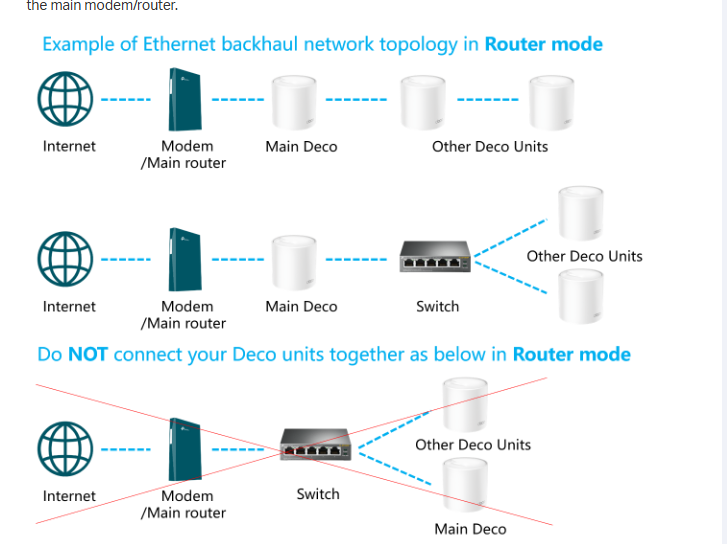
Any other questions please let us know :)
- Copy Link
- Report Inappropriate Content
Interesting. I will definitely keep in mind what you mention about losing functionality. I'll bbe sure to read the lost functionality in the page that you referenced. I now understand that the deco is also a router. I had missed that detail.
With respect to the image that you sent, I would use the second image.
The image identifies the first devices as the modem/main router. Would its router functionality be disabled when I select bridge mode? If I understand there should only be one router, which would the deco. Thanks!
- Copy Link
- Report Inappropriate Content
So my modem is also a router so i called my ISP and told them I wanted to disable WiFi because I was going to use the deco as the WiFi router. So my router is only providing internet to my deco node. So all they had to do was place my router in bridge mode which stops which stops it from broadcasting a WiFi signal.
So routers have a bridge mode setting and a WiFi setting so it's important to shut up both off.
If you have a current WiFi network you can still use it on the deco. Lets say your current SSID is dog and the password is bananas. When you make your new deco network just use the same SSID and password you used for your old WiFi and everything will connect :)
- Copy Link
- Report Inappropriate Content
Thanks! Sorry for the delay in responding. I was away from the computer.
Thank you for the extensive explanation. I understand everything. I need to decide whether I want the Deco connected directly tot he modem and take advantgae of all its capabilities, or use the router that I have and live with the loss of the Deco's features.
I read the information on the page that lists the features that are lost if I use the Deco as an AP. Something that caught my eyes was the mention IoT. I assume that these devices also use WiFi, but not sure how they fit into the scheme of the Deco.
- Copy Link
- Report Inappropriate Content
Remember you can keep the router IF you have it in bridge mode and the WiFi is turned off.
As for the IoT network it's turned off by default. You can use the IoT network on your deco no matter what mode you have it set to. Once you turn on the IoT network your are creating a new SSID for your smart home devices.
So what you can do is call your ISP - Have them set the modem/router you have to bridge mode making sure WiFi is also off. Set up your decos as routers. Create the first network with a different SSID and password than what you use now. At this point none of your devices will connect because you made a new SSID and Password
Now enable the IoT network - Now when you make this network use the same SSID and Password you used to use one all your devices - Now everything with connect to the IoT network
You don't have to use the IoT network but it's nice if you have lots of smart home devices
- Copy Link
- Report Inappropriate Content
@HelpFixDecoApp Thanks again. What is the advantage of having the router in bridge mode? I would think that it would be better to connect the Deco directly to the modem and forget about the router. Am I missing something? Thanks again, and again apologies for the delay.
- Copy Link
- Report Inappropriate Content
Information
Helpful: 0
Views: 884
Replies: 11
Voters 0
No one has voted for it yet.