
Deco App Settings for IPv6 with Spectrum Internet

Has anyone, with Spectrum as their ISP, successfully set a Deco x20 Mesh system up for Dual Stack IPv4/IPv6? If so what IPv6 settings should be selected?
My Deco default settings are for IPv4 only.
I looked into setting up IPv6 and couldn't get any assistance from Spectrum tech support. They refuse to give you any IPv6 settings for use on 3rd party routers.
I asked google what settings to use for IPv6 on Spectrum and this is what was suggested:
Connection Type: Dyanmic
Get IPv6 Address: Auto
Prefix Delegation: Enabled
DNS Address: Auto
Assigned Type: DHCPv6 first or SLAAC+ Stateless DHCP second choice.
Then, for the settings to take effect, both the Deco router and Spectrum Modem need a reboot.
There was also mention of Spectrum using prefix sizes of /64 or /60 or /56; preferably /60 or /56, but I have no idea where in the Deco app those are.
I have been misled by google in the past, so I'm hoping to find out what works for anyone that has actually done it.
My network works to my satisfaction as currently configured to IPv4, should I leave well enough alone, or is there something to be gained with IPv6?
Thanks for any advice.
- Copy Link
- Subscribe
- Bookmark
- Report Inappropriate Content

@IrvSp Have you logged into the web GUI? I think there it shows whether the Deco gets an IPv6 address or not...
http://192.168.68.1
Check if it does or doesn't....
- Copy Link
- Report Inappropriate Content


You can't do much of anything on the BE68's GUI.
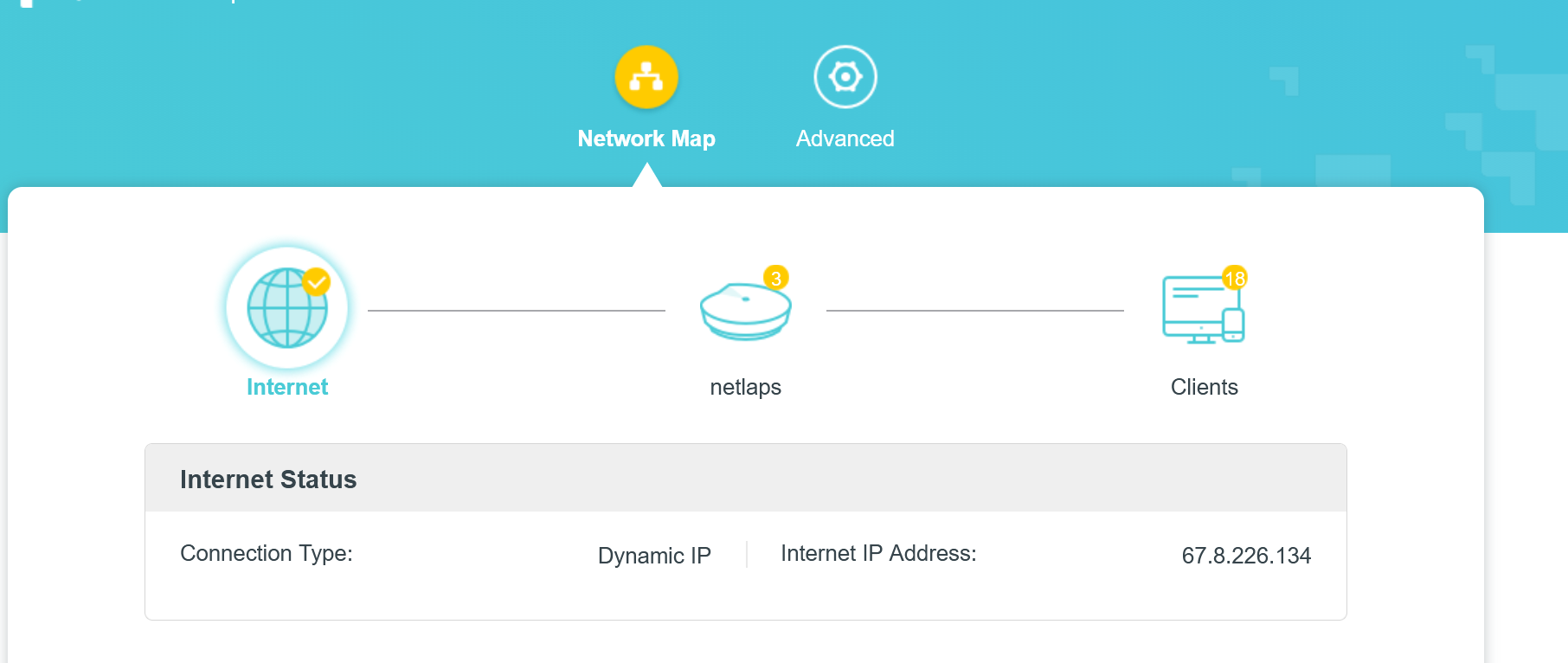
The above is the Internet page, below is the main page:
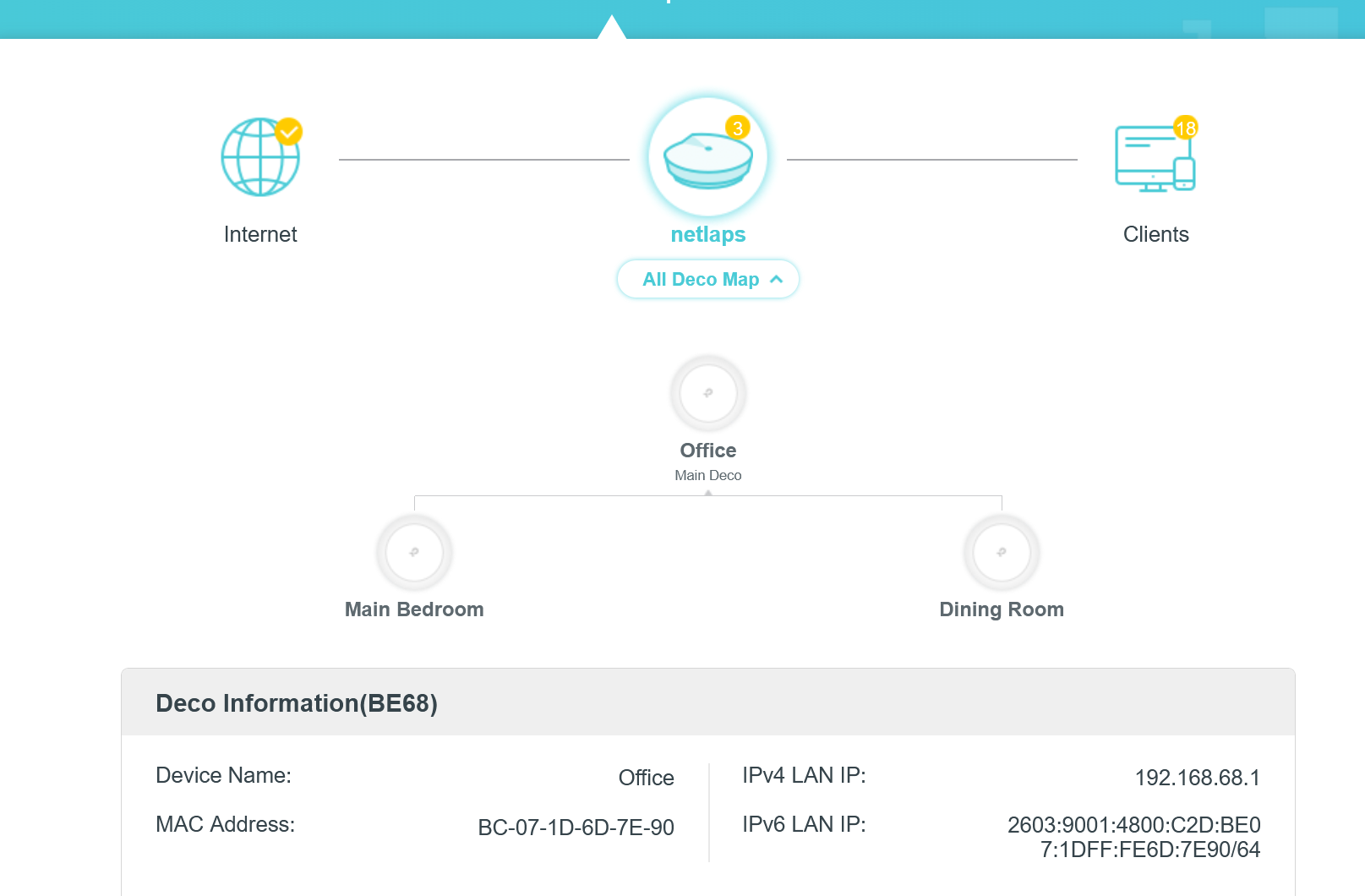
Now since the IPv4 is an internal address, I assume the IPv6 that starts with2603 is ALSO internal, not External IP Address of the Router.
Web GUI basically shows me the above data and can be used to install new F/W or Reboot the Deco's, not much else in terms of settings or even 'deep' info, have to use the iOS Deco App for almost everything.
You must have a Smart Phone to install and use this Deco, and the BE65 was the same way,
- Copy Link
- Report Inappropriate Content
@IrvSp Hmmm. I think I'm going to have to get off my lazy butt and try to set up my BE95 as router. There is a setting on the GUI that is not anywhere on the Deco App... There should be a place there where you can see WAN IP info? (It has been a while and my memory is not very good)... I might have to do this Monday or Tuesday as our son is in Southern California for the weekend and we expect to see him tonight....
- Copy Link
- Report Inappropriate Content
- Copy Link
- Report Inappropriate Content
For now I simply set up the Deco as Router Mode behind a GT-BE19000Ai router, and the IPv6 site fails with a 0/10....
May have to set it up directly connected to the BGW320-500 Gateway....
- Copy Link
- Report Inappropriate Content
jzchen wrote
@IrvSp Hmmm. I think I'm going to have to get off my lazy butt and try to set up my BE95 as router. There is a setting on the GUI that is not anywhere on the Deco App... There should be a place there where you can see WAN IP info? (It has been a while and my memory is not very good)... I might have to do this Monday or Tuesday as our son is in Southern California for the weekend and we expect to see him tonight....
There is a page to see the Internet connection data, but it is not changeable.
Default taken seems to be what the Deco discovered when it connected to Spectrum, and from what I can see/Google, it seems correct.
I believe the problem is the DUAL STACK DNS....IPv4 first, and if it can't connect, then IPv6 is tried. So a PURE IPv6 website would then connect. Many of those though aslo work with IPv6,
- Copy Link
- Report Inappropriate Content

Can you give me a list of options you would like added to the deco app? I will pester US support and see if I cant get them added for you :)
- Copy Link
- Report Inappropriate Content
I posted this in the APP forum almost a year ago, https://community.tp-link.com/us/home/forum/topic/814694?moduleId=2420 and in addition, I have an ANNOYING problem when using WiFi7 MLO.
See, for our PC's, I set the Deco App to notify me when our PC's connect or disconnect. With MLO being used I get 2 notices for a connect. Use the 6Ghz band I'll get only one.
Yes, the app needs work and I have not only posted there, emailed the same to TP-Link people, but go ahead, give it your best shot.
I also use TESTDRIVE to get the latest versions.
- Copy Link
- Report Inappropriate Content
- Copy Link
- Report Inappropriate Content
@Jamval I was about to give up, but tried a few more things. In the Deco app I used the SLAAC+Stateless DHCP setting, then rebooted Modem and router in the proper order, Modem first. https://test-ipv6.com still resulted in "no ipv6 address detected" from my Win 11 PC. Just for the heck of it I checked my Win 11 PC wifi adapter settings. IPv6 was not enabled. I enabled IPv6, flushed DNS cache and rebooted the PC. Now test-ipv6.com does detect my IPv6 address, but on the last test it says DNS server, possibly my ISP does not have access or is not configured properly to access IPv6 internet. The test results page has a Tab "Other IPv6" sites and I can connect to all of them. What does that mean?
- Copy Link
- Report Inappropriate Content
Information
Helpful: 1
Views: 5078
Replies: 38
Voters 0
No one has voted for it yet.