Official Welcome to the Tapo Robot Vacuum Forum - Get Started Here!


Welcome to the Official Forum for Tapo Robot Vacuums!
Find Links to our Latest Getting Started Guides, Tips for getting the most out of Your Vacuum, and Answers to Any Questions You May Have!
Getting Started with Your Robot Vacuum
See What Our Team Recommends When Getting Started
Comparing Robot Vacuums
Get Help Choosing the Best Vacuum for Your Home
Customizing Your Home’s Map
Setting Cleaning Directions, Carpets, Suction Levels and More!
Automate Your Robot Vacuum and Mop
Smart Actions and Geofencing for an Always-Clean Home
Clean with Your Voice
Starting Cleaning Routines for Amazon Alexa, Samsung SmartThings, and Google Home
What's New?
Since our very first vacuums were released, our teams have completely redesigned the interface and drastically improved the performance of our devices – with each generation of vacuum providing significant advantages over the earlier.
(Check Out our Comparison of All Tapo’s Robot Vacuums and Mops Here: Comparing Robot Vacuums from Tapo)
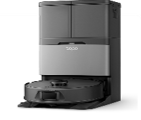 Tapo RV50 Pro Omni
The RV50 Pro Omni is our most powerful vacuum/mop, with an even more powerful dock. The RV50 was designed to tackle common robot vacuum frustrations, including automatic hair cutting, self-cleaning mop heads, pet zones, water storage/maintenance, and intelligent obstacle avoidance. It also brings an entirely new and improved interface with more thorough options for customizing your map and device's cleaning ability
Introducing the Tapo RV50 Pro Omni - The Vacuum that Can Handle it All! - Smart Home Community
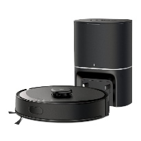 RV30Max Series: The Tapo RV30 Max and RV30 Max Plus are our latest releases, featuring new 3D Real-Time Whole-Home Mapping and Improved Navigation to achieve the most accurate map and path of any of our robot vacuums.
You may also see an RV30Max Turbo, which is a vacuum-only model of the RV30 series.
See the RV30Max and RV30Max Plus on our Product Overview Page or Buy Now on Amazon
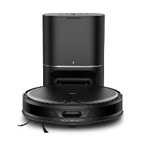 RV20 Series: The Tapo RV20 Series is much the same. However, it does not feature the latest 3D Mapping technology, but it still uses LiDAR for path navigation and obstacle avoidance. If your home is not as complex, not as messy, or you just need an everyday-driver – the RV20 series is still a great option!
See the RV20Max and RV20Max Plus on our Product Overview Page or Buy Now on Amazon


A Few Features You Don't Want to Miss Out On:
Multi-Floor Mapping – While your dock has to remain stationary from clean-to-clean, you are free to take your vacuum to another floor of your home, create a new map, and vacuum that floor as if you didn’t have an auto-empty dock.
If you move your dock, your vacuum will attempt to orient itself with the new positioning; however, it will create a new map if it cannot determine the location of your dock on the map. It is recommended not to move the dock once mapped.
Advanced Cleaning Settings—Choose the direction your vacuum should clean your floor, whether it should clean, avoid, or even mop your carpets and Rugs, and Set Virtual Walls and No-Go Zones, Customize Rooms, and More!
Carpet Boost - All Tapo Vacuums offer the ability to increase the suction power whenever a capet or rug is being cleaned. For the RV50, this can happen as the vacuum detects different surfaces, or it can be configured to automatically occur with mapped carpets, similar to the RV20 and 30 Series.

Related Articles
Welcome and General Tips for the Latest Robot Vacuums
Getting Started with Your Robot Vacuum – See What Our Team Recommends When Getting Started
Comparing Robot Vacuums and Mops from Tapo (RV20Max Plus, RV30Max Plus, RV50 Pro Omni)
Customizing Your Home’s Map – Setting Cleaning Directions, Carpets, Suction Levels and More!
Clean with Your Voice – Starting Cleaning Routines for Amazon Alexa, Samsung SmartThings, and Google Home
Automate Your Robot Vacuum and Mop – Smart Actions and Geofencing for an Always-Clean Home
What Should I Do If I Need to Move My Dock After Mapping My Home?
Introducing the Tapo RV50 Pro Omni - The Vacuum that Can Handle it All!
Don't Know Where to Get Started?
Welcome and General Tips for the Latest Robot Vacuums
Contact Support or Join our Official Subreddits: r/tapo, r/tplink, r/omada_networks