Smear WiFi Plug not showing in app

Smear WiFi Plug not showing in app

Smear WiFi Plug not showing in app
2025-10-16 17:30:39
Model: EP25P4  
Hardware Version:
Firmware Version:

I bought a box of 4 Kasa Smart Wi-fi Plug Slim. I've used them before with no issue. I've tried to install 2, and there's an error message they are not added to my Home. They show up in the Apple Home app, but not the Kasa app.  I want to program on and off times, but I can't do that from the Apple Home app.


any suggestions on getting the Kasa App to see my Kasa smart plugs?

  0      
  0      
#1
Options
1 Reply
Re:Smear WiFi Plug not showing in app
2025-10-30 07:54:41

  @David_HJM 


Are they added to your Home app or not? If the smart plug has been added to the Home app, when you open the Kasa app, the app will discover devices on the same network automatically. 


Make sure your phone is on the same WiFi as the smart plug, disable VPN if any. And make sure to enable the Local Network permission for the Kasa app.


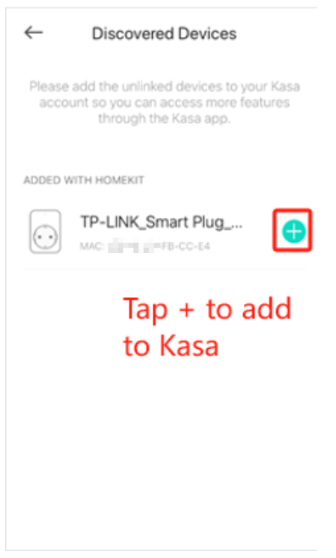
Normally you will receive a pop-up window when you open the Kasa app if the app discovers new devices. If you don't see that, add it manually: open Kasa app, click the + icon in the upper right corner, click Discovered Devices, then add devices to the Kasa app.

CES 2026 Meet TP-Link AI Assistant and More New Products!
  0  
  0  
#2
Options