Connecting Deco units to router

Connecting Deco units to router

Connecting Deco units to router
2 weeks ago
Model: Archer BE9700  
Hardware Version:
Firmware Version:

I want to connect my Deco mesh units (be68) to my router. I have them set in AP mode. I connected my main deco to a LAN on my router and it worked. When I connected the other two decos into other LANs on the back of my router, the router didn't see them, and they would continue to connect to the main deco wirelessly. I finally connected my main deco into the back of the router, and then ran cables from other LAN ports in the back of the main deco unit (instead of the router) to the satellite units to get it to work.
Is there a way to get my router to see all units as equal using the LAN ports on the back of my router, or do I need an unmanaged switch plugged into my router, then plug the decos into the switch?

  0      
  0      
#1
Options
3 Reply
Re:Connecting Deco units to router
a week ago

  @Parttimesleuth 


You should be able to run you Deco in AP mode directly from your router.

The router LAN ports normally are in bridge mode as if they were a LAN ports of an unmanaged switch.

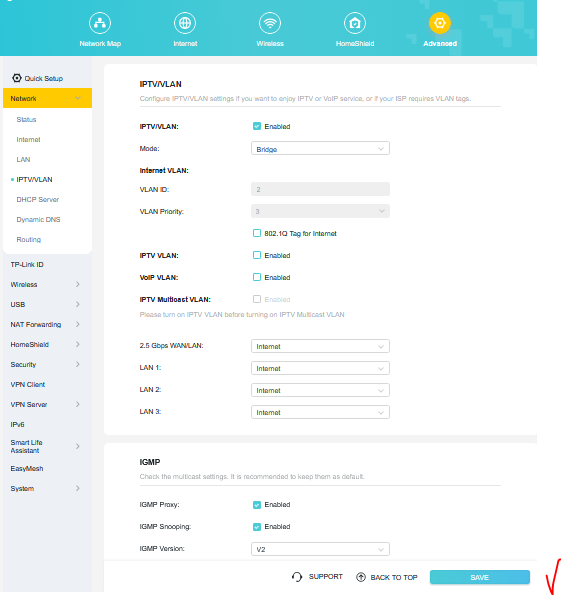
To be sure that this was properly set, check IPTV/VLAN settings:


21b9af21a7364c2cb1de5008a8cacb17


and make sure the LAN ports where the Decos have been connected are set to Internet.

If the issue persists then check your ethernet cables or use another ones.

If this was helpful click on the arrow pointing upward to make it blue. If this solves your issue, click the star to make it blue and mark the post as a "Recommended Solution".
  0  
  0  
#2
Options
Re:Connecting Deco units to router
a week ago

  @terziyski So would this have to be done even thought I am not using IPVT/VLAN and don't have it enabled?

  0  
  0  
#3
Options
Re:Connecting Deco units to router
a week ago - last edited a week ago

  @Parttimesleuth 


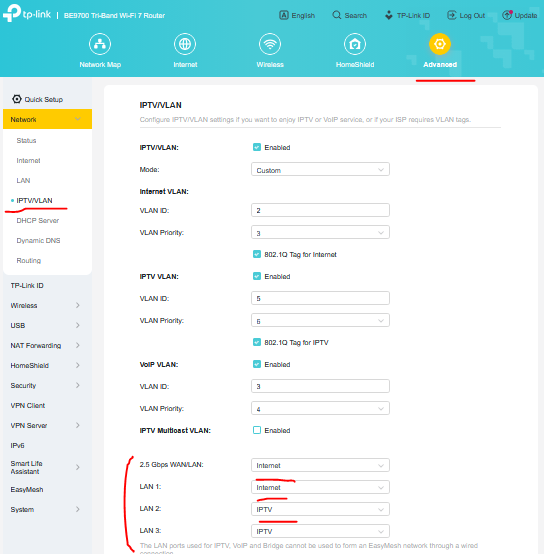
If your IPVT/VLAN setting is not enabled, you should not see these LAN port settings at all - Deco in AP mode should work as if it's connected to a unmanaged switch - details.

For the sake of experiment you could enable IPVT/VLAN setting and set all other other settings like so, then test again:


5bcaac33c7e44e4cb9a828952a5474d4


You may also take a lool at this solution for troubleshooting purposes.

If this was helpful click on the arrow pointing upward to make it blue. If this solves your issue, click the star to make it blue and mark the post as a "Recommended Solution".
  0  
  0  
#4
Options