
IR blaster Mitsubishi mini split AC

Live in U.S. but when I add the mini split remote to my IR blaster on the hub it adds the remote as Celsius and I cannot find a way to change it, there is no setting to change to fahrenheit.
- Copy Link
- Subscribe
- Bookmark
- Report Inappropriate Content


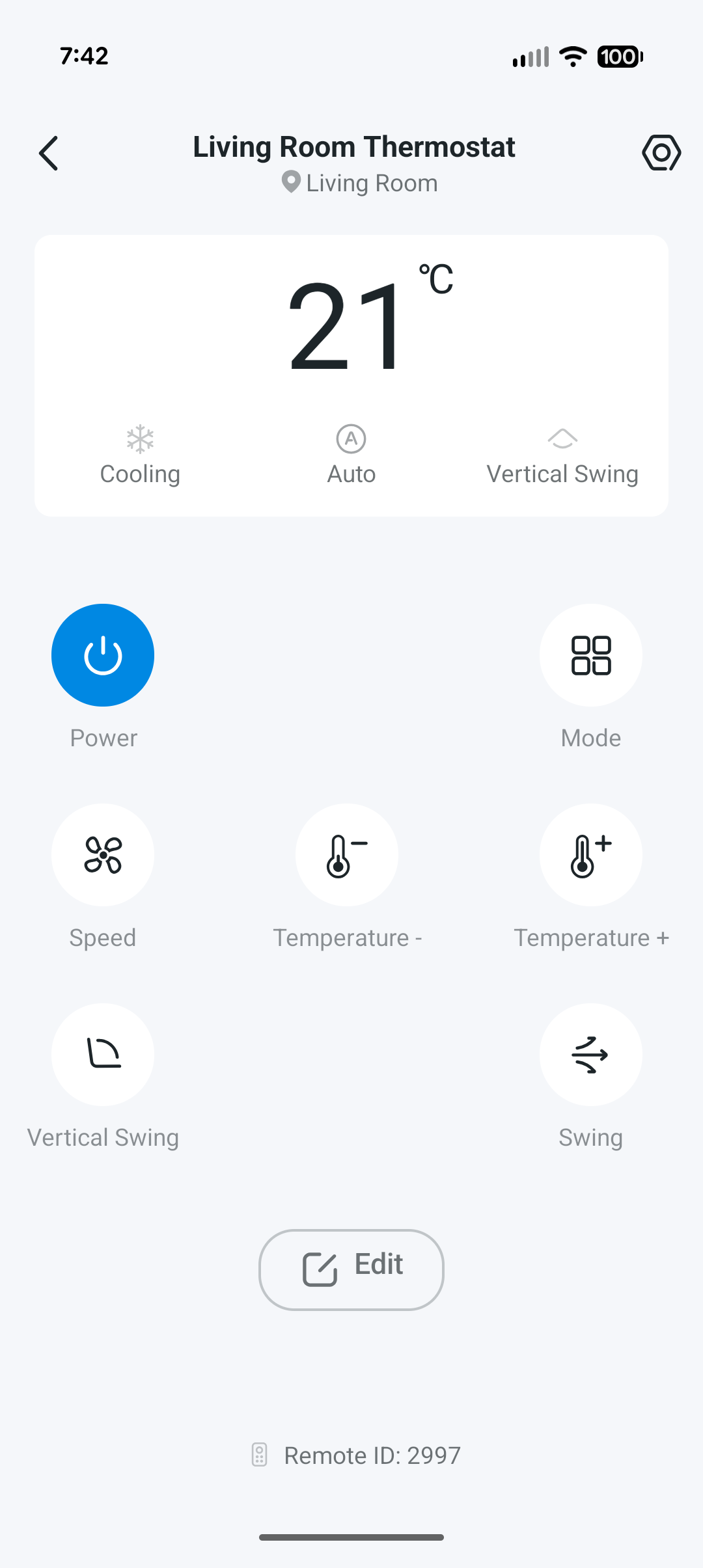
I haven't had a chance to test the AC/temperature controls on my H110 yet. Is it possible for you to provide a screenshot of the controls?
We were able to get this to our development team, and it looks like it is set to be developed and added, but we are unfortunately not able to provide a timeline for when it may occur.
I am curious, though, are you able to control the device through a third-party voice assistant in Fahrenheit? For a short while, with the temperature sensors, there was odd behavior that made it seem like the Google Home <> Tapo connection could perform unit conversions.
Contact Support or Join our Official Subreddits: r/tapo, r/tplink, r/omada_networks
- Copy Link
- Report Inappropriate Content
- Copy Link
- Report Inappropriate Content
Yes, if I tell my Google Home speakers to set the temperature to "75 degrees Fahrenheit," it works! I was going to return mine until I discovered this workaround.
I am using Daikin mini split and the control screen looks the same as Johnathan0256.
- Copy Link
- Report Inappropriate Content
@Itzaroos - Good to hear that there is some sort of workaround for the time being, thanks for checking. I will work with our teams to follow the development of the feature.
Thanks for providing the screenshot!
Contact Support or Join our Official Subreddits: r/tapo, r/tplink, r/omada_networks
- Copy Link
- Report Inappropriate Content

@Riley_S Same problem here, no way to change to Celsius. The AC works well enough, and if I use the existing remote the display on the AC unit reads as Fahrenheit, but as soon as I use the H110 it flips to Celsius. Not a deal breaker, but what an odd thing to overlook during the software development phase. Definitely keeping mine as it meets my needs. Not that it matters at this point, but the AC unit in question is from Gree.
BTW, I had all kinds of problems trying to auto-add the hub using an Iphone with the latest IOS. It failed to add the device via auto-detect. I had to manually add it instead. It added the device, but still failed/crashed/froze the app during the phase of naming it. I closed the app and tried again from the iphone, it found the device as generically named and not assigned to a room, but the apps still failed to let me change this info. I had to switch to an android tablet to finish naming and setting the room.
- Copy Link
- Report Inappropriate Content
Yeah this Google home solution doesn't work for me, I have 3 of these mini split units, and I wanted to set up an IR blaster for each one where I have another tapo sensor reading the current temperature in the home and then when I get above or below certain thresholds I fire the blaster to adjust the different AC units, the problem is the sensors are reading in fahrenheit the way I want them to but then I can't adjust the AC units in real time automatically, I'd have to manually convert to fahrenheit then adjust the way I want since they would be all in Celsius, it's baffling to me that you can't display or interact with them in fahrenheit.
- Copy Link
- Report Inappropriate Content

@Jonathan0256 same issue for me... how do we change it from Celsius to Fahrenheit???
- Copy Link
- Report Inappropriate Content
@JMode877 they told me they wouldn't fix it, so I decided not to buy the additional units to control the system.
- Copy Link
- Report Inappropriate Content

Jonathan0256 wrote
@JMode877 they told me they wouldn't fix it, so I decided not to buy the additional units to control the system.
Just to clarify, this feature has been in our plans all along. May I ask where you heard that we would not support it?
Based on the latest updates I’ve received, the firmware to enable it is making solid progress and is likely to be available in the near future, though i don't have an exact timeline yet.
The good news is that an early-access version of the firmware is currently available for testing. If you’re interested in trying it out, you can email forumsupport.usa@tp-link.com to request access to the beta. @JMode877 @Silly_Goose @Itzaroos
When submitting the request, please include the following information in your email:
Subject: [Forum Escalation][ID 859846] Beta Firmware Request: Temperature Unit Switching Feature for Tapo H110
Forum Nickname: [User Provided]
Thread URL: https://community.tp-link.com/us/smart-home/forum/topic/859846
Product Info (Mac address):[User Provided]
Before the Upgrade
(1) Please be sure you have read the Beta Test Agreement before upgrading the Pre-release firmware!
(2) How to update the firmware of the Tapo devices on the Tapo App
(3) Firmware downgrade is not supported. When a new official version is released, updating it will overwrite the beta version.
- Copy Link
- Report Inappropriate Content
Information
Helpful: 2
Views: 900
Replies: 9
Voters 1
