
Automating Your Smart Lights to Save Power and Frustration


It has been some time since we contributed to the "Automating Your..." series, which is being refreshed in recognition of Earth Day, with a focus on the automations and devices that can help your home use less power.
What Do You Think? Do You Think Your Smart Devices Help Save You Energy?
See What is Possible in our Story Article: Smart Action 2.0 - Unlock Next-Level Smart Home Automation or check out the rest of our Automating Your Home Series Here: Automating Your Home with Tapo and Sub-GHz
 Automatically Turn Lights On/Off When Entering a Room
Automating your home lighting is one of the most effective ways to reduce energy waste and improve convenience, and likely one of the most popular.
While it's easy to find an automation to turn on your devices, it can be extremely difficult to turn the lights off in a timely manner – without leaving you in complete darkness.
Tips to Add Automation Reliability and Reduce Frustrations
Auto-Off as a Failsafe:
If your device supports the onboard auto-off feature, consider using the feature as a reliable failsafe mechanism to prevent lights from being left on for long periods of time, or to keep your lights behaving – even without an internet connection.
FAQ: Setting Away Mode, Schedules, and Auto-Off Features
Add Additional Sensors for Conditions AND Automation Triggers
- Tapo T100 – Motion Sensor for In-Room Triggers and Reduced Frustrations
- Tapo T110 – Contact Sensor for Doors, Drawers, Garage Doors
- Cameras to Improve Coverage and Reliability of Turn ON abilities (no camera conditionals)
Use Secondary Automations to Improve Automation Flexibility
- Ability to Prevent Lights from Turning Off or Automation from Firing, Given Additional Trigger Options
- Add the Ability to Add Conditions Specific to the OFF Sequence of a Light
Create a Separate ‘OFF’ Automation for Increased Control
- Prevent Lights from Turning Off if a Door is Open
- Allows You to Use Triggers Based on 'Motion Not Being Detected for ‘x’ Time' to Turn Lights Off
- Add Delays to the OFF sequence to give extra time in which the automation can turn itself off
Tip: Consider Dimming the Lights at the Start of the Two Minutes for Large Areas. This Will Give You Enough Time to Retrigger One of Your Sensors – without being left in the dark.
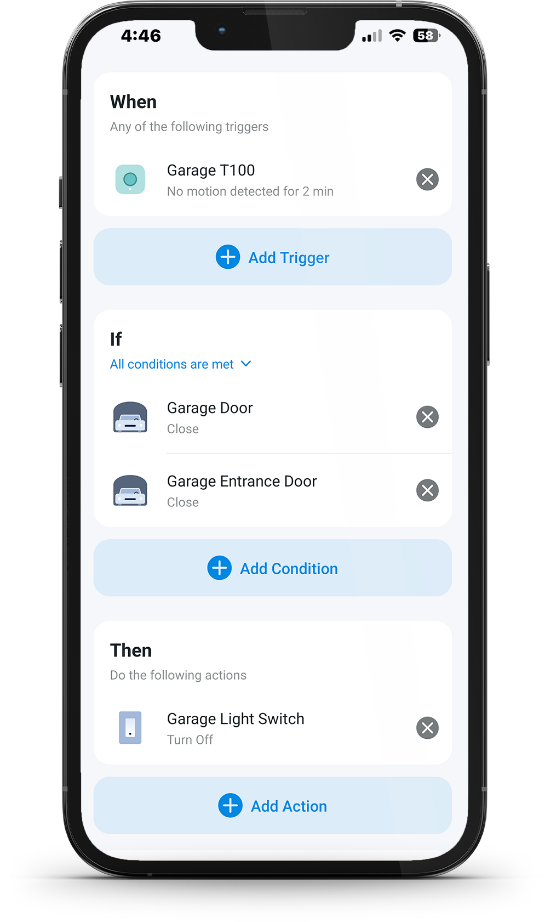
Principle for Creating Supporting Automations “Wasp-in-a-Box”
“Wasp in a Box” is a smart home occupancy concept that treats a room like a sealed box—once motion is detected and the door closes, the system assumes someone is still inside until the door opens again.
Motion sensors stop detecting you when you’re still (showering, working, reading), so lights or fans may turn off even though you’re still in the room.
How the “Wasp in a Box” logic works
- If motion is detected, the “wasp” is in the box
- If the door closes while motion was detected, the system assumes the wasp is trapped inside
- Even if motion stops, the room stays marked occupied
- The room only becomes unoccupied again when the door opens (the wasp can escape)
Using “Wasp-in-a-Box” logic improves smart home automations, making them more accurate and responsive while minimizing false triggers and increasing comfort.
Instead of relying solely on simple triggers, consider combining sensor inputs and context—like motion and door status—to better reflect real-life occupancy.
Learn more about how you can use your smart devices to save power in our story:
Contact Support or Join our Official Subreddits: r/tapo, r/tplink, r/omada_networks