
Securing Your Tapo Account and Devices
- What To Do When Your Camera Behaves Unexpectedly
- How to Stay on Top of Your Device, Network, and Account Security
As our homes and networks become more connected, it becomes even more important to maintain and monitor the security of our devices.
We recommend regularly taking steps to secure your account, such as reviewing your trusted devices or changing your account password.
 Protect Your Account
What Should I Do When My Camera Behaves Unexpectedly or Concerningly?
A majority of account intrusions stem from reused, weak, outdated passwords, data breaches, or phishing attempts.
- Enable Two-Step Authentication (2FA) for Your Tapo and Kasa Apps
- Change Your TP-Link Password
- What if I forget my TP-Link ID password for TP-Link Tapo/Kasa device | FAQ
- Community Link: https://community.tp-link.com/us/forgetpw
- Changing Your TP-Link / Tapo Password will change the password for all TP-Link services that use the account – from Deco to Kasa to Tether.
- Verify Device Sharing Settings: Check whether the device was shared to another TP-Link ID through ‘Device Sharing’
- How to share Tapo/Kasa Smart Devices | FAQ
- Shared Accounts Can Access: Live view, Talk, Voice Call, Pan/Tilt Control, and the SD Card Video Storage Features of the Camera
- Consider resetting the Device to Factory Defaults to remove any Previous Configurations
If you have done all of the above and your camera is still behaving unexpectedly, please get in touch with your local support team for further investigation.
If you receive a "We Noticed a New Login" email or notification, it may indicate that a new device has logged in to your TP-Link account. Here are possible reasons:
- You logged in using a new device with the same TP-Link ID.
- Your TP-Link ID was shared with others (e.g., family or friends), and they logged in from a different device.
Why do I receive a "We Noticed a New Login" email? | TP-Link
 Protect Your Network
How Can I Keep My Network Secure?
Many IoT device vulnerabilities require specific conditions, such as the attacker having access to your home Wi-Fi. To keep your network and device secure, it is important to regularly review your accounts and the devices accessing your network.
-
- Device / Household Sharing Settings
- Trusted 2FA Devices / Logins
- Third-Party Connection Such as Google / Alexa
- Emails from TP-Link Indicating New or Suspicious Login Activity
- Suitable and Secure Network Password
- Learn More About the Requirements of Wireless Passwords and our Teams’ recommendations in our Knowledge Base Article:
Special Characters Not Suitable for Wi-Fi Name and Password | Community KB
- Learn More About the Requirements of Wireless Passwords and our Teams’ recommendations in our Knowledge Base Article:
- Monitor and Remove Access to Any Unknown Devices on Your Network
- Disable ‘Random MAC Addressing’ on your Family’s Phones
- Use a MAC Lookup Tool to Find the Type of Device Listed
- Set up ‘New Device Connection Alerts’ if Your Router Supports It
- Provide a wireless guest network for non-household members
 Protect Your Privacy
How Can I Stay Secure in What I Do At Home?
Get Started with Tapo’s Privacy Mode and Automatic Activation
- Enable Privacy Mode on Indoor Cameras (Prevents Recording)
- Create Privacy Zones on Your Cameras to Block Out Portions of its View
- Create Recording / Detection Schedules for Your Cameras
- Use Cameras with Identifiable / Physical Privacy Modes Indoors (Tapo C225, Tapo C125)
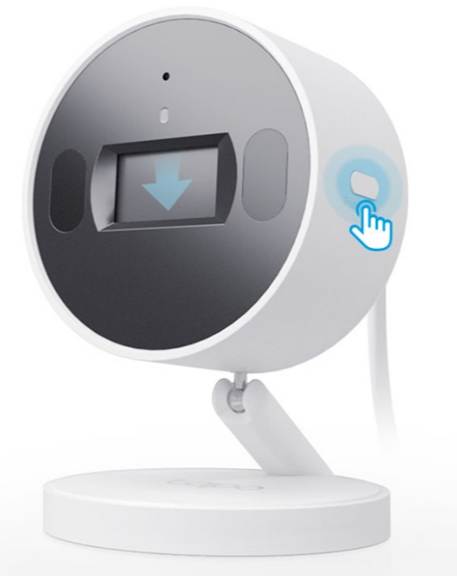
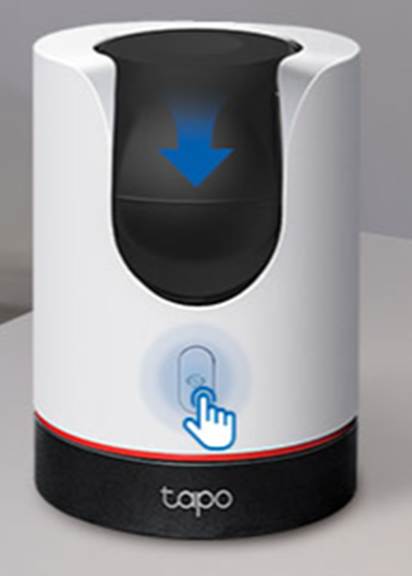
Keep in Mind: Automated Voice Prompts May Occur When Disconnecting from Wi-Fi, an Error in the Camera’s SD Card Occurs, or After Updating.