
Clients Ignoring Speed Limit

Clients Ignoring Speed Limit

Clients Ignoring Speed Limit
19 hours ago
Model: Deco X55  
Hardware Version:
Firmware Version: 1.7.1 Build 25080612 Rel. 70421

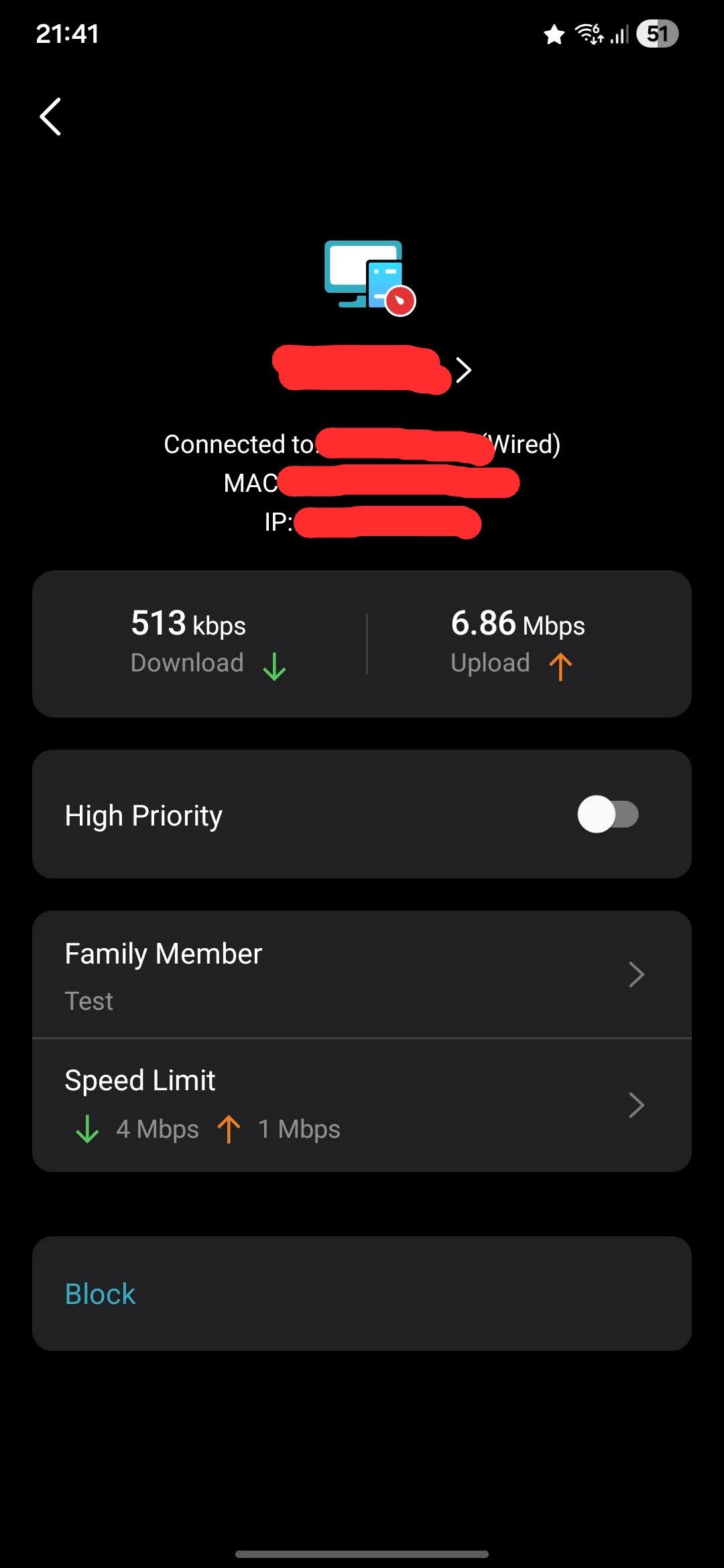
I have an issue whereby clients on the network are ignoring the speed limit rules I have set.


You can see from the picture that thw 1Mbps Upload Limit is just being breezed past. The device in questions is a Windows 11 PC, hardwired to a Deco S4, which then connects to the X50 master Deco. All get rebooted on a weekly schedule, all are on latest official firmware. 


Any advice would be great as I need these limits to work. My only thought was that the PC belongs to my tech savvy Son, so maybe he's found a way of bypassing the limits, or would having the PC on a VPN bypass them?


Any advice would be great!
 

  2      
  2      
#1
Options
2 Reply
Re:Clients Ignoring Speed Limit
15 hours ago

  @NathanF1 Actually your PC is connected through Deco S4 and Deco S4 is not supported Speed Limit function that's why the function is not working properly. You can connect PC directly to Deco X55 if possible or buy a WiFi adapter to connect your PC over WiFi.

Please & Thank You !! ❤️
  0  
  0  
#2
Options
Re:Clients Ignoring Speed Limit
3 hours ago

  @NathanF1 

Hi, were you having similar speed limit issues on other devices?

In case the real-time speed is displayed incorrectly, have you tried to run a speed test on this Windows PC directly?


It is also suggested to install the latest 1.8.0 firmware here:

Deco X50_V1_1.8.0 Significantly Expanded the Client Connection Details and Added Channel Selection


Wait for your reply.

Best regards.

  0  
  0  
#3
Options