
TP-Link Archer AX72 no QOS or prioritize device in AP mode

Hi why isn't this a option and blocked when the router is put in to access point mode , this would be so useful if you could fix this in future firmwares.
- Copy Link
- Subscribe
- Bookmark
- Report Inappropriate Content


Hello @chrisjenkins ,
Yes, most routers do not support QoS features in Access Point mode.
If you cannot see the QoS feature after setting Access Point mode, this is usually normal.
The list below will let you figure out which functions can be supported by Router Mode/ Wireless Access Point Mode:
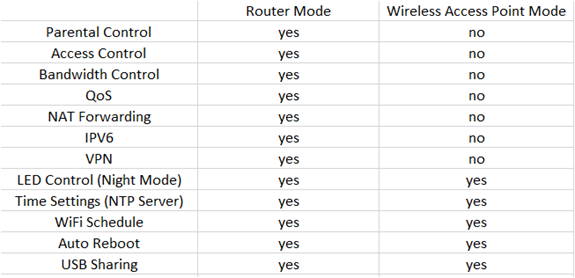
Note: It’s suggested to check the exact functions on the router’s Web UI as functions under AP mode may vary from different TP-Link devices
- Copy Link
- Report Inappropriate Content

In TP-Link Archer AX72, this behavior is actually expected. When the router is switched to Access Point (AP) Mode, several routing-related features such as QoS, bandwidth control, parental controls, and NAT functions are usually disabled. These features typically work only when the device is operating in Router Mode, because traffic management must be handled by the main router in the network.
If you need device prioritization or QoS, you may need to run the AX72 in Router Mode, or configure those settings on the main router/gateway that is managing the internet connection.
It would definitely be useful if future firmware updates could allow limited QoS or device prioritization in AP mode, especially for users who use the AX72 as a secondary access point.
- Copy Link
- Report Inappropriate Content
Hello @chrisjenkins ,
Welcome to our community.
In Access Point mode, some features may no longer be supported. For more details, please refer to What’s the difference between the Access Point Mode and Router Mode on the TP-Link wireless router?
Thanks for your suggestion, and hope you have a nice day~
- Copy Link
- Report Inappropriate Content
@Joseph-TP
Thanks for your response. I’m looking to improve both my wireless coverage and my gaming performance.
At the moment I’m stuck using my Sky router because it’s required for my landline (VoIP). The router itself has very basic features and doesn’t support things like QoS. I’ve disabled the Wi-Fi on it and I’m currently using my AX72 in AP mode instead.
Do you sell a router that can still provide features like QoS while operating in AP mode? I’d prefer not to run it in full router mode because that would create double NAT, which can cause extra latency and connection issues when gaming.
I’ve noticed the delay seems worse when playing FC26, so I’m trying to avoid that setup if possible.
- Copy Link
- Report Inappropriate Content
Hello @chrisjenkins ,
Yes, most routers do not support QoS features in Access Point mode.
If you cannot see the QoS feature after setting Access Point mode, this is usually normal.
The list below will let you figure out which functions can be supported by Router Mode/ Wireless Access Point Mode:
Note: It’s suggested to check the exact functions on the router’s Web UI as functions under AP mode may vary from different TP-Link devices
- Copy Link
- Report Inappropriate Content
In TP-Link Archer AX72, this behavior is actually expected. When the router is switched to Access Point (AP) Mode, several routing-related features such as QoS, bandwidth control, parental controls, and NAT functions are usually disabled. These features typically work only when the device is operating in Router Mode, because traffic management must be handled by the main router in the network.
If you need device prioritization or QoS, you may need to run the AX72 in Router Mode, or configure those settings on the main router/gateway that is managing the internet connection.
It would definitely be useful if future firmware updates could allow limited QoS or device prioritization in AP mode, especially for users who use the AX72 as a secondary access point.
- Copy Link
- Report Inappropriate Content
Information
Helpful: 0
Views: 485
Replies: 4
Voters 0
No one has voted for it yet.