T315 - app not refreshing temperature or humidity.

T315 - app not refreshing temperature or humidity.

T315 - app not refreshing temperature or humidity.
a week ago - last edited a week ago
Model: Tapo T315  
Hardware Version: V1
Firmware Version: 1.8.0 Build 230921

Topography:


T315/T310 > H200 > EAP110-Outdoor > TL-PA7017PKIT > Deco X50 > Internet.


Problem:


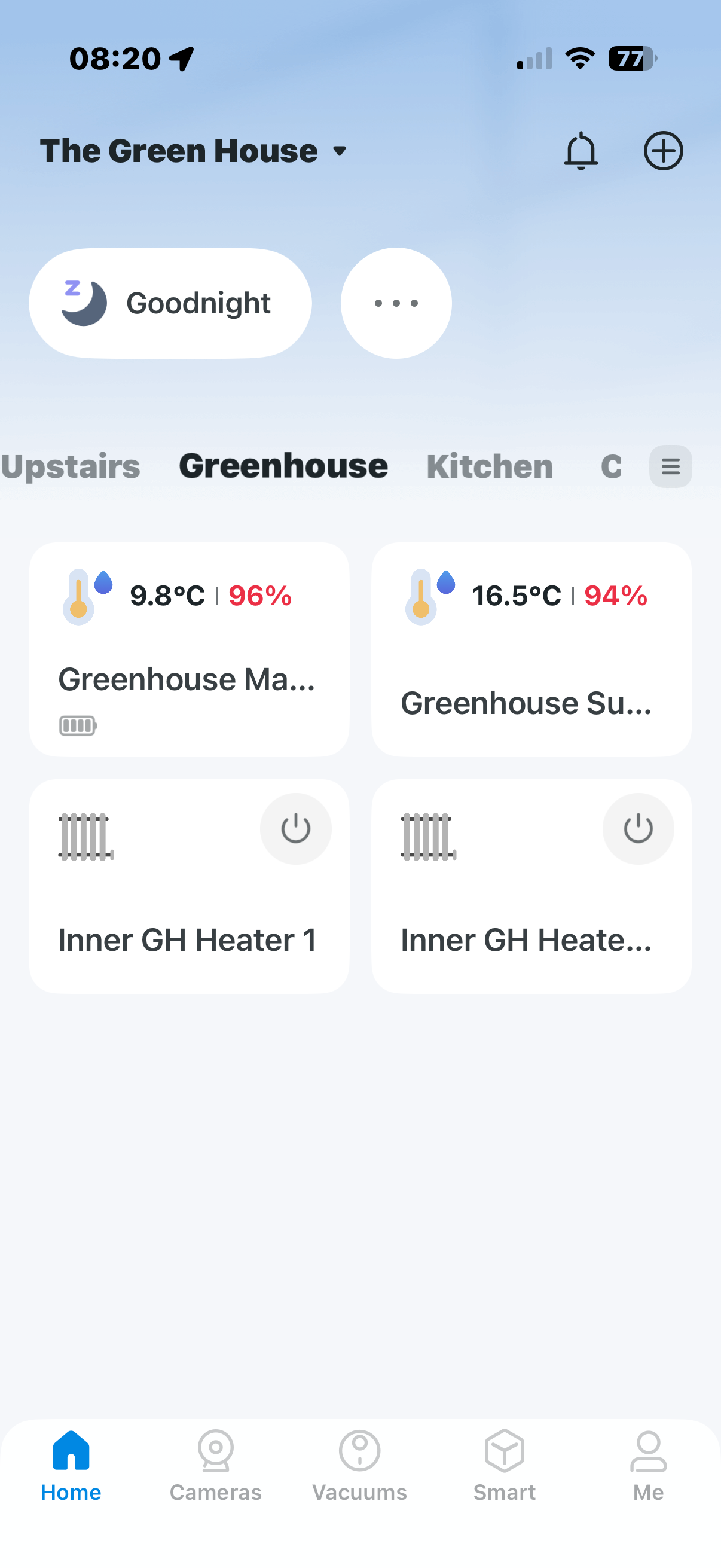
Having fitted two T315 and one T310 to the above network, the app will not refresh the temperature and humidity measurements until I tap through to the graphs, which appear to have updated.


However, automations to turn heaters on via Tapo P110 are working in a timely manner. Only the tiles on the app do not update or refresh.


This is on all three sensors.


Additional info:


I have several additional T315/T310 inside the house controlling the temperature on KASA KE100s. These are connected to one of four Deco X55/X60 via a KASA hub. These update on the app immediately.

Prior to adding the three T315/T310, I used an X50-Outdoor (topography as above except I replaced an H100 with an H200). The sensors refreshed perfectly through this topography. However, I needed additional reach for outfdoor cameras and the EAP110 improved the range. 

I would rather not reintroduce the X50-Outdoor.

All sensors, hubs, APs and Decos have the latest firmware.


It appears to be an issue with either the H200 or the EAP110-Outdoor as these are the only parts I have changed. 


Any assistance would be gratefully received.

  0      
  0      
#1
Options
5 Reply
Re:T315 - app not refreshing temperature or humidity.
a week ago

@admin 


Is anyone able to help me with this?

  0  
  0  
#2
Options
Re:T315 - app not refreshing temperature or humidity.
Wednesday

  @SteveWex 


Which section are you referring to specifically? Please share a screenshot here.

CES 2026 Meet TP-Link AI Assistant and More New Products!
  0  
  0  
#3
Options
Re:T315 - app not refreshing temperature or humidity.
Wednesday


@Wayne-TP 


The Home Screen:

I also have a screengrab video showing it refreshing only when the tile is tapped then returning to the Home screen: https://share.icloud.com/photos/0f4hKj9aJ4SDreygkJCnM80yQ


  0  
  0  
#4
Options
Re:T315 - app not refreshing temperature or humidity.
19 hours ago

  @SteveWex 


On the app home screen, Tapo T315's device card will automatically update its data when either of the following changes is detected:

  1. Temperature changes by more than 0.3°C.
  2. Humidity changes by more than 3%.


A manual refresh will always update the data immediately -- such as your operation. Additionally, if your sensor is set to Balanced Mode (Device Settings > Operation Mode), then data will be updated when larger changes occur.

CES 2026 Meet TP-Link AI Assistant and More New Products!
  0  
  0  
#5
Options
Re:T315 - app not refreshing temperature or humidity.
12 hours ago

  @Wayne-TP 


Can I ask you to review again. If you do you will see that the tile view only refreshes when I tap the tile.


The example show refreshes the left hand tile from 6.5 to 12.4 degrees, and the right-hand tile from 8.5 to 18.6, both well outside the 0.3 degrees it is set to refresh at.


This happens on ALL devices linked to the H200 via EAP110-Outdoor. I have a KASA Hub indoors and all the tiles refresh correctly and as expected as per specifications you have laid out above.


Please review again.

  0  
  0  
#6
Options