
Using powerline for backhaul

I have 4 Deco units, 2x BE65 for indoors and 2x BE25 for outdoors, working as a mesh system. It is not bad, but could be better.
Now the signal strength in the mesh setup of the BE65 is not brilliant. It's not a big house, chalet style, wood, but somehow the signals are not much more then medium and I actually have a near dead spot where I plan to add a 3rd BE65 unit (should not need it but am a bit limited in where I can put them) .
Now I thought to put a powerline adapter at each BE65 unit (and if I can find a way to do it also the BE25's) in the hope that this would work as a back haul network between the BE65 units providing them with an Ethernet connection.
Would linking all BE65 units with TP-Link TL-PA9025P 2000 Mbps powerline adapters as back haul actually work? So basically the BE65's should communicate via the powerline freeing up wifi and also make them thus less dependent on wifi talking to each other?
- Copy Link
- Subscribe
- Bookmark
- Report Inappropriate Content


Hi, welcome to the community.
It is indeed feasible to use PLC adapters to establish a wired connection between a satellite Deco and the main Deco via a Powerline connection. However, under this network topology, the speed that the satellite Deco obtains depends on the quality of the connection between the PLC adapters. If the Powerline rate between the adapters is low, the actual speed obtained by the satellite Deco may not be better than if it were connected wirelessly to the main Deco/other Deco nodes. However, if a specific area suffers from very poor (or virtually non-existent) Wi-Fi coverage and you intend to place a satellite Deco there, connecting it to the main Deco via a Powerline connection may be a better choice.
You can refer to the articles below to see how to improve the Powerline rate between the powerline adapters and to better understand the relationship between the Powerline rate and actual network speeds.
What can I do if my powerline rate is very low?
Explanation about the Powerline Rate and Actual speed of the Powerline Adapters
P.S. If you are utilizing only Deco units (without PLC adapters), you can follow the link below to place your Deco for better performance.
Deco Placement Guide: Where to Place Your Deco Mesh Wi-Fi Units
Best Regards
- Copy Link
- Report Inappropriate Content

Yes, your approach would work! Using powerline adapters to connect your Deco units is actually a valid way to establish Ethernet backhaul. The powerline adapters essentially create an Ethernet connection through your home's electrical wiring, and from the Deco's perspective, this functions as a wired Ethernet backhaul connection.
How it works:
Ethernet Backhaul is a feature that allows different Deco units to transmit data via Ethernet (wire) instead of Wi-Fi (wireless), increasing throughput and optimizing network stability. Once Ethernet backhaul is established, Wi-Fi backhaul will be disconnected automatically, and the Deco APP will display the backhaul status as "Ethernet" as well.
When you connect powerline adapters to your Deco units, they create an Ethernet bridge through your electrical wiring. This will allow your BE65 units (and BE25 units if you can add adapters there too) to communicate via this wired connection, freeing up the WiFi bands and significantly improving overall mesh performance.
Important recommendations:
• Make sure all Deco units are connected to the same power grid
• Use wall sockets rather than extension boards or power strips, as they might block powerline signals
• Surge protectors and air switches might also interfere with powerline communication
• Ensure your powerline adapters support gigabit speeds to take full advantage of your BE65/BE25 capabilities
This solution should definitely help with your signal strength issues and reduce the dead spots you're experiencing!
- Copy Link
- Report Inappropriate Content

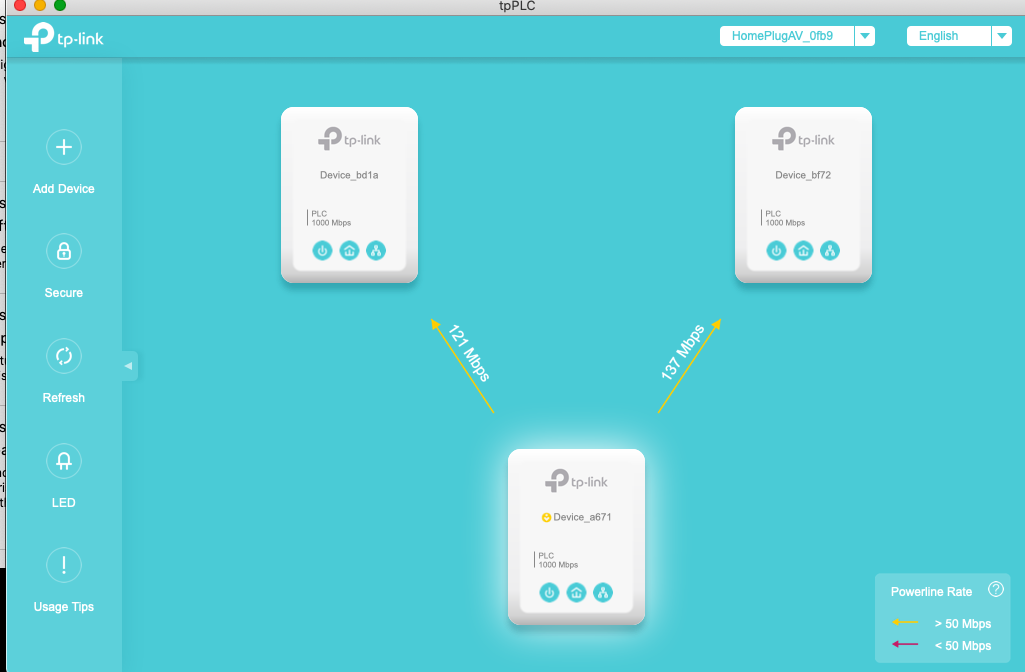
Just be aware that my testing shows that most of the time you will only get max 50Mb/s out of powerline.
So do some internet speedtests with your setup the way it is, if you are getting more than 50Mb/s now then you are not going to see any improvement with a powerline backhaul.
If you are getting like 8-10Mb/s with the Wi-Fi mesh then yes, powerline will help. But noth as much as running ethernet between the Deco's if you can.
BTW, whats is your incoming internet speed from your provider? If your incoming internet speed is less than 100Mb/s then you probably won't notice the powerline speed drop.
Lots of things to consider. Of course you could buy from somewhere they are easily returned if they don't satisfy your requirements.
- Copy Link
- Report Inappropriate Content
Yes!
I use Powerline adapters and with decent power cabling you can get some pretty good speeds.
Image below shows Powerline adapters shifting IP camera footage without quality issues. I have seen this top out much higher than this, but it gives you a good idea what is possible.
- Copy Link
- Report Inappropriate Content
Hi, welcome to the community.
It is indeed feasible to use PLC adapters to establish a wired connection between a satellite Deco and the main Deco via a Powerline connection. However, under this network topology, the speed that the satellite Deco obtains depends on the quality of the connection between the PLC adapters. If the Powerline rate between the adapters is low, the actual speed obtained by the satellite Deco may not be better than if it were connected wirelessly to the main Deco/other Deco nodes. However, if a specific area suffers from very poor (or virtually non-existent) Wi-Fi coverage and you intend to place a satellite Deco there, connecting it to the main Deco via a Powerline connection may be a better choice.
You can refer to the articles below to see how to improve the Powerline rate between the powerline adapters and to better understand the relationship between the Powerline rate and actual network speeds.
What can I do if my powerline rate is very low?
Explanation about the Powerline Rate and Actual speed of the Powerline Adapters
P.S. If you are utilizing only Deco units (without PLC adapters), you can follow the link below to place your Deco for better performance.
Deco Placement Guide: Where to Place Your Deco Mesh Wi-Fi Units
Best Regards
- Copy Link
- Report Inappropriate Content
Information
Helpful: 0
Views: 1351
Replies: 4
Voters 0
No one has voted for it yet.