
Home shield parental control

Multiple devices stay online durring standby
In parental control online time is not working. Online time is counted while devices are in standby.
- Copy Link
- Subscribe
- Bookmark
- Report Inappropriate Content

This is actually expected behavior with Deco's parental controls. The system counts internet time for all internet activities on devices under parental control, including background activities. Even when devices appear to be in standby, they continue to perform background tasks such as iCloud communications (on iOS devices), app updates, syncing, notifications, and other system processes. These background activities work the same as regular internet activities, and it's difficult for the Deco system to distinguish them from regular internet activities like browsing. This is why the device's actual active usage time appears shorter than the time limit you've set.
To ensure that the device's internet usage aligns better with the set time limit on Deco, you can try the following steps:
1. Turn off Wi-Fi when not in use: When the device is not actively being used, consider turning off the Wi-Fi connection on the device or disconnecting it from the Deco network. This will prevent any background activities from consuming internet time unnecessarily.
2. Adjust background app settings: If the device has specific background app refresh settings, you can review and adjust them to minimize internet usage during idle periods. This can usually be found in the device's settings under apps or battery optimization.
Note: Devices will not receive a notification when their time limit is reached.
- Copy Link
- Report Inappropriate Content
This is actually expected behavior with Deco's parental controls. The system counts internet time for all internet activities on devices under parental control, including background activities. Even when devices appear to be in standby, they continue to perform background tasks such as iCloud communications (on iOS devices), app updates, syncing, notifications, and other system processes. These background activities work the same as regular internet activities, and it's difficult for the Deco system to distinguish them from regular internet activities like browsing. This is why the device's actual active usage time appears shorter than the time limit you've set.
To ensure that the device's internet usage aligns better with the set time limit on Deco, you can try the following steps:
1. Turn off Wi-Fi when not in use: When the device is not actively being used, consider turning off the Wi-Fi connection on the device or disconnecting it from the Deco network. This will prevent any background activities from consuming internet time unnecessarily.
2. Adjust background app settings: If the device has specific background app refresh settings, you can review and adjust them to minimize internet usage during idle periods. This can usually be found in the device's settings under apps or battery optimization.
Note: Devices will not receive a notification when their time limit is reached.
- Copy Link
- Report Inappropriate Content

I have bedtime set between 9:00pm and 8:00am, however the device is recording active time between 12:00am and 4:00am whilst the device is not in use by anyone.
This activity is consuming my childs traffic hours.
So what does bedtime actually mean if internet traffic is not being blocked or is being blocked but is being recorded as activity?
Is someone please able to clarify?
- Copy Link
- Report Inappropriate Content


Hi,
Regarding the reported phenomenon, please provide the following information.
1. What's the model number, hardware, and firmware version of your Deco?
2. Please send us the screenshots of the Deco app > Parental Control > your profile > Bedtime settings page and the page showing there are activities during bedtime.
Best Regards
- Copy Link
- Report Inappropriate Content
1. Deco X50, Firmware 1.2.10
2.
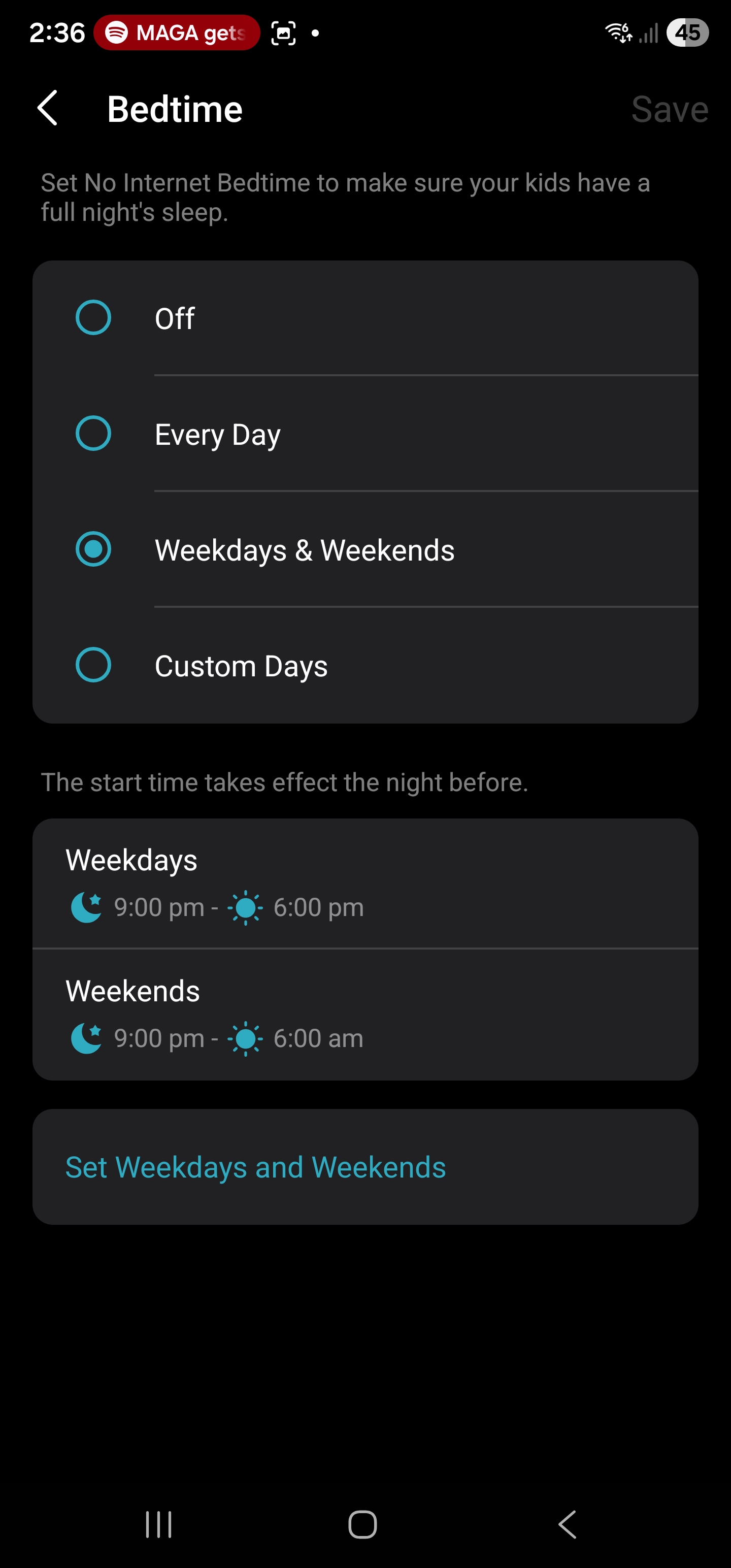
Bedtime is between 9:00pm and 6:00pm
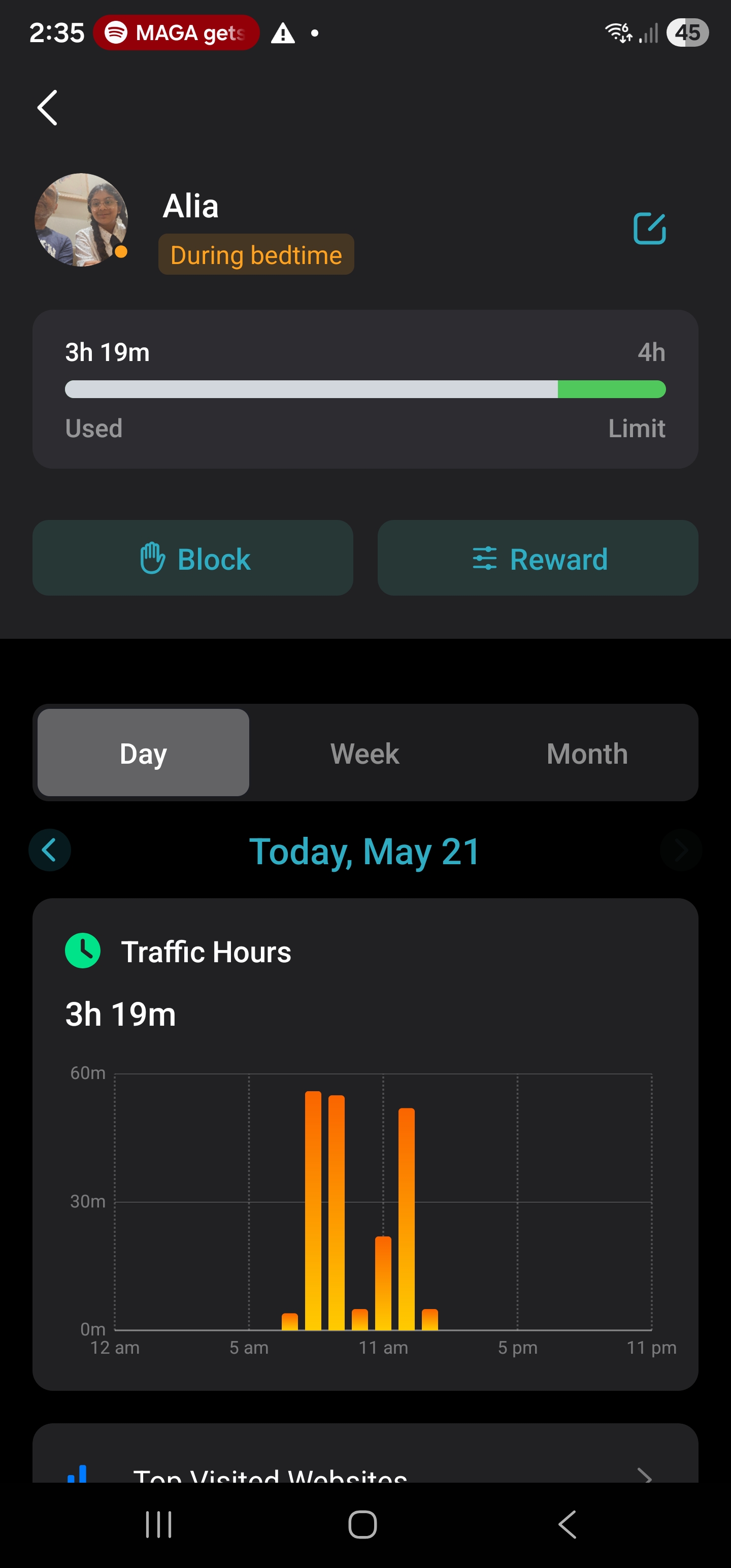
Note the activity of 3:19 between 6:00am-1:00pm. (I took the screen shot at 2:00pm Thursday). Noone is using the ipad during this time.
So during Bedtime there is traffic being logged, which is eating into the time limits.
This is not expewcted behaviour. Any ideas?
- Copy Link
- Report Inappropriate Content
Hi,
Please refer to the instructions below to check the hardware version of your Deco X50.
How to Find the Hardware Version on Your TP-Link Device
If your Deco X50's hardware version is v1.3, please update the firmware in the following thread to see if it helps.
Deco X50/X55_V1.3_1.8.2 Expanded the Client Connection Detail and Added ECO Mode, VPN Kill Switch
Best Regards
- Copy Link
- Report Inappropriate Content
Information
Helpful: 0
Views: 388
Replies: 5
Voters 0
No one has voted for it yet.