
Expanding my network

Hello,
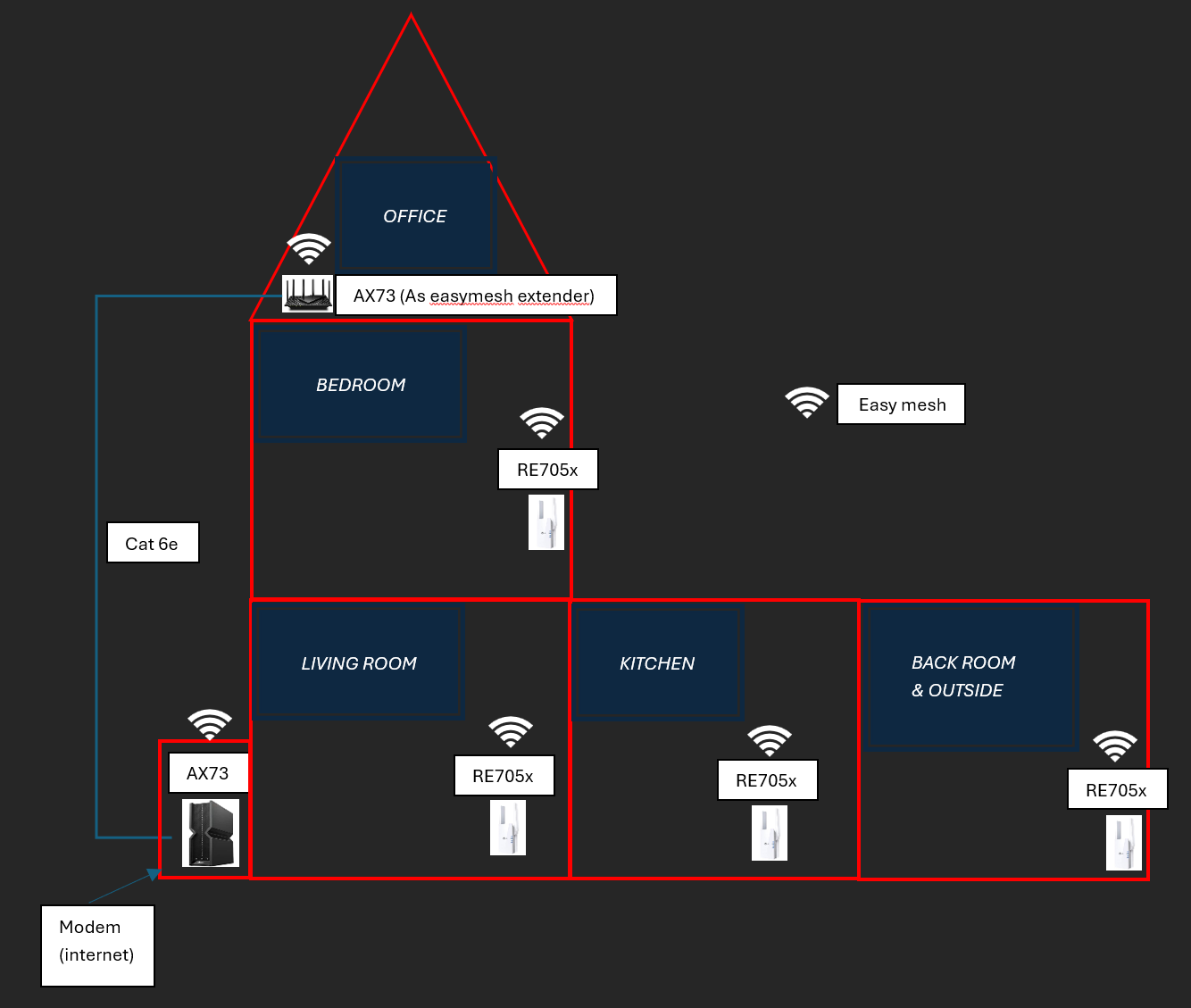
I want to extend my network. now I have an AX73 as main router with RE505x, RE605x and RE705X extenders.
My network is not stable troughout my house.
I now have the possibility to upgrade (zie picture). BE550 as main router, AX73 as cabled extender and 3 RE705X extenders.
Is there something that I need to adress? Is this all compatible? I want to use Easymesh.
- Copy Link
- Subscribe
- Bookmark
- Report Inappropriate Content

Hi,
The routers BE550 V1/V2 and AX73 V1/V2 all support EasyMesh via Ethernet Backhaul. So you should be fine.
https://community.tp-link.com/en/home/forum/topic/593722
By the way, are the walls of your house very thick? I am wondering why you need Wi-Fi extenders in every single room. When it comes to Wi-Fi extenders, more is not necessarily always better. Having too many such devices can cause more problems than it solves.
- Copy Link
- Report Inappropriate Content
Hi,
The routers BE550 V1/V2 and AX73 V1/V2 all support EasyMesh via Ethernet Backhaul. So you should be fine.
https://community.tp-link.com/en/home/forum/topic/593722
By the way, are the walls of your house very thick? I am wondering why you need Wi-Fi extenders in every single room. When it comes to Wi-Fi extenders, more is not necessarily always better. Having too many such devices can cause more problems than it solves.
- Copy Link
- Report Inappropriate Content
@woozle thanks for you reply.
I could skip the one in the living room and 1e floor because they are indeed close to each other.
My toughts where, the more the better 
In the kitchen I use the RE705x also to add devices which only have ethernet and no wifi. (I have only cabled network in the front part of the house (not kitchen and backroom)
I tried to take away the one in the backroom but then I have nog wifi in the garden...
greets Dirk
- Copy Link
- Report Inappropriate Content


Hello @Kiezelke ,
As Woozle noted, when it comes to wireless extension devices, more is not necessarily better; wireless signals are highly susceptible to environmental interference and experience significant signal loss during transmission.
Of course, given your existing equipment, you could start by adding some range extenders and testing their actual performance.
If the results are unsatisfactory, I recommend considering a wired connection instead. Alternatively—particularly if your network coverage area is extensive or includes outdoor spaces—you might want to consider upgrading to higher-performance business-grade products.
- Copy Link
- Report Inappropriate Content
Information
Helpful: 0
Views: 119
Replies: 3
Voters 0
No one has voted for it yet.