
Port Forwarding Not Actually Forwarding Port

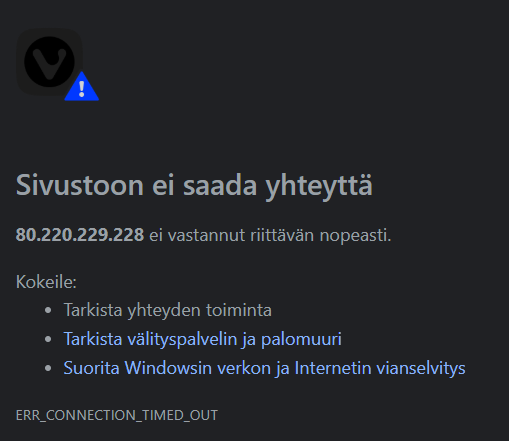
Port forwarding through Advanced>NAT Forwarding>Port Forwarding has been doing nothing. I used multiple port checkers but still the port is not open. I did use STEP 3: https://www.tp-link.com/nordic/support/faq/1379/
AND on:
https://www.youtube.com/watch?v=2tIUts0fyFk
but to no avail. The port is still not open.
I tried add one more port, and it didn't seem work either. I wonder what is happening. The real reason is that the game hosting that worked before is no longer working. I tried without windows firewall, and it is now private. The port is open there too, and I couldn't use the browser tester.
I use Archer BE550 V1, what now?
EDIT. Did reduce the repetition of words.
- Copy Link
- Subscribe
- Bookmark
- Report Inappropriate Content

Then I don't understand why you can't reach your PC.
I just updated my own BE550 to firmware version 1.2.3 Build 20260127 as well and checked it. Port forwarding still works fine for me.
As a last resort you could try the "DMZ" feature of the BE550 (also in the NAT Forwarding menu). When enabled, this feature forwards all incoming connections for which there are no other NAT forwarding rules configured to the device whose IP address is entered in the entry field. Make sure the firewall of the PC is active when you set it as the DMZ host.
- Copy Link
- Report Inappropriate Content
Hi,
So, you are running a game hosting server on a Windows PC that is connected to the LAN of your Archer BE550. Is that correct?
Is 80.220.229.228 the "Internet IP Address" of your Archer BE550 or do you have another NAT router connected before the BE550?
- Copy Link
- Report Inappropriate Content
That is correct. I have used "Adress Reservation" and Port Forwarding. IP is always same for that Windows PC.
My Internet IP address is from Archer BE550 80.220.229.228.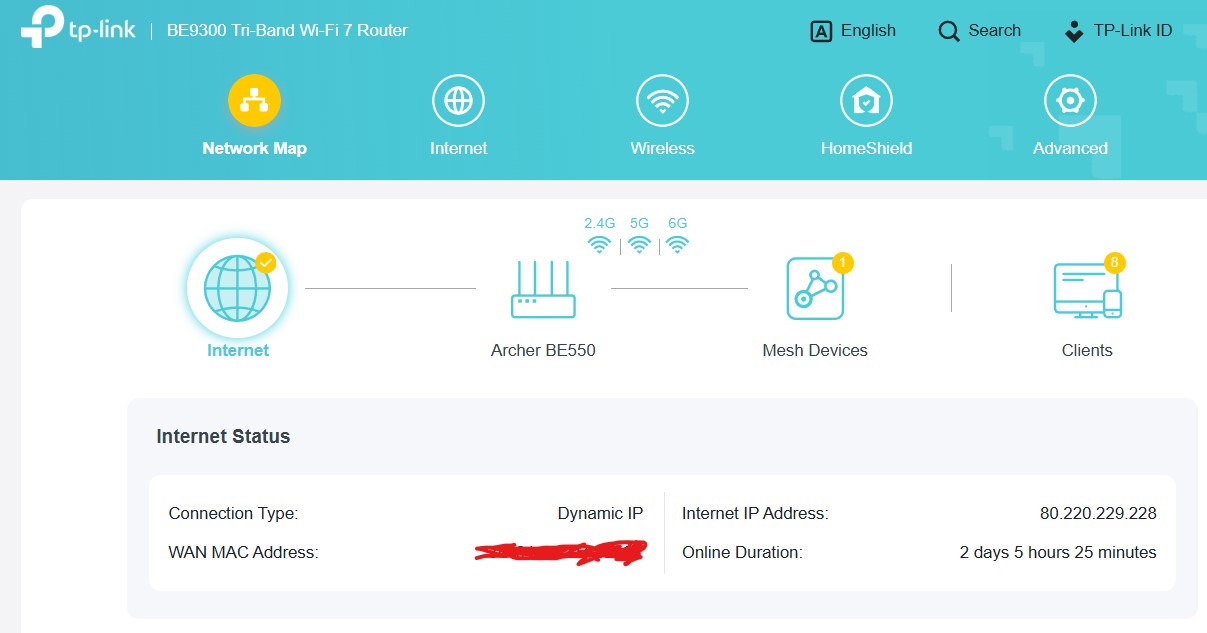
- Copy Link
- Report Inappropriate Content
Have you already verified that you can still reach your BE550 from the Internet? The easiest method would be to activate the BE550's "Remote Management" for a minute or two and check that the router login screen can be accessed from the Internet. (menu Advanced -> System -> Administration -> Remote Management)
- Copy Link
- Report Inappropriate Content
I did try it with my phone from mobile network. Did use "remote management" default port. It worked well.
- Copy Link
- Report Inappropriate Content
Then I don't understand why you can't reach your PC.
I just updated my own BE550 to firmware version 1.2.3 Build 20260127 as well and checked it. Port forwarding still works fine for me.
As a last resort you could try the "DMZ" feature of the BE550 (also in the NAT Forwarding menu). When enabled, this feature forwards all incoming connections for which there are no other NAT forwarding rules configured to the device whose IP address is entered in the entry field. Make sure the firewall of the PC is active when you set it as the DMZ host.
- Copy Link
- Report Inappropriate Content

I’m having the same issue on my Archer BE550 V1. Port forwarding rules are configured correctly, but external port checkers still show the ports as closed. Could this be related to G555 or perhaps CGNAT, ISP restrictions, or a firmware issue? Any additional troubleshooting steps would be appreciated.
- Copy Link
- Report Inappropriate Content


@kelvincarter63 Have you tried the following suggestions?
woozle wrote
Then I don't understand why you can't reach your PC.
I just updated my own BE550 to firmware version 1.2.3 Build 20260127 as well and checked it. Port forwarding still works fine for me.
As a last resort you could try the "DMZ" feature of the BE550 (also in the NAT Forwarding menu). When enabled, this feature forwards all incoming connections for which there are no other NAT forwarding rules configured to the device whose IP address is entered in the entry field. Make sure the firewall of the PC is active when you set it as the DMZ host.
- Copy Link
- Report Inappropriate Content
Information
Helpful: 0
Views: 379
Replies: 7
Voters 0
No one has voted for it yet.