
Future Consideration make Guest and IoT Networks Mesh-able and extendable

as per title, and per image bellow:

it is absolutely useless to have an option to enable Guest and IoT Network if they are NOT transmitted/extended by EasyMesh
we have guests up there and surprise-surprise we also have a lot of IoT devices up there and all over the place. whole point of having Geust and IoT Network is to unload and secure the main wifi network. it is unacceptable to not have an option to extend those too.
what if we want to connect IoT devices up there too? or what if we do not need Guest Network down there at all, only up?
therefore, make it happen to be able to select multiple (at least) 2,4Ghz SSIDs to be extended when establishing EasyMesh Network
as things are now we can do only:
- not use Guest and IoT Networks and have all devices and guests on the main wifi network
- buy 4 more extenders to extend Guest and IoT Networks in two directions (UNACCEPTABLE) and even with those 4 more extenders they won't be part of EasyMesh
- complain, suggest future request, wait and finally sell all TP-Link faulty products and move to other brand which supports such basic functionality
- Copy Link
- Subscribe
- Bookmark
- Report Inappropriate Content
as per this recent post on January 2026, you can see that TP-Link is NOT taking this fundamental request seriously.
I suggest we start talking about what other brands of mesh routers we should look into buying instead as TP-Link does not have any specific plans or intention to extend Guest and IoT networks to its mesh network.
does anyone want to get rolling with suggesting other brands we should look into that provides this functionality?
- Copy Link
- Report Inappropriate Content


osaya wrote
as per this recent post on January 2026, you can see that TP-Link is NOT taking this fundamental request seriously.
I suggest we start talking about what other brands of mesh routers we should look into buying instead as TP-Link does not have any specific plans or intention to extend Guest and IoT networks to its mesh network.
does anyone want to get rolling with suggesting other brands we should look into that provides this functionality?
Hello @osaya
You mentioned you have an Archer AX55 and a RE705X in the following topic:
https://community.tp-link.com/en/business/forum/topic/718368?replyId=1653492
What are the hardware version and firmware version of these two devices?
As far as I can confirm, Archer AX55 V1 and RE705X V1&V2 should support extending Guest Network via EasyMesh:
Archer AX55 V1 Supports Extending Guest Network via EasyMesh and Optimizing Performance in AP Mode
Could you please confirm? Is it not working on your devices?
- Copy Link
- Report Inappropriate Content
@Kevin_Z how about other models?
For example, I had invested in a number of BE9300 devices only to find that these basic features were not supported. It is not unreasonable to expect that when devices are advertised as mesh and supporting guest and IoT networks, that those features would all be compatible.
It's hugely disappointing that this was not the case from the start, that it's dragged on this long and continues to do so.
I very much regret investing so much in these devices. It's not an insignificant amount, and the devices are not fit for purpose which will mean I avoid TP-Link when purchasing in the future.
- Copy Link
- Report Inappropriate Content
When saying BE9300, could you please confirm the exact model numbers, such as Archer BE550?
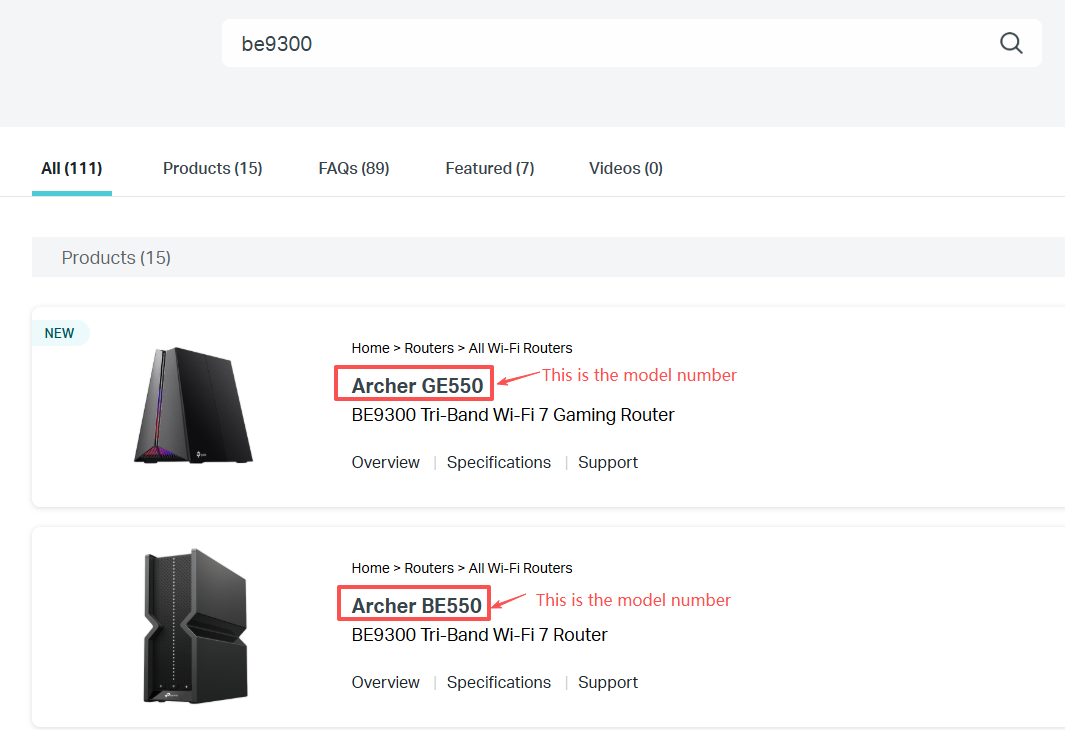
I believe more models will receive these new features in the future. Just keep an eye on our official website and/or the announcements on our community forum for new features.
- Copy Link
- Report Inappropriate Content
I have Archer BE550 v1.0 firm 1.2.1 Build 20250813 rel.27119(4555) as router, and Archer AX10 firmware 1.3.12 Build 20250828 Rel. 26873 as Satellite.
It will be possible to have IoT Mesh-able and extendable ?
What is the current alternative to having IoT Mesh-able and extendable?
- Copy Link
- Report Inappropriate Content
Kevin_Z wrote
osaya wrote
as per this recent post on January 2026, you can see that TP-Link is NOT taking this fundamental request seriously.
I suggest we start talking about what other brands of mesh routers we should look into buying instead as TP-Link does not have any specific plans or intention to extend Guest and IoT networks to its mesh network.
does anyone want to get rolling with suggesting other brands we should look into that provides this functionality?
Hello @osaya
You mentioned you have an Archer AX55 and a RE705X in the following topic:
https://community.tp-link.com/en/business/forum/topic/718368?replyId=1653492
What are the hardware version and firmware version of these two devices?
As far as I can confirm, Archer AX55 V1 and RE705X V1&V2 should support extending Guest Network via EasyMesh:
Archer AX55 V1 Supports Extending Guest Network via EasyMesh and Optimizing Performance in AP Mode
Could you please confirm? Is it not working on your devices?
Hi @Kevin_Z, thanks for responding.
I have:-
- Archer AX55 v1.0 (main router)
- firmware 1.5.10 Build 20251119 rel.50509(4555)
- RE705X v2.0 (satellite)
- firmware 1.0.4 Build 20231220 rel. 58619
Unfortunately, no, it is not extending the Guest Network via the EasyMesh. The Archer AX55 firmware seems fairly new, but the RE705X firmware is very dated. When I check the firmware page for the RE705X, the V1 has a more recent firmware from 2025 that has "Added support for EasyMesh R2/R3(including traffic separation and DPP)", but the V2 version's last firmware was back in 2024.
Can you please confirm that my setup should still work?
Thanks.
- Copy Link
- Report Inappropriate Content
TP Link have been saying for over a year that it is "coming soon". I have:
- Archer AXE75 (router)
- Air E5 (extender)
- Air R5 (extender)
- RE815XE x2 (extenders)
When will I be able to extend Guest and IoT? These were purchased *because* it was advertised as being able to extend these. Thank you.
- Copy Link
- Report Inappropriate Content
osaya wrote
Kevin_Z wrote
osaya wrote
as per this recent post on January 2026, you can see that TP-Link is NOT taking this fundamental request seriously.
I suggest we start talking about what other brands of mesh routers we should look into buying instead as TP-Link does not have any specific plans or intention to extend Guest and IoT networks to its mesh network.
does anyone want to get rolling with suggesting other brands we should look into that provides this functionality?
Hello @osaya
You mentioned you have an Archer AX55 and a RE705X in the following topic:
https://community.tp-link.com/en/business/forum/topic/718368?replyId=1653492
What are the hardware version and firmware version of these two devices?
As far as I can confirm, Archer AX55 V1 and RE705X V1&V2 should support extending Guest Network via EasyMesh:
Archer AX55 V1 Supports Extending Guest Network via EasyMesh and Optimizing Performance in AP Mode
Could you please confirm? Is it not working on your devices?
Hi @Kevin_Z, thanks for responding.
I have:-
- Archer AX55 v1.0 (main router)
- firmware 1.5.10 Build 20251119 rel.50509(4555)
- RE705X v2.0 (satellite)
- firmware 1.0.4 Build 20231220 rel. 58619
Unfortunately, no, it is not extending the Guest Network via the EasyMesh. The Archer AX55 firmware seems fairly new, but the RE705X firmware is very dated. When I check the firmware page for the RE705X, the V1 has a more recent firmware from 2025 that has "Added support for EasyMesh R2/R3(including traffic separation and DPP)", but the V2 version's last firmware was back in 2024.
Can you please confirm that my setup should still work?
Thanks.
What is the region version of your RE705X V2.0? You can find it underneath the device, which displays as RE705X(XX).
- Copy Link
- Report Inappropriate Content
Akrasia wrote
TP Link have been saying for over a year that it is "coming soon". I have:
- Archer AXE75 (router)
- Air E5 (extender)
- Air R5 (extender)
- RE815XE x2 (extenders)
When will I be able to extend Guest and IoT? These were purchased *because* it was advertised as being able to extend these. Thank you.
Apologize that I don't have advanced notice of whether or when these models will receive the new features.
I don't think we have ever advertised that EasyMesh can extend the Guest and IoT network. We have a QA in this FAQ (Q13) to state that.
- Copy Link
- Report Inappropriate Content
Kevin_Z wrote
osaya wrote
Kevin_Z wrote
osaya wrote
as per this recent post on January 2026, you can see that TP-Link is NOT taking this fundamental request seriously.
I suggest we start talking about what other brands of mesh routers we should look into buying instead as TP-Link does not have any specific plans or intention to extend Guest and IoT networks to its mesh network.
does anyone want to get rolling with suggesting other brands we should look into that provides this functionality?
Hello @osaya
You mentioned you have an Archer AX55 and a RE705X in the following topic:
https://community.tp-link.com/en/business/forum/topic/718368?replyId=1653492
What are the hardware version and firmware version of these two devices?
As far as I can confirm, Archer AX55 V1 and RE705X V1&V2 should support extending Guest Network via EasyMesh:
Archer AX55 V1 Supports Extending Guest Network via EasyMesh and Optimizing Performance in AP Mode
Could you please confirm? Is it not working on your devices?
Hi @Kevin_Z, thanks for responding.
I have:-
- Archer AX55 v1.0 (main router)
- firmware 1.5.10 Build 20251119 rel.50509(4555)
- RE705X v2.0 (satellite)
- firmware 1.0.4 Build 20231220 rel. 58619
Unfortunately, no, it is not extending the Guest Network via the EasyMesh. The Archer AX55 firmware seems fairly new, but the RE705X firmware is very dated. When I check the firmware page for the RE705X, the V1 has a more recent firmware from 2025 that has "Added support for EasyMesh R2/R3(including traffic separation and DPP)", but the V2 version's last firmware was back in 2024.
Can you please confirm that my setup should still work?
Thanks.
What is the region version of your RE705X V2.0? You can find it underneath the device, which displays as RE705X(XX).
Hi @Kevin_Z, my RE705X V2.0 shows the AU region.
- Copy Link
- Report Inappropriate Content
Information
Helpful: 90
Views: 19045
Replies: 110
Voters 90





























