
Disabling DHCP without losing 4G backup connectivity.

This thread has been locked for further replies. You can start a new thread to share your ideas or ask questions.

Disabling DHCP without losing 4G backup connectivity.

This thread has been locked for further replies. You can start a new thread to share your ideas or ask questions.

Disabling DHCP without losing 4G backup connectivity.
2024-08-08 02:35:44 - last edited 2024-08-08 03:36:01
Model: Archer MR600  
Hardware Version: V2
Firmware Version: 1.6.0 0.9.1

I have a TP-Link XC220-G3v XPON router as my main router on which there are devices attached, two of them are my NAS and my MR600 router (which I'm using if I am to lose my main internet, its running on Wireless Router Mode with 3G/4G backup enabled, main reason is that I have WiFi cameras attached to it)

Now I want to add my camera to my NAS but the two are on different subnet.

I can't disable DHCP because then I cannot access my router.


My Main router is on Subnet 192.168.1.0/24

Where as my backup router is on Subnet 192.168.0.0/24


I had ONLY studied networking in College but now I don't remember most of the things so.

@Sunshine can you help me out?


I tried creating a static route after watching this video
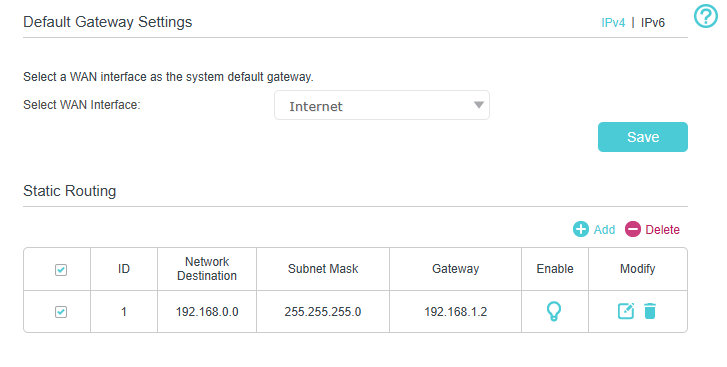
But I am still unable to access the subnet.

  0      
0
#1
Options
2 Reply
Re:Disabling DHCP without losing 4G backup connectivity.
2024-08-09 09:07:55

  @SweenWolf 

Hi


It is recommended that you open the port for the camera on MR600 and main router:
How to use NAT Forwarding function on TP-Link Wireless 4G LTE Router

Welcome to Our Community! Get the latest posts: △New Firmware for Archer GE550/GE650 V1 Introduces AI-QoS, EasyMesh IoT Expansion, and More! △New Firmware Releases for Archer BE805 V1/BE450 V1 to Support VPN Merge, New ECO Mode, and More! More posts, please see: △ Get the Ongoing Pre-release Firmware for Wi-Fi Routers Here— Subscribe for Updates! Urgent problems with your Wi-Fi Router, Range Extender, or DSL Modem? Please reach out via private Messages or @Joesph-TP in your new thread directly. Click Or ☆Recommended Solution if the post/answer helps.
  0  
0
#2
Options
Re:Disabling DHCP without losing 4G backup connectivity.
2024-08-16 00:53:56 - last edited 2024-08-16 00:54:27

  @Joseph-TP 

Thanks,

But I forgot to update here, The subnet was reachable actually.

I did a trace route to find it was reaching the MR600 but nothing after that.

Then I did a nmap scan and i found out that I was using the wrong port number for the cameras.

Now i can access all me devices without Port Triggering/Forwarding.

  0  
0
#3
Options