VR600 AC2100 cant get to work on fttp connection!

This thread has been locked for further replies. You can start a new thread to share your ideas or ask questions.

VR600 AC2100 cant get to work on fttp connection!

This thread has been locked for further replies. You can start a new thread to share your ideas or ask questions.

VR600 AC2100 cant get to work on fttp connection!
2025-05-21 18:34:44 - last edited 2025-06-24 01:19:17
Model: Archer VR600  
Hardware Version:
Firmware Version:

Hi all,


I previously used this router on my phone line connection setup at my own house without issues.


I have since moved to my partners address and cannot get it set up! I have tried so many things with no luck.


She has an FTTP connection through vodafone.


I have plugged the ethernet into the correct port (LAN 4/ WAN) which is connected to the ONT


Entered the correct PPPoE username and password provided by Vodafone


Changed it to wireless router mode


Entered the VLAN ID provided by Vodafone (901) event tried 101 which other people have had success with.


I've tried hard resetting the router and this hasnt helped.


Vodafone forums closed last month so will have no luck there either


Many thanks,

  0      
  0      
#1
Options
1 Accepted Solution
Re:VR600 AC2100 cant get to work on fttp connection!-Solution
2025-05-22 03:00:21 - last edited 2025-06-24 01:19:17

Hi@Uk101,

Thank you for contacting our community.

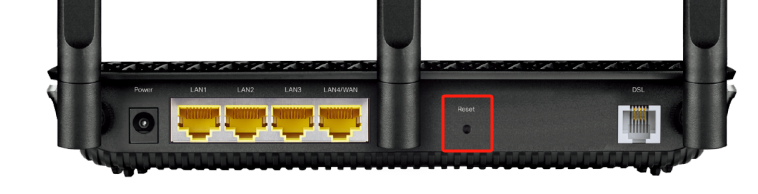
It is recommended that you can hard reset the modem firstly: Press and hold down for 8 seconds to reset the modem router into factory default settings.


For VLAN ID, please try 101 or not required.


Nice to Meet You in Our TP-Link Community. Check Out the Latest Posts: △Pre-release Firmware for Archer AX50 Introduces New Parental Control Features and Enhancements △Introducing AI QoS: Elevate Your Gaming Experience on the Archer GE800 Gaming Router △Connect TP-Link Archer BE550 to Germany's DS-Lite (Dual Stack Lite) Internet via WAN △Tether KidShield Test Recruitment - Safeguarding Children's Online Experience If you found the post or response helpful, please click Helpful. If an answer solves your problem, click "Recommended Solution" so that others can benefit from it.
Recommended Solution
  0  
  0  
#2
Options
1 Reply
Re:VR600 AC2100 cant get to work on fttp connection!-Solution
2025-05-22 03:00:21 - last edited 2025-06-24 01:19:17

Hi@Uk101,

Thank you for contacting our community.

It is recommended that you can hard reset the modem firstly: Press and hold down for 8 seconds to reset the modem router into factory default settings.


For VLAN ID, please try 101 or not required.


Nice to Meet You in Our TP-Link Community. Check Out the Latest Posts: △Pre-release Firmware for Archer AX50 Introduces New Parental Control Features and Enhancements △Introducing AI QoS: Elevate Your Gaming Experience on the Archer GE800 Gaming Router △Connect TP-Link Archer BE550 to Germany's DS-Lite (Dual Stack Lite) Internet via WAN △Tether KidShield Test Recruitment - Safeguarding Children's Online Experience If you found the post or response helpful, please click Helpful. If an answer solves your problem, click "Recommended Solution" so that others can benefit from it.
Recommended Solution
  0  
  0  
#2
Options