
Firmware update buggy
 This thread has been locked for further replies. You can start a new thread to share your ideas or ask questions.
Since the firmware auto-updated last friday, I have had a very unstable connection.
my setup
ethernet cable from modem/router to first X55 (downstairs)
wireless connection from this primary X55 to 2 X55's upstairs
powerline from X55s to get multiple PC over ethernet connections.
since the update once the load gets a little heavier the entire X55 network fails and we all lose internet connection. i've checked with a device plugged directly into the router and the connection is not affected, so it's the X55s
I can see (and have downloaded) the previous firmware version from
https://www.tp-link.com/uk/support/download/deco-x55/v1/#Firmware
but is it a good idea to downgrade the firmware?
- Copy Link
- Subscribe
- Bookmark
- Report Inappropriate Content


@Colin69 Hi, welcome to the community. I wish you could cooperate with us to identify the root cause. Downgrading the firmware might help now, but it is always better to keep the firmware up-to-date.
If possible, can you help me check the following details:
1. Would the main Deco X55 turn solid red when the Mesh network crashed?
2. Can you consistently reproduce the issue "once the load gets a little heavier, the entire X55 network fails"? Or can you give me some examples of the "heavy load"?
3. When the internet connection fails, do you need to restart the Deco, or will the Internet connection come back automatically a few seconds later?
-It would be highly appreciated if you could help me save the web UI system log:
(Please don't restart the Deco before exporting the system log.)
Thank you very much.
Best regards.
- Copy Link
- Report Inappropriate Content
@Colin69 Hi, welcome to the community. I wish you could cooperate with us to identify the root cause. Downgrading the firmware might help now, but it is always better to keep the firmware up-to-date.
If possible, can you help me check the following details:
1. Would the main Deco X55 turn solid red when the Mesh network crashed?
2. Can you consistently reproduce the issue "once the load gets a little heavier, the entire X55 network fails"? Or can you give me some examples of the "heavy load"?
3. When the internet connection fails, do you need to restart the Deco, or will the Internet connection come back automatically a few seconds later?
-It would be highly appreciated if you could help me save the web UI system log:
(Please don't restart the Deco before exporting the system log.)
Thank you very much.
Best regards.
- Copy Link
- Report Inappropriate Content
Thanks for your message. To answer your questions, to the best of my knowledge:
1. no it doesn't go red
2. i've not been able to consistently replicate it, but what happened the other day was I was working from home alone fine, then my kids came home from school and barely started their PCs when the network went down.
3. i do not need to restart the deco - i have been waiting around and it was fixing itself after a while. in the last couple of days i've been forced to run a long ethernet cable from the router upstairs directly to either a deco unit up here, or straight into the powerline socket in the mains.
i've saved the system logs - which one(s) do you want?
update - when logged into the web ui, i notice the CPU load fluctuating between 25% to 83% with one occurance of 100% while monitoring. Memory usage seems stable around the 50% level
- Copy Link
- Report Inappropriate Content
Hi, thank you very much for the update.
If the CPU load is not always at 100%, it would be expected. When we access the web UI, Deco would need to process a lot of traffic data in a short time to synchronize the current network status.
Can you help me get a simple layout of the network topology, such as:
ISP modem router---main X55------<wifi>----satellite X55#1------<wifi>-----satellite X55#2
\------------<Ethernet connection via powerline adapters>---multiple wired PCs
-As there is also an ISP modem/router, did you set Deco X55 into Access Point mode?
-Can I have the model number of the ISP router?
-How many devices have you connected to Deco Mesh, especially the wireless devices?
By the way, I noticed you mentioned that:
"in the last couple of days i've been forced to run a long ethernet cable from the router upstairs directly to either a deco unit up here, or straight into the powerline socket in the mains."
Am I able to say the Ethernet connection(via powerline adapters) from Deco will not be affected by the heavy load?
PS: As there is no LED change on the Deco units, I might not need the logs for the time being.
Thanks a lot.
Best regards.
- Copy Link
- Report Inappropriate Content
The current setup is:
router --- main X55 --- <wifi> --- X55#1 --- <wifi> --- X55#2
\ \ <powerline> -- PCs
\
\ --- PC from ethernet port
\
\ --- <powerline> -- PCs / PS5
Deco is set to Access Point mode
router is a mikrotik hex router model RB750Gr3
so when this first started happening, i tested the router directly with a laptop with an ethernet cable connected directly to it using another port, and it connected while the deco did not.
i ran an ethernet cable directly from the router upstairs to the back of the second hub - which itself was also connected to the powerline socket, and this seemed to fix the issue.
but since using that workaround, we have found on occasion the connection still getting extremely slow, so i moved the ethernet socket from the back of the hub directly into the powerline socket (it has 2 ports) which seemed like just moving the end of the cable from one point to another, but it did seem to improve the signal.
currently there are 12 devices registered with the deco - this includes a printer, a couple of smart speakers, a couple of smart switches
just to reiterate, as far as i know apart from using the ethernet cable extension, nothing in software and hardware has changed since i first noticed this, apart from the firmware which was set to automatically update.
thanks
- Copy Link
- Report Inappropriate Content
Hi, I edited the topology a little bit and used 2*TL-PA8030P kit as an example:
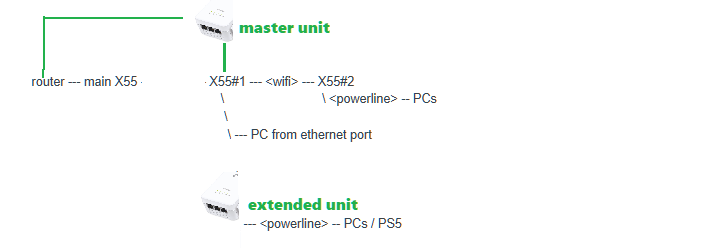
The green wire means Ethernet cable
Do you mean after changing the network connections, the Mesh network stability on the Deco X55 improved a lot, at least the whole Mesh network didn't collapse when the PS5 started online gaming?
Thank you very much.
Best regards.
- Copy Link
- Report Inappropriate Content
I'd say that is generally true. With the help of a couple of long ethernet cables, i've slightly modified my network. It's now more like this:
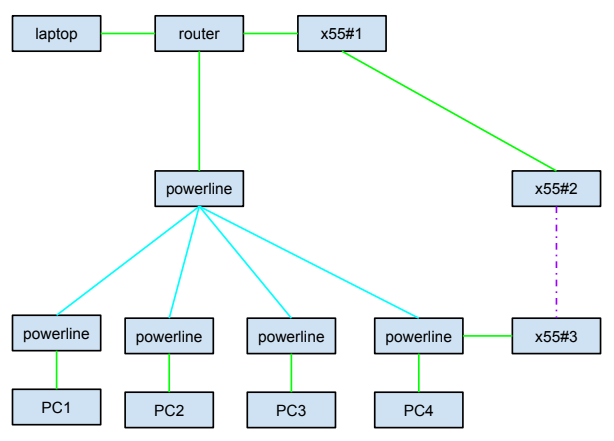
Green = ethernet
Cyan = powerline
Purple (dotted) = mesh wifi
With all other devices connecting to the mesh wifi, including the PS5. It did seem that starting a gaming session on the PS5 started the slowdown of all network machines.
- Copy Link
- Report Inappropriate Content
Thanks for the update.
I've seen users successfully use TP-Link powerline adapters to establish Ethernet Backhaul among Deco units.
So I doubt that there might be a network loop in the current layout.
Would it be possible to connect the PS5 to the 4th powerline adapter so that the PS5 is "indirectly" connected to the ISP router?
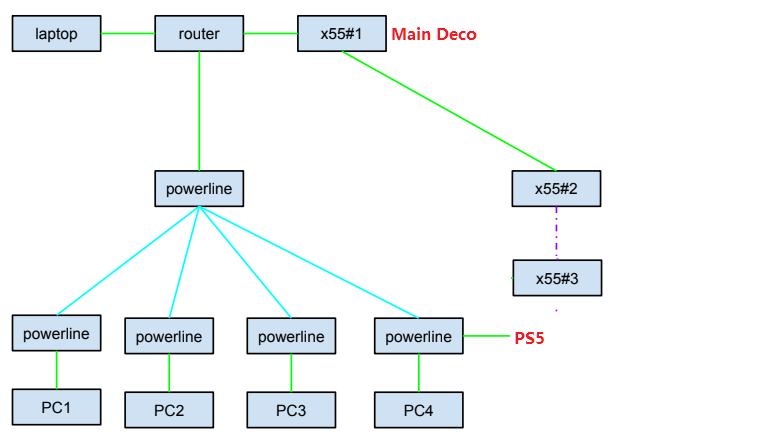
- Copy Link
- Report Inappropriate Content
- Copy Link
- Report Inappropriate Content

i have a problem with the same firmware (release 48241) on 5x X50s . should i start a new thread or add to this one?
a few curiosities. firmware updates are disabled in the app. cpu is pinned at 100% on the main unit. network often is usable for maybe 15 minutes.
often reproducible
-paul
- Copy Link
- Report Inappropriate Content
Hi, welcome to the community.
If possible, please try to start a new thread with some screenshots of the CPU load and the current network map on the Deco APP, such as:
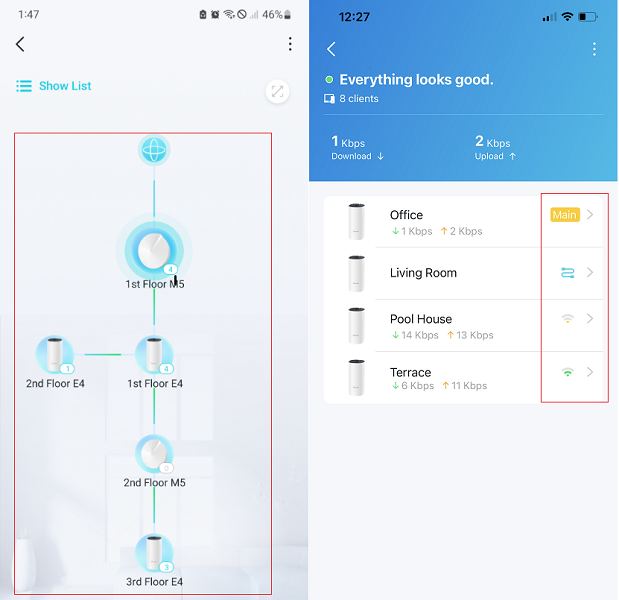
Best regards.
- Copy Link
- Report Inappropriate Content
Information
Helpful: 0
Views: 906
Replies: 10
Voters 0
No one has voted for it yet.