
AX53 - TL-WPA7617 - Ethernet backhaul not working?

This thread has been locked for further replies. You can start a new thread to share your ideas or ask questions.

AX53 - TL-WPA7617 - Ethernet backhaul not working?

This thread has been locked for further replies. You can start a new thread to share your ideas or ask questions.

AX53 - TL-WPA7617 - Ethernet backhaul not working?
2025-06-11 21:06:18 - last edited 2025-06-18 01:36:09
Hardware Version: V1
Firmware Version: 1.4.3 Build 20250314 rel.78903(4555)

Hello, 

I've got the following devices :

AX53 (1.4.3 Build 20250314 rel.78903(4555))

2 x  TL-WPA7617 (1.0.10 Build 220701 Rel.65093n (6985/8575))

I've set the 
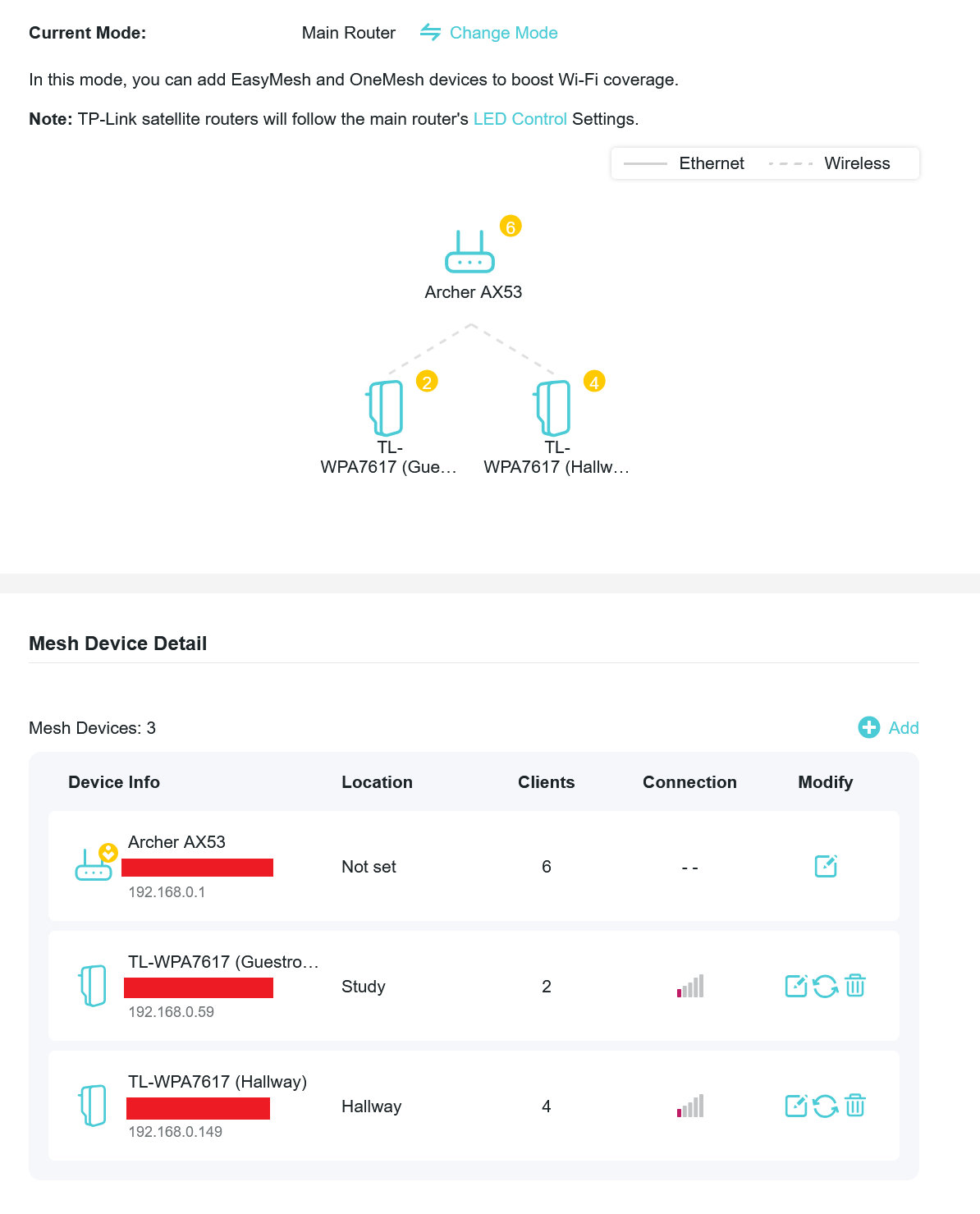
"Network Name" parameters for the TL-WPA7617 devices to be unique to stop them communicating using the powerline as I've plugged them in to the AX53 via Ethernet cables however within the AX53's settings it shows the devices as being connected via WIFI rather than ethernet - I'd like to enforce the ethernet backhaul but this doesn't seem to be an option anywhere. 

I've tried resetting all devices and all the firmware is updated - what am I doing wrong? 
0
0
#1
1 Accepted Solution
Re:AX53 - TL-WPA7617 - Ethernet backhaul not working?-Solution
2025-06-11 22:30:28 - last edited 2025-06-18 01:36:09

  @BVC 


That's most probably because TL-WPA7617 doeasn't support Easymesh with an ethernet backhaul - it only supports Onemesh (details).

If this was helpful click on the arrow pointing upward to make it blue. If this solves your issue, click the star to make it blue as a "Recommended Solution". BTC:149wubkkfoLmNDjDbiTxx4ZU8mpcMA5CJt
Recommended Solution
2
2
#2
4 Reply
Re:AX53 - TL-WPA7617 - Ethernet backhaul not working?-Solution
2025-06-11 22:30:28 - last edited 2025-06-18 01:36:09

  @BVC 


That's most probably because TL-WPA7617 doeasn't support Easymesh with an ethernet backhaul - it only supports Onemesh (details).

If this was helpful click on the arrow pointing upward to make it blue. If this solves your issue, click the star to make it blue as a "Recommended Solution". BTC:149wubkkfoLmNDjDbiTxx4ZU8mpcMA5CJt
Recommended Solution
2
2
#2
Re:AX53 - TL-WPA7617 - Ethernet backhaul not working?
2025-06-12 09:13:23

Hi @BVC,

Thank you for contacting our community.

If you want the TL-WPA7617 to use the same wireless settings as the router's, you can consider setting Wi-Fi clone for the TL-WPA7617 KIT.
How can I copy the wireless setting from the front router using Wi-Fi Clone button?

Best Regards~

Welcome to Community! Get the latest posts: △New Firmware for Archer GE550/GE650 V1 Introduces AI-QoS, EasyMesh IoT Expansion, and More! △New Firmware Releases for Archer BE805 V1/BE450 V1 to Support VPN Merge, New ECO Mode, and More! More posts, please see: △ Get the Ongoing Pre-release Firmware for Wi-Fi Routers Here— Subscribe for Updates! Urgent problems with your Wi-Fi Router, Range Extender, or DSL Modem? Please reach out via private Messages or @Joesph-TP in your new thread directly. Click Or ☆Recommended Solution if the post/answer helps.
1
1
#3
Re:AX53 - TL-WPA7617 - Ethernet backhaul not working?
2025-06-16 18:27:10 - last edited 2025-06-16 18:30:02

@terziyski Ah, I missed the "planned" label for easymesh capability.

@Joseph-TP - I mean extending the Wifi isn't so much the attraction it's the idea that you could use the extenders in a far more intuitive fashion. Seems like this isn't possible with TP Link products outside the deco range. 

0
0
#4
Re:AX53 - TL-WPA7617 - Ethernet backhaul not working?
2025-06-18 01:35:52

 Hi@BVC,

Thank you for getting back to me.


We are also working hard to optimize product performance and hope to achieve seamless integration between different products as soon as possible, so that users can experience the convenience of Mesh networks more intuitively.


Best Regards~

Welcome to Community! Get the latest posts: △New Firmware for Archer GE550/GE650 V1 Introduces AI-QoS, EasyMesh IoT Expansion, and More! △New Firmware Releases for Archer BE805 V1/BE450 V1 to Support VPN Merge, New ECO Mode, and More! More posts, please see: △ Get the Ongoing Pre-release Firmware for Wi-Fi Routers Here— Subscribe for Updates! Urgent problems with your Wi-Fi Router, Range Extender, or DSL Modem? Please reach out via private Messages or @Joesph-TP in your new thread directly. Click Or ☆Recommended Solution if the post/answer helps.
0
0
#5
